
SEO Content Brief Prompt Templates with Claude Projects: A Team-Scale Setup Guide
For SEO teams who already use Claude ad-hoc, this guide explains how to move from per-session re-explanation to a repeatable brief workflow using Claude Projects and a structured three-layer context architecture — so any team member can generate consistent, on-brand briefs without starting from scratch each time.
If your team already uses Claude to write SEO content briefs, you've probably hit the same wall: every new session starts with the same re-explanation. Brand voice. Client ICP. Banned phrases. Competitor context. One practitioner working alone can manage that overhead. A team of three writers running briefs across five clients cannot.
This guide is the team-scale upgrade path from single-session Claude prompting. If you're just getting started with Claude for brief production, the XML-structured single-session approach is a good foundation. This article assumes you've been there and want something repeatable across a whole team — without training every writer from scratch or maintaining a separate prompt documentation library.
The mechanism is Claude Projects combined with a structured context file. When set up correctly, any team member opens the Project and gets consistent briefs — on brand, on format, on client voice — without touching the context layer at all. That's the goal this guide walks you through.
Why Standard Claude Chat Breaks at Team Scale
Standard Claude chat is stateless. When a session ends, everything you told Claude about your brand, your client, and your output preferences is gone. The next session starts from zero.
For a solo practitioner running one or two briefs a week, that's manageable — annoying, but manageable. For a team producing briefs across multiple clients at volume, it creates three compounding problems:
- The re-explanation tax. Every writer must paste brand voice rules, competitor context, banned phrases, and client ICP into each new session. This isn't just time-consuming — it's error-prone. Writers abbreviate. They forget a rule. They paste last week's context for the wrong client.
- Context drift across writers. Two writers briefing the same keyword for the same client will produce structurally different outputs if they're each assembling their own context from memory or from an internal doc that's three months out of date.
- Voice inconsistency across briefs. Without a shared, persistent context layer, Claude defaults to a generic voice that could belong to any client. The output is technically correct but tonally unanchored — which means editors spend time fixing register problems that shouldn't exist in the first place.
This is the gap Claude Projects is designed to close. It shifts the context from something each writer manually supplies to something the Project loads automatically — every session, for every team member.
What Claude Projects Adds for SEO Brief Production
Claude Projects is a workspace within the Claude interface that persists context across sessions. Instead of re-explaining your brand every time, you load that information once into the Project — and it's available automatically from that point forward, for every team member who has access to the Project.
For SEO brief production specifically, Projects adds three things that standard chat cannot provide:
- Persistent system instructions. A system prompt that loads at the start of every session — containing brand voice rules, output format requirements, banned phrases, and behavior instructions like "ask clarifying questions instead of filling gaps."
- Project knowledge files. Uploaded documents that Claude reads as part of its context — client ICPs, competitor content, SERP exports, keyword research CSVs, and previous brief examples.
- Shared team access. Any writer added to the Project inherits the full context layer immediately. Onboarding a new team member to brief production means adding them to the Project — not training them on a separate prompt library.
One important limitation: Claude has no live access to search engine results pages. It cannot pull current SERPs, check rankings, or read competitor URLs on its own. The workaround is to upload that research as project knowledge files — SERP exports from tools like Semrush or Ahrefs, Screaming Frog crawl data, and saved competitor content. Claude reads those files as if it had done the research itself.
How to Structure Your Project Context Files for SEO Briefs
The context layer is where most teams underinvest. They write a short system prompt that says "you are an SEO expert" and wonder why the output sounds generic. The context file needs to do four specific jobs for brief production to work consistently.
What belongs in the system prompt
The system prompt is the always-on instruction layer. For SEO brief production, it should contain:
- Identity and role. Who the team is, what the site or agency does, and the professional context Claude is operating within. Not "you are an expert" — actual specifics about the business, audience, and content program.
- Voice and tone rules. Concrete behavioral rules, not adjectives. "Use second-person throughout" is a rule. "Write conversationally" is not. "Do not use em dashes" is a rule. "Avoid corporate jargon" is not.
- Banned phrases and constructions. An explicit list of phrases the client or brand has flagged — competitor names used in certain contexts, superlative claims, words that create legal risk, phrases that conflict with brand positioning.
- Output format expectations. The standard brief structure Claude should produce — field names, field order, and what each field should contain. This is the template layer that keeps briefs structurally consistent across team members.
- The clarifying-questions rule. Instruct Claude to ask clarifying questions when a task is ambiguous rather than filling gaps with assumptions. This single instruction prevents Claude from generating plausible-but-wrong output when the brief prompt is underspecified.
The clarifying-questions rule deserves emphasis. Practitioner Ran Isenberg, who documents his Claude Projects setup in detail, identifies it as the single instruction that improved his output quality more than anything else. When Claude fills a gap with a confident assumption, you often don't know it happened. When Claude asks a question instead, you catch the underspecification before it propagates into the brief.
What belongs in project knowledge files
Knowledge files are the research and reference layer — documents Claude reads when producing briefs. For SEO brief work, upload:
- Client ICP document: target audience segments, pain points, decision triggers, language they use, and language they distrust.
- Competitor content examples: saved HTML or text exports of competitor articles ranking for your target keyword clusters, so Claude can identify gaps and differentiation angles.
- SERP exports: CSV or text exports from Semrush, Ahrefs, or similar tools showing current ranking URLs, titles, and featured snippet content for the keyword set.
- Previous brief examples: two or three approved briefs that represent the output standard the team is targeting — Claude uses these as format anchors.
- Style guide or anti-AI style guide: a document listing specific writing patterns to avoid (AI-typical phrasing, passive constructions, filler transitions) and patterns to use instead.
The style guide file is worth building deliberately. Isenberg's setup includes an explicit anti-AI style guide in his context layer — a document that names the patterns Claude tends to default to and instructs it to avoid them. This is more effective than generic instructions like "don't sound like AI" because it gives Claude specific, actionable patterns to check against.
# System Prompt: SEO Brief Production — [Agency Name]

## Identity
You are the SEO content brief specialist for [Agency Name], a B2B SaaS-focused content agency.
Our clients are mid-market software companies. Our readers are technical buyers and practitioners,
not generalist audiences.

## Voice rules
- Use second-person ("you") throughout briefs when describing writer tasks
- Write field labels in sentence case, not title case
- Do not use em dashes; use commas or restructure the sentence
- Do not use the phrase "in today's landscape" or any variant of it
- Do not use "leverage" as a verb

## Banned phrases (client-specific files override this list)
- "game-changing"
- "seamless"
- "robust"
- "cutting-edge"

## Output format
Produce briefs using the 14-field structure defined in [brief-template.md].
Do not add fields not in the template. Do not omit required fields.

## Behavior
If a brief task is ambiguous or missing required inputs, ask clarifying questions
before generating output. Do not fill gaps with assumptions.
The Three-Layer Context Model: Agency, Client, and Task
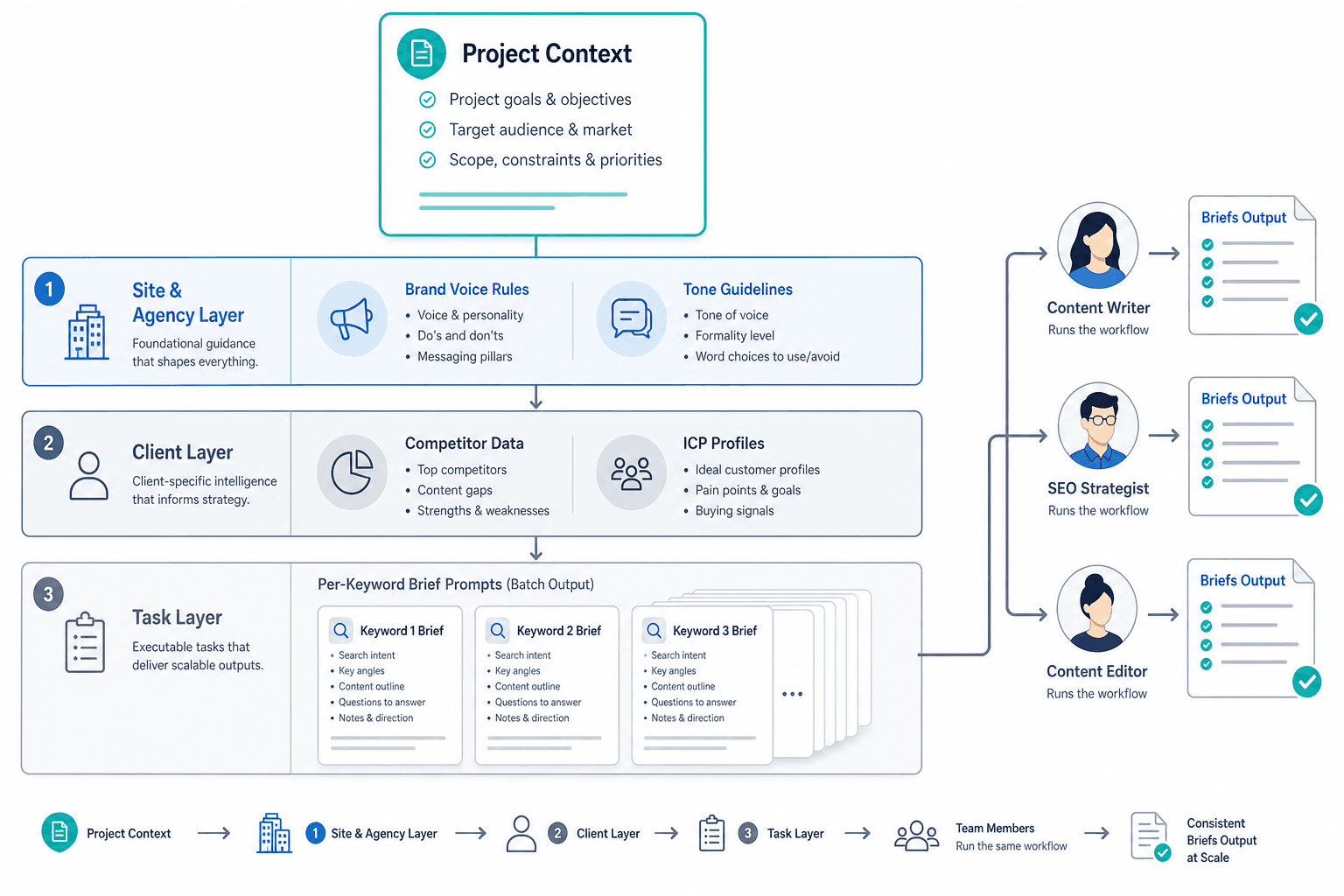
The context architecture that makes brief prompts reusable across team members operates in three distinct layers. Each layer handles a different scope of information, and each layer's presence is what allows the layers below it to stay narrow.
| Layer | What it contains | Where it lives | Who maintains it |
|---|---|---|---|
| Agency / site | Brand voice, methodology rules, output format template, banned phrases, anti-AI style guide | System prompt + shared knowledge files | SEO lead or content director |
| Client | Client ICP, competitor set, tone specifics, client-specific banned phrases, SERP exports for keyword cluster | Per-client knowledge files uploaded to the Project | Account manager or senior writer |
| Task | Per-keyword brief prompt: target keyword, SERP intent, specific competitor gap to address, heading skeleton request | The actual prompt typed in each session | Any team member |
The logic of this model is that each layer handles what it's uniquely positioned to know. Agency-level rules don't change per client. Client-level context doesn't change per keyword. Per-keyword task prompts don't need to repeat what's already loaded above them.
TripleDart, a B2B SaaS content agency, runs this three-layer discipline across every client engagement and reports that prompts paired with a client context layer produce first-read-accept rates roughly 30 percentage points higher than the same prompts run without one. That figure is agency-stated from their own engagements and hasn't been independently audited — but the directional logic is sound. The context layer is doing the work that writers would otherwise do manually in every session, and it's doing it consistently.
Copy-pasting prompts without the CLAUDE.md discipline gets you 40% of the value. The context around the prompt is what makes it repeatable.
Per-Brief Prompt Templates That Work Because Context Is Pre-Loaded
With the three-layer context in place, individual brief prompts can stay narrow. Each prompt handles one specific task. The context layer handles everything else.
Below are the core prompt templates for each brief component. These are starting points — adjust field names and instructions to match your team's brief format.
SERP intent classification
Using the SERP export in [filename], classify the dominant search intent for the keyword "[target keyword]".
Identify: (1) the primary intent type (informational, navigational, commercial, transactional),
(2) the content format that dominates the top 5 results (listicle, how-to guide, comparison, definition, etc.),
(3) the implied audience stage (awareness, consideration, decision).
Output as three labeled fields. Do not explain your reasoning unless I ask.
Competitor gap identification
Review the competitor content files for "[target keyword]" in this project.
Identify: (1) the three most common subtopics all competitors cover (the table stakes),
(2) two to three subtopics or angles that appear in only one competitor or none,
(3) one factual claim or data point that multiple competitors cite but do not source.
Output as three labeled sections. Be specific — name the competitors where relevant.
Answer-intent targeting
This is the field most legacy brief templates omit. Search intent tells you what the reader is looking for. Answer intent tells you what specific question the content needs to answer directly and concisely enough to earn a featured snippet or an AI citation. They require different brief fields because they drive different decisions in the draft. For a deeper treatment of how answer intent connects to AI citation placement, see the AEO tactics guide for marketers.
For the keyword "[target keyword]", identify the single most likely question a reader is trying
to answer when they search this term — not the topic, the specific question.
Then write a two-to-three sentence direct answer to that question that could serve as a
featured snippet or AI citation target. Use plain language. Do not start with the keyword.
Output as two labeled fields: "Answer-intent question" and "Draft direct answer."
Entity and keyword targeting
Using the keyword CSV in [filename] and the competitor content files, identify:
(1) the primary keyword and its closest semantic variants (3–5 terms),
(2) the named entities (people, tools, organizations, standards) that appear across
multiple top-ranking pages for this keyword,
(3) any entities present in the client ICP file that are absent from competitor content
(potential differentiation angle).
Output as three labeled sections.
Heading skeleton
Draft a heading skeleton for a [content format from SERP intent] on "[target keyword]".
The skeleton should:
- Include an H1 that leads with the answer-intent question or its resolution
- Include 4–7 H2s that cover the table-stakes subtopics and at least one gap angle
- Include H3s only where a subsection requires more than two distinct points
Do not write body copy. Output the skeleton only, indented to show H2/H3 hierarchy.
E-E-A-T fields
For the brief on "[target keyword]", populate the following E-E-A-T fields:
- Named author: [name and credentials the writer or subject matter expert will provide]
- Disclosed production method: how this content was produced (e.g., "researched by [name],
  drafted with AI assistance, reviewed and edited by [name]")
- Required external sources: identify 2–3 specific types of sources the draft must cite
  (e.g., peer-reviewed research, government data, named practitioner case studies)
  based on the claims the content will make
Do not use adjectives like "authoritative" or "trustworthy." Output as three labeled fields.
FAQ and PAA extraction
Using the SERP export in [filename], list the People Also Ask questions for "[target keyword]".
For each question: (1) note whether it is already addressed in the heading skeleton,
(2) flag any question that represents a distinct subtopic not covered in the skeleton.
Output as a table with columns: Question | Covered in skeleton (Y/N) | Action.
Meta elements
Draft the meta elements for the brief on "[target keyword]":
- Title tag: under 60 characters, leads with the primary keyword, does not duplicate the H1
- Meta description: under 155 characters, includes the answer-intent question resolution,
  ends with a specific action or benefit
- Slug: lowercase, hyphenated, under 60 characters
Output as three labeled fields. Do not offer alternatives unless I ask.The Dual-Purpose Brief: One Spec for Human Writers and AI Drafting Runs
A brief produced through this Project-based workflow governs both a human writer and an AI drafting run from the same document. You don't need a separate prompt set for each reader type.
This insight comes from Digital Applied's 2026 brief framework, which explicitly designs for both reader types in the same document. The reasoning is straightforward: a human writer can infer tone, fill in judgment gaps, and interpret loose instructions. An AI drafting run cannot — it writes exactly what the brief specifies and invents plausibly where the brief is silent. A brief that's specific enough to constrain an AI is also a better brief for humans, because it removes the ambiguity both readers would otherwise fill differently.
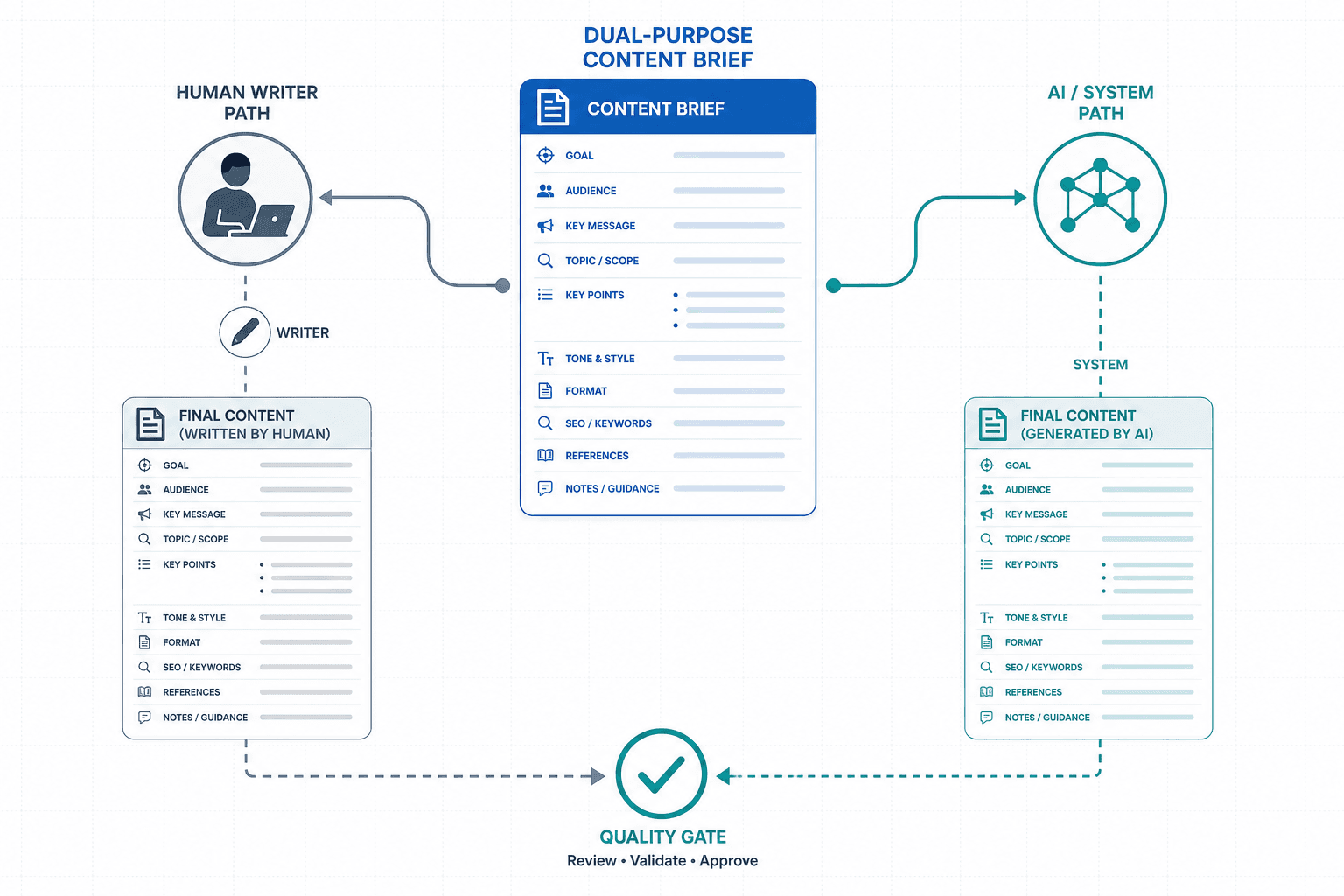
The key structural decision in a dual-purpose brief is separating search intent from answer intent as distinct fields. Most legacy brief templates treat these as the same thing or omit answer intent entirely. They are not the same:
| Field | What it captures | Who uses it and how |
|---|---|---|
| Search intent | Why the reader is searching (informational, commercial, etc.) and what content format dominates the SERP | Writer uses it to match the document type and depth to the SERP expectation |
| Answer intent | The specific question the content must answer directly and concisely, and the draft direct answer targeting a featured snippet or AI citation | Writer uses it to write the lead answer block; AI drafting run uses it as the anchor for the opening section |
E-E-A-T signals work the same way in a dual-purpose brief. They must be encoded as specific, mandatory fields — not aspirational adjectives. A brief that says "write authoritatively" tells a human writer very little and tells an AI drafting run nothing. A brief that says "include the named author's credentials in the byline, cite at least two external sources with URLs, and disclose the production method in the footer" gives both readers something concrete to produce.
Quality Gate and Handoff Checklist Prompt
Before a brief leaves the Project and reaches a writer or enters an AI drafting run, it should pass a structured quality check. The following prompt runs that check against the brief spec.
Review the attached brief against the following checklist. For each item, output:
PASS / FAIL / MISSING, followed by a one-line note if the status is FAIL or MISSING.

Checklist:
1. All 14 required fields are populated (no blank or placeholder values)
2. E-E-A-T fields completed: named author with credentials, disclosed production method,
   required external sources listed
3. Answer-intent question and draft direct answer are present and distinct from the
   search intent classification
4. Heading skeleton is present and follows H2/H3 hierarchy
5. No banned phrases from the system prompt or client knowledge files appear in any field
6. Meta title is under 60 characters and does not duplicate the H1
7. Meta description is under 155 characters
8. At least one competitor gap angle is reflected in the heading skeleton

Do not suggest edits. Output the checklist results only.
This checklist prompt applies identically to briefs that will go to a human writer and to briefs that will feed an AI drafting run. The quality standard is the same in both cases.
When to Step Up: From Claude Projects to Claude Code or an Agentic Pipeline
Claude Projects covers the most valuable part of the maturity curve for most teams. To understand where it sits, it helps to see the full progression.
| Level | Setup | Context handling | Who it's for |
|---|---|---|---|
| Level 0 — Ad-hoc | Copy-paste into standard Claude chat | Re-explained every session by each writer | Individual practitioners, early exploration |
| Level 1 — Documented | ICP, voice rules, and output format exist as files in Claude Projects | Loaded automatically every session; shared across team | Teams producing consistent volume across clients |
| Level 2 — Assisted | Three-layer context model in place; per-brief prompt templates standardized; quality gate prompt in use | Context is versioned and maintained; onboarding = Project access | Agencies and in-house teams at production scale |
| Level 3 — Systematic | Claude Code agentic pipeline; CLAUDE.md on filesystem; versioned context files; automated signal-to-workflow-to-output patterns | Programmatic context management; derived modules update from a master knowledge base | Teams with engineering resources and high-volume, multi-channel content programs |
The Level 3 escalation path — using Claude Code to build a proper agentic pipeline — is documented by practitioners like Benjamin Gibert (GTM Strategist), whose Claude Code content engineering system uses a cascade principle: when positioning or ICP changes, you edit the master knowledge base once, run a sync, and every downstream prompt file updates automatically. That eliminates the drift problem that occurs when the same context lives in 15 different places.
The important caveat from that same work: 90% of output quality comes from what you feed the system, not from the sophistication of the pipeline. A Claude Projects setup with rich, specific context will outperform a complex agentic pipeline reading thin context. Most teams should reach Level 2 before considering Level 3.
Caveats: What This Workflow Cannot Do
- Claude Projects is a paid feature. Available on Claude Pro and above. Free-tier workaround: paste your full context block as the first message in each new conversation. You lose the persistence and shared-access benefits, but the prompt templates and three-layer structure still apply.
- CLAUDE.md is a Claude Code concept, not a web UI feature. In the Claude web interface, the equivalent is the system prompt field plus project knowledge file uploads. If you encounter guides that reference CLAUDE.md, they are describing the Claude Code filesystem architecture — the web UI Projects equivalent is what this article covers.
- Claude has no live SERP access. It cannot retrieve current rankings, read live competitor URLs, or pull fresh keyword data. The workaround is uploading research exports as project knowledge files. This works well but requires that someone on the team runs and uploads the exports before brief production begins.
- The quality gate prompt does not verify factual accuracy. It checks structural completeness. Claude can and does hallucinate specific data points, source URLs, and competitor claims. A human review pass is mandatory before any brief reaches a writer or an AI drafting run.
- The TripleDart first-read-accept rate figure is agency-stated. The claim that prompts paired with a client context layer produce roughly 30 percentage points higher first-read-accept rates comes from TripleDart's own B2B SaaS engagements. It has not been independently audited. Treat it as directional evidence, not a benchmark you can cite in a proposal without that caveat.
- Context richness matters more than prompt sophistication. If the knowledge files are thin, outdated, or missing, the prompt templates in this guide will produce generic output. The system is only as good as the context you load into it.

Comments
Join the discussion with an anonymous comment.