
ChatGPT vs. Claude (Comparison)
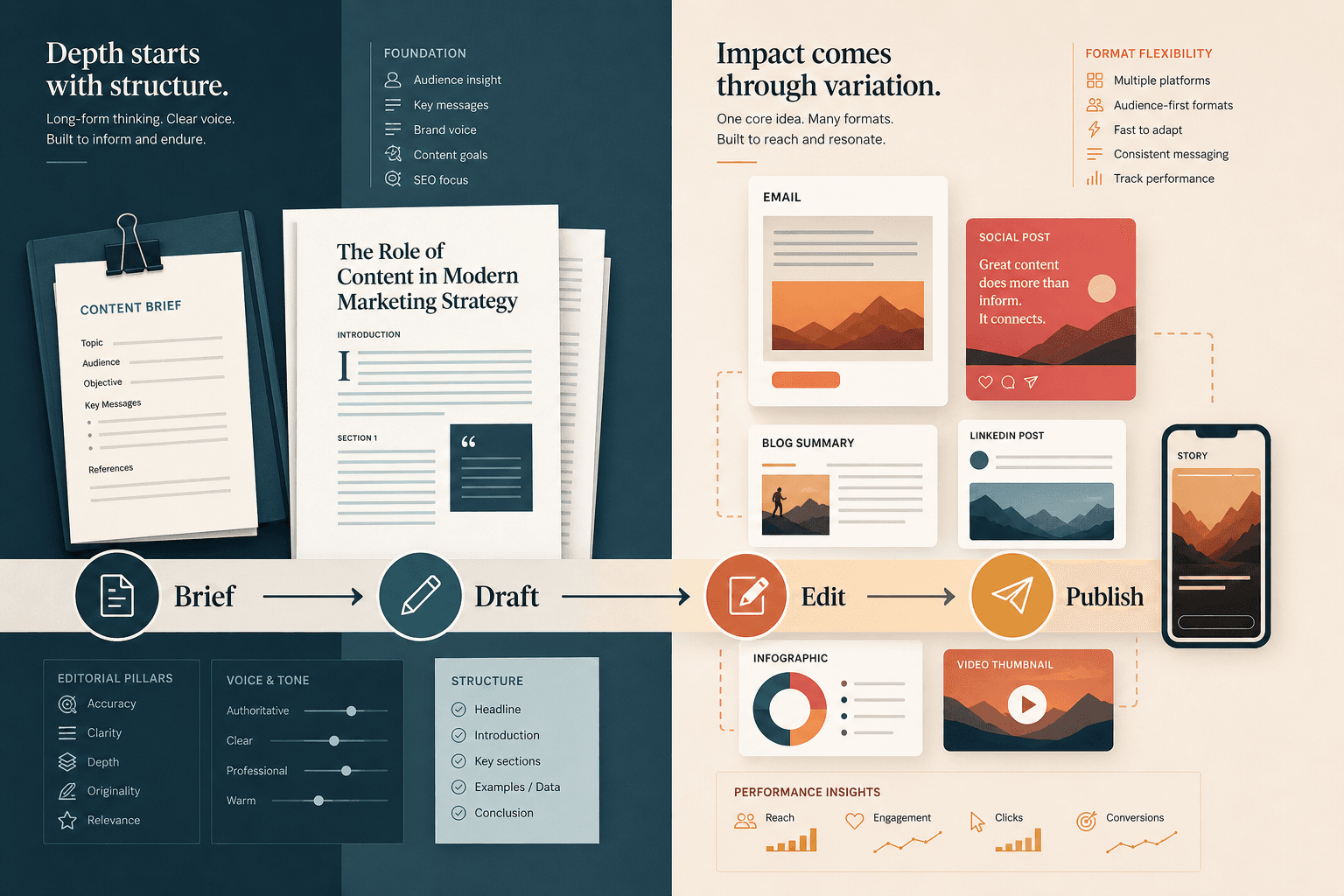
For content marketing practitioners, choosing between ChatGPT and Claude is a routing problem, not a winner-take-all decision. This guide maps each tool to the content tasks it handles best — from long-form drafts and brand voice work to visual assets and email sequences — with role-specific recommendations for solo writers, team leads, and agencies.
Key Integrations
Marketing Categories
⚠ Notable Limitations
Both tools drift toward generic output without strong editorial direction; AI reliably completes ~80% of a task but human judgment is required for the final quality gap; hallucination risk is real for both — factual claims require independent verification before publishing; Claude has no image generation; ChatGPT video generation (Sora) discontinued April 2026
Why 'Which Is Better?' Is the Wrong Question for Content Teams
Every few months, a new round of head-to-head tests declares a winner between ChatGPT and Claude. Content teams read the verdict, maybe switch tools for a week, then drift back to whichever one they already have open. The cycle is unproductive because the question itself is malformed.
The more useful question is: which tool handles which task better, and how do I build a workflow around that? That reframe — from ranking to routing — is what separates content teams that get consistent, publishable output from AI from teams that get inconsistent drafts they spend hours fixing.
The evidence from practitioners who use both tools seriously points in the same direction: most experienced marketers maintain both subscriptions and use them for different purposes. Claude handles customer-facing writing — emails, landing pages, long-form content — where voice quality matters. ChatGPT handles internal work, visual assets, and high-volume variation tasks where speed and ecosystem breadth matter more.
This guide maps that routing logic to the specific tasks content marketing teams run every week. It also covers the honest limitations both tools share — the ones most comparison articles skip. The goal is a decision framework you can act on, not a ranking you'll debate.
Capability Snapshot: What Each Tool Offers in 2026
Before getting into task-level verdicts, here is the current state of each tool on the attributes content teams evaluate at the selection stage. Model names and pricing shift frequently — this snapshot reflects what was confirmed as of June 2026.
| Attribute | Claude (Anthropic) | ChatGPT (OpenAI) |
|---|---|---|
| Current flagship model | Claude Opus 4 / Sonnet 4 series | GPT-5 / GPT-5.5 series |
| Context window (consumer Pro) | 200,000 tokens | 128,000 tokens |
| Context window (API) | Up to 1M tokens (beta) | 128,000 tokens |
| Native image generation | None | Yes — GPT Image 2 |
| Native video generation | None | Discontinued for consumers (April 2026); API ends September 2026 |
| Individual Pro/Plus pricing | ~$20/month (Claude Pro) | ~$20/month (ChatGPT Plus) |
| Team plan pricing | Claude Team — ~$25/user/month | ChatGPT Team — ~$25/user/month |
| Persistent brand context | Claude Projects (context persists across all project conversations) | Custom GPTs (context embedded in system prompt) |
| Ecosystem / integrations | MCP connectors (Google Drive, Slack, analytics tools) | GPT Store (3M+ custom GPTs), broad plugin ecosystem |
| Data privacy default | Does not use consumer conversations for training by default | Uses data for improvement on lower tiers unless you opt out in settings |
| Best-fit content tasks | Long-form drafts, brand voice editing, SEO briefs, large-document analysis | Ideation, variation volume, visual assets, structured internal reports |
Task-by-Task Verdicts for Content Marketing Workflows
The routing decisions below are based on practitioner testing and structured comparisons across real content marketing tasks. Each verdict names a preferred tool, explains why, and notes meaningful caveats.
| Content Task | Preferred Tool | Reasoning |
|---|---|---|
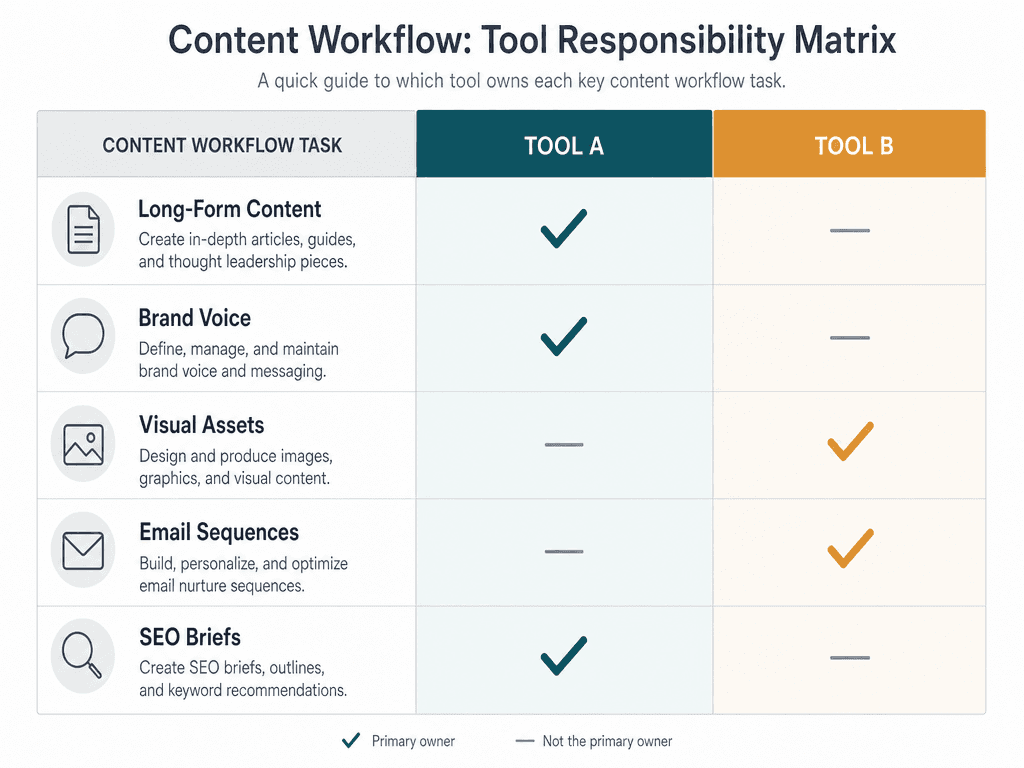
| Long-form blog and thought leadership drafts | Claude | Maintains argument structure, tonal consistency, and logical flow across 3,000+ word posts more reliably than ChatGPT |
| Brand voice editing and consistency | Claude | Holds full style guide context in one session; less prone to drifting toward a generic 'AI voice' during editing |
| SEO content briefs and keyword analysis | Claude | 200K context window absorbs full keyword exports, competitor pages, and briefs simultaneously without chunking |
| Email sequences (personalized outreach) | Claude | Produces more natural, on-brand prose for customer-facing sequences |
| Email sequences (volume / A/B variants) | ChatGPT | Faster at generating high-volume subject line and copy variations for testing |
| B2B and LinkedIn text copy | Claude | Avoids AI clichés, produces more strategic and natural-sounding copy in structured testing |
| Social media visual assets and graphics | ChatGPT | Decisive capability gap — Claude has no image generation; ChatGPT's GPT Image 2 generates social graphics, carousel cards, and promotional visuals directly in chat |
| Ideation and creative brainstorming | ChatGPT | Faster at generating high volumes of options; useful for early-stage concept exploration |
| Internal research reports and competitive analysis | ChatGPT | Produces structured, scannable outputs efficiently; practitioners commonly route internal work here |
Long-Form Content: Why Claude Holds Its Voice Longer
The clearest performance gap between the two tools shows up in long-form drafts. Claude Opus 4 maintains argument structure, tonal consistency, and logical flow across 3,000+ word posts in a way ChatGPT does not reliably match. A post that loses its voice in section three signals AI production to readers — and that signal erodes trust in the content.
ChatGPT's GPT-5.5 improved on reducing boilerplate output, but Claude's writing style is more natural and collaborative in a way that still distinguishes it. For content teams where editorial quality is a differentiator, that gap is meaningful.
Visual Assets: ChatGPT's Decisive Advantage
This is not a close call. Claude cannot generate images. ChatGPT's GPT Image 2 generates social graphics, carousel cards, and promotional visuals directly in the chat interface. For any content team that produces visual assets alongside written content — which is most of them — this makes ChatGPT a non-negotiable part of the stack.
One important note on video: Sora, OpenAI's consumer video generation product, was discontinued in April 2026. The API is expected to end in September 2026. Do not plan a visual content workflow around ChatGPT video generation at this time.
SEO Content Briefs: Context Window as a Practical Advantage
For SEO content work, Claude's context window is a practical production advantage, not just a spec number. Loading an entire keyword export, brand guidelines, competitor analysis, and a content brief into one conversation means the model holds full strategic context without losing thread mid-session. ChatGPT's 128K window requires chunking for large competitive sets, which introduces the risk of inconsistent recommendations across sections of the same brief.
Claude Projects vs. ChatGPT Custom GPTs: Persistent Brand Context
For content teams managing brand voice at scale, the ability to persist context across sessions is one of the most practically important features either tool offers. Both tools have mechanisms for this, but they work differently and suit different use cases.
How Claude Projects Works
Claude Projects maintains context across all conversations within a project. You upload your brand guidelines, tone-of-voice documentation, sample content, and editorial standards once — and every conversation in that project has access to all of it, without re-pasting. On Claude Team plans, Projects can be shared with team members, meaning every writer on the team works from the same brand context without managing separate uploads.
For editorial-quality consistency on long-form work — where a writer needs the model to hold a specific voice across a 4,000-word article and apply it consistently during editing — this architecture outperforms the Custom GPT approach.
How ChatGPT Custom GPTs Work
Custom GPTs embed brand context in a system prompt that runs at the start of every conversation. The context is consistent but fixed — it does not accumulate across sessions the way Claude Projects does. What Custom GPTs do well is shareability: a Custom GPT can be published publicly, shared via a link, or distributed to a team without requiring the recipient to have a Claude Team subscription.
This makes Custom GPTs a stronger choice for use cases like public-facing lead magnets, onboarding tools for freelance contributors, or team-wide content templates where broad distribution matters more than deep editorial consistency.
| Feature | Claude Projects | ChatGPT Custom GPTs |
|---|---|---|
| Context persistence | Across all conversations in the project | System prompt runs at conversation start; does not accumulate |
| Team sharing (paid plans) | Yes — shared within Claude Team plan | Yes — shareable via link or GPT Store |
| Public distribution | No | Yes — can be published publicly |
| Best for | Editorial consistency on long-form, customer-facing content | Reusable team tools, public lead magnets, onboarding templates |
| Context update process | Upload new documents to the project | Edit the system prompt or knowledge files in the GPT builder |
Pricing and Team Plan Comparison
| Plan | Claude (Anthropic) | ChatGPT (OpenAI) | What you get |
|---|---|---|---|
| Free | Yes — limited Claude usage | Yes — limited GPT-4o usage | Basic access; not sufficient for production content workflows |
| Individual Pro / Plus | ~$20/month (Claude Pro) | ~$20/month (ChatGPT Plus) | Full model access, higher usage limits, Projects / Custom GPTs |
| Team plan | ~$25/user/month (Claude Team, min. 2 users) | ~$25/user/month (ChatGPT Team, min. 2 users) | Shared workspaces, admin controls, higher context limits, team-level Projects or GPTs |
| Enterprise | Custom pricing | Custom pricing | SSO, audit logs, expanded privacy controls, dedicated support |
For most content teams, the dual-tool setup at the individual tier costs approximately $40/month total — $20 for Claude Pro and $20 for ChatGPT Plus. That is the configuration most experienced practitioners land on, and it is the baseline this guide's role-based recommendations are built around.
Role-Based Recommendation Matrix
The right configuration depends on your role, output volume, and whether you are managing a team or working independently. Here is how the routing logic translates to concrete setups.
| Role | Recommended Setup | Monthly Cost (approx.) | Routing Logic |
|---|---|---|---|
| Solo content writer | Claude Pro only (add ChatGPT Plus if producing visual assets) | ~$20–40/month | Claude handles drafts, editing, and brand voice; add ChatGPT if you produce social graphics or need high-volume copy variants |
| Content team lead (2–5 writers) | Claude Pro + ChatGPT Plus (individual tier) or Claude Team + ChatGPT Team | ~$40/month individual; ~$50+/user/month team | Use Claude Projects for shared brand context; use ChatGPT for visual assets and variation tasks; team plans add admin controls and shared workspaces |
| Multi-client agency | Claude Team + ChatGPT Team with a routing layer in Zapier or Make | ~$50+/user/month per tool, plus automation platform costs | Build client-specific Claude Projects for each account; route visual and variation tasks to ChatGPT automatically; agencies typically configure the routing layer in under two hours |
Solo Content Writer
If you are a solo writer producing primarily text-based content — blog posts, email newsletters, LinkedIn articles — Claude Pro at $20/month covers the majority of your AI-assisted workflow. The 200K context window handles full briefs and style guides, and Projects gives you persistent brand context without managing separate uploads per session.
Add ChatGPT Plus if you regularly produce social media graphics, need to generate high volumes of subject line variants for A/B testing, or work within a team that already has Custom GPTs built around specific workflows.
Content Team Lead
A team lead managing two to five writers benefits most from the dual-tool setup. Use Claude Projects to standardize brand context across your team — every writer works from the same uploaded style guide and editorial standards. Route visual asset requests and high-volume variation tasks to ChatGPT.
At the team plan tier, both tools add admin controls and shared workspaces. Whether you upgrade to team plans depends on whether centralized usage management and expanded privacy controls are worth the per-user cost increase over individual subscriptions.
Multi-Client Agency
Agencies managing multiple client accounts need both the editorial consistency of Claude Projects and the visual and variation capabilities of ChatGPT, connected by a routing layer that assigns tasks to the right tool automatically. Agencies routing text and creative tasks to Claude and multimodal tasks to ChatGPT via Zapier or Make typically configure the routing layer in under two hours.
Build a separate Claude Project for each client account, loaded with that client's brand guidelines and sample content. This gives every writer on the account a consistent starting point without relying on individual prompt memory or manual re-uploads.
Honest Limitations: What Neither Tool Reliably Handles
Most ChatGPT vs. Claude comparisons stop at the task verdicts. This section covers the risks and gaps that get systematically underdisclosed — the ones that matter most before you commit to an AI-assisted content workflow.
The Generic-Drift Problem
Both tools are statistical best-fit models. Left to their own defaults, they produce the most probabilistically likely output given your input — which is usually competent, coherent, and forgettable. Both tools swerve toward the generic unless heavily prompted otherwise. The problem is not that the output is bad — it is that it sounds like every other AI-assisted piece on the same topic.
The mitigation is editorial direction, not better prompts alone. Strong context (specific brand voice examples, a defined argument, a named audience with real constraints), a clear point of view in the brief, and active editing during drafting all reduce generic drift. Neither tool eliminates it.
The 80/20 Refinement Gap
LLMs regularly get you 80% done. The last 10–20% makes the difference between content that performs and content that gets ignored — and that gap requires human editorial judgment. AI cannot reliably supply the specific example that makes an abstract point land, the counterintuitive angle that earns a share, or the precise wording that fits a brand's voice without sounding like a template.
Content teams that treat AI output as a first draft requiring genuine editorial work consistently get better results than teams that treat it as near-final copy. The tools accelerate production; they do not replace the judgment that makes content worth producing.
Hallucination Risk
Both Claude and ChatGPT can fabricate statistics, misattribute quotes, and invent sources. Neither should be trusted as a primary research source. In structured testing across multiple AI tools, fabricated statistics appeared in lead paragraphs without any signal that the data was invented — the output looked authoritative and was wrong.
This applies equally to both tools. Claude's longer context window and more careful writing style do not reduce its hallucination rate on factual claims. The verification step is a workflow requirement, not an optional quality check.
Data Privacy: A Meaningful Difference for Client Work
One limitation that is not about output quality but is operationally important: Claude does not use consumer conversations for model training by default; ChatGPT requires opt-out in settings on lower tiers. For content teams handling proprietary client data, unreleased product information, or sensitive brand materials, this default difference matters. Verify the current data handling policy for your specific plan tier before loading confidential materials into either tool.
The Routing Decision: A Practical Summary for Content Teams
Here is the routing logic consolidated into a reference you can use when assigning tasks.
- Route to Claude: long-form blog posts and thought leadership drafts, brand voice editing, SEO content briefs requiring large-context document synthesis, customer-facing email sequences, B2B and LinkedIn copy, any task where editorial consistency across a long document is the primary quality criterion.
- Route to ChatGPT: social media graphics and visual assets (GPT Image 2), high-volume subject line and copy variants for A/B testing, internal research reports, creative brainstorming at the ideation stage, any task that requires the GPT Store ecosystem or an existing Custom GPT your team has already built.
- Use Claude Projects for: persistent brand context across a content team — upload style guides, editorial standards, and sample content once, share the project across team members, and every writer works from the same foundation.
- Use Custom GPTs for: shareable team tools, public lead magnets, and contributor onboarding templates where broad distribution matters more than deep editorial consistency.
The dual-tool setup costs approximately $40/month at the individual Pro/Plus tier. What it unlocks is the ability to assign work to the tool that handles it best, rather than forcing every task through whichever tool you happen to have open.
What neither tool replaces: editorial judgment. The generic-drift problem, the 80/20 refinement gap, and the hallucination risk are all real, and they all require a human editor who can recognize when output is technically competent but strategically wrong, when a statistic needs verification, and when a draft needs a specific example that the model cannot supply because it does not know your customers, your market, or your brand's actual position.

Comments
Join the discussion with an anonymous comment.