
Salesforce Data Cloud (Data 360) and Marketing Cloud AI
A decision-first setup guide for marketing operations managers and demand generation leads at mid-market companies already on Salesforce Sales or Service Cloud — covering edition selection, Data 360 prerequisites, credit cost modeling, and a phased AI activation sequence from Einstein through Agentforce Campaign Creation agents.
Key Integrations
Marketing Categories
⚠ Notable Limitations
Data 360 credit costs are consumption-based and unpredictable — identity resolution costs 100,000 credits per million rows; streaming is up to 160x more expensive than batch; sandbox usage consumes production credits; data classification locks after ingestion and cannot be changed without re-ingesting at full cost; Agentforce agents degrade severely on messy or incomplete unified profiles; Marketing Cloud Next requires full Data 360 maturity most mid-market teams lack in 2026
Why Mid-Market Setup Is Different
Most Salesforce Marketing Cloud implementation guides fall into one of two traps: they assume a solo admin with a simple contact list, or they assume a dedicated 10-person technical team with a multi-business-unit org. If you're a marketing operations manager or demand generation lead at a company with 200 to 2,000 employees, neither describes your situation.
Mid-market teams typically have an existing Sales Cloud or Service Cloud instance with real data, one or two people who own the Salesforce relationship, a marketing team that has outgrown basic email tools, and leadership that wants AI-driven personalization — but not a $500,000 implementation budget or a six-month runway.
That gap is where most implementations go wrong. Teams either over-buy (defaulting to the legacy Marketing Cloud Engagement platform designed for enterprise B2C operations at millions of contacts) or under-plan (activating AI features before the data foundation is in place). Both paths produce the same result: a platform you're paying for that isn't delivering.
This guide is written specifically for teams already on Salesforce Sales or Service Cloud who are evaluating or actively implementing Data Cloud (now branded as Data 360) and Marketing Cloud AI in 2026. It covers edition selection, Data 360 prerequisites, credit cost modeling, and a phased AI activation sequence — in that order, because the order matters.
The 2026 Salesforce Marketing Product Landscape in Plain Language
Salesforce's marketing product line is in the middle of a multi-year architectural transition, and the naming changes alone are enough to cause confusion. Here is what you need to know before making any edition or implementation decision.
In October 2025, Salesforce rebranded Data Cloud to Data 360. The product is the same — it is Salesforce's customer data platform that unifies profiles, runs identity resolution, and powers AI features. You will see both names in vendor documentation, community content, and partner guides throughout 2026. This article uses Data 360 as the primary name and notes Data Cloud equivalence where relevant.
There are currently four Marketing Cloud editions in active use or announced development. Understanding what each is — and is not — is the foundation of the edition decision in the next section.
| Edition | Infrastructure | Data 360 Relationship | Who It Fits | Status |
|---|---|---|---|---|
| Marketing Cloud Growth (MCG) | Salesforce core platform | Built-in, native | SMB to mid-market teams new to Marketing Cloud, primarily email | Available |
| Marketing Cloud Advanced (MCA) | Salesforce core platform | Built-in, native | Growing B2B or B2C teams needing CRM-native automation and AI features | Available (launched Nov 2024) |
| Marketing Cloud Engagement (MCE) | Legacy ExactTarget infrastructure | Connected via connector | Large B2C operations with millions of contacts and complex multi-channel journeys | Available, no sunset date announced |
| Marketing Cloud Next (MCN) | Salesforce core platform | Requires full Data 360 maturity | Teams with mature Data 360 implementation seeking full agentic orchestration | Future direction, announced June 2025 |
The key architectural distinction that drives every other decision: MCG and MCA are natively built on the Salesforce core platform with Data 360 as a built-in foundation. MCE runs on legacy ExactTarget infrastructure and connects to Data 360 through a separate connector that must be configured before Data 360 segments can activate in MCE campaigns.
Marketing Cloud Next (MCN) is the announced future direction — a fully agentic platform built natively on Data 360. Salesforce describes the transition from MCE to MCN as 'convergence' rather than migration, meaning customers can run both systems in parallel. No sunset date for MCE has been announced. For mid-market teams in 2026, MCN is not the recommended starting point — it requires full Data 360 maturity that most teams at this stage do not yet have.
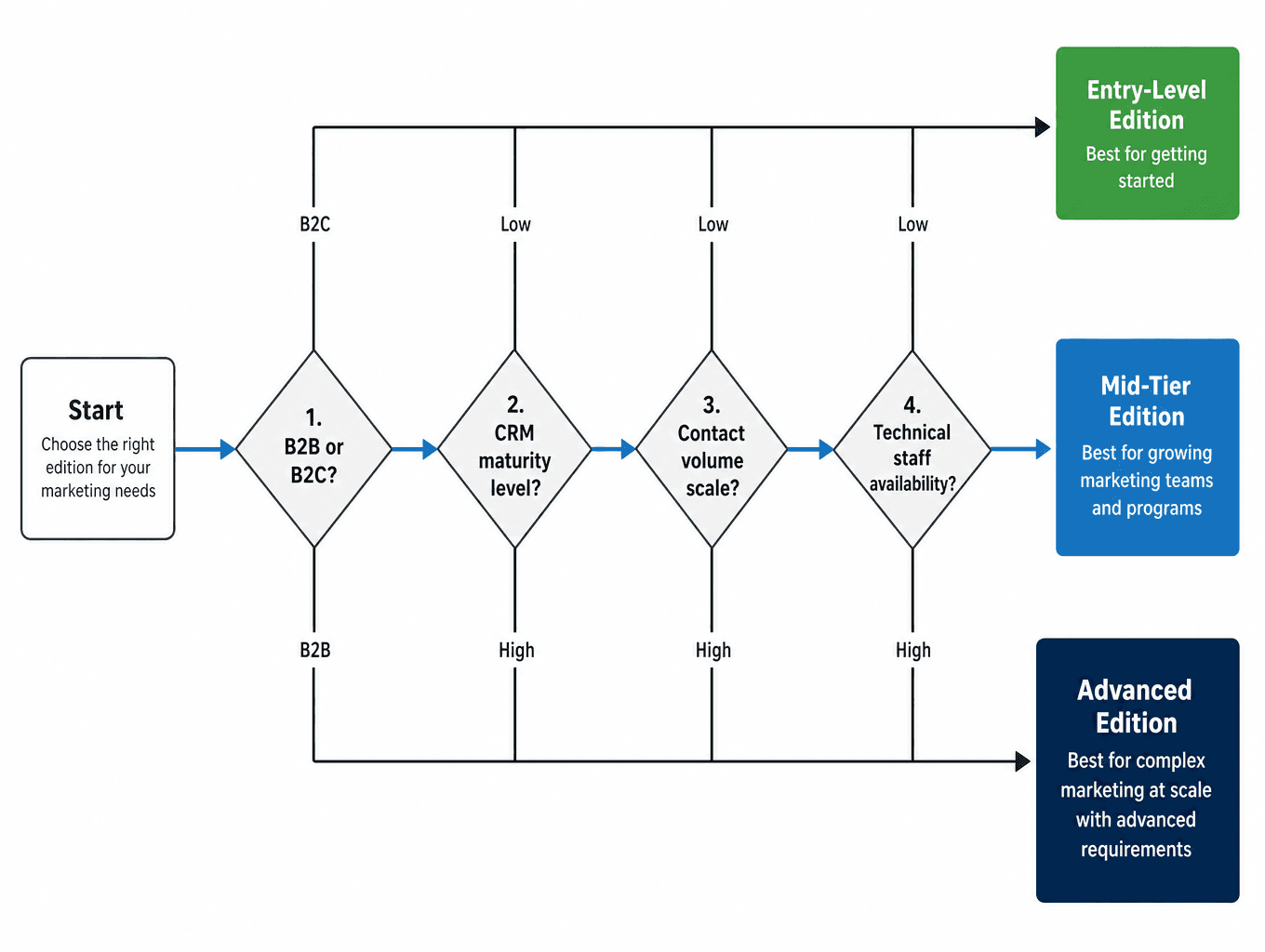
Edition Selection: A Four-Question Decision Framework
The edition decision is the highest-leverage choice in this guide. Choosing MCE when MCG or MCA fits your actual use case is the single most expensive mid-market mistake — not just in licensing cost, but in implementation complexity, timeline, and the technical resources required to maintain it.
Work through these four questions in order. Your answers will narrow the field to one or two viable options.
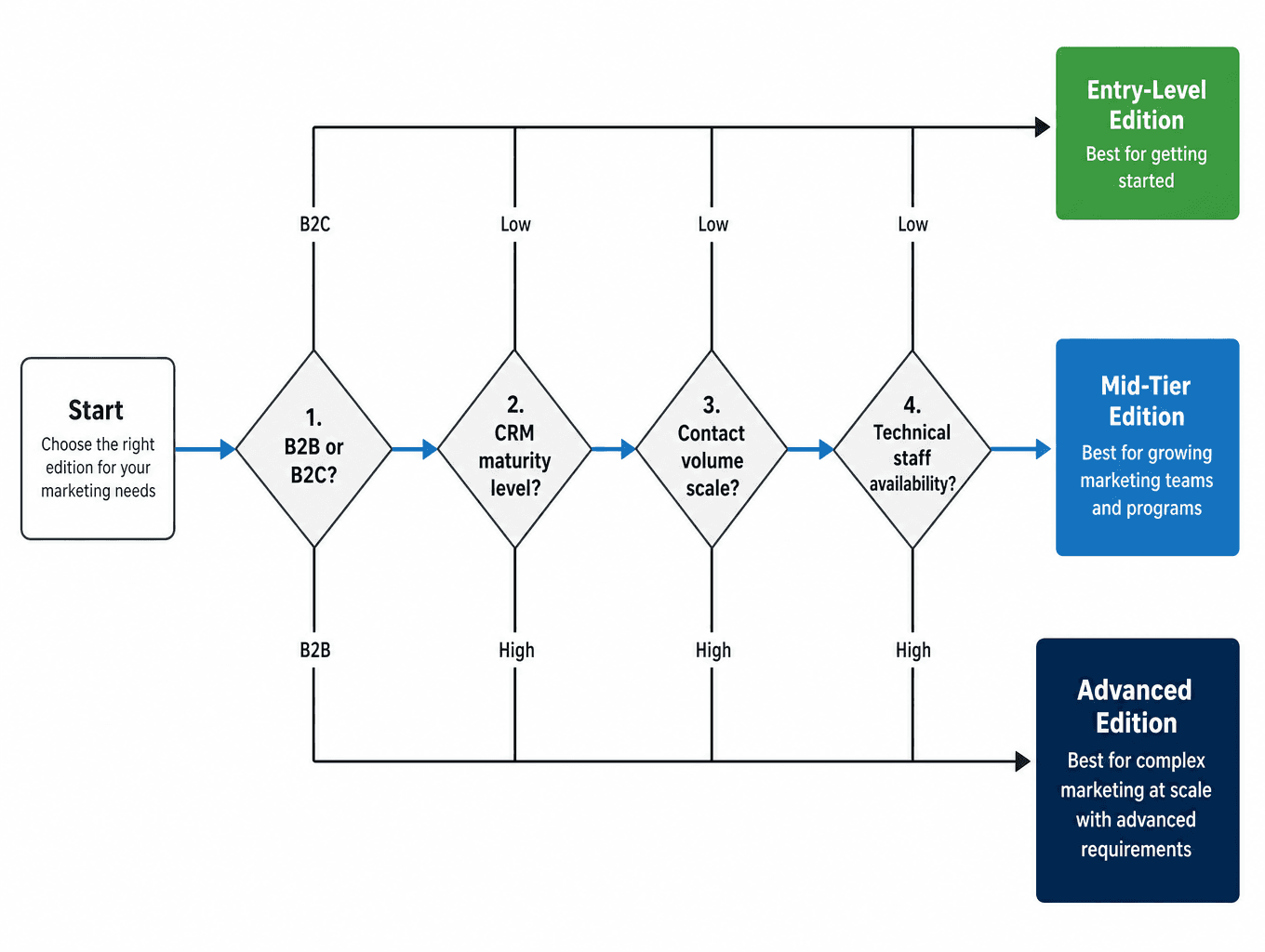
Question 1: Is your primary use case B2B or B2C?
If you are primarily doing B2B marketing — account-based campaigns, lead nurture tied to Sales Cloud opportunities, pipeline acceleration emails — MCG or MCA is the correct frame. Both editions are built on the Salesforce core platform and share the same CRM data natively, which eliminates the sync delays and data mapping overhead that MCE requires for B2B use cases.
If you are doing high-volume B2C marketing — transactional emails at millions of sends, complex multi-step journeys with real-time triggers, SMS at scale — MCE (Corporate or Enterprise) may be warranted. But most mid-market teams overestimate their B2C volume. If your contact database is under 500,000 and your journey complexity is moderate, MCG or MCA handles it.
Question 2: How mature is your current CRM data?
MCG and MCA work best when your Sales Cloud or Service Cloud data is reasonably clean and structured. If your contact and account records are fragmented, duplicated, or inconsistently populated, that problem will surface immediately in Data 360 — and identity resolution will be expensive. Teams with messy CRM data should plan a data cleanup sprint before any Data 360 ingestion begins.
Question 3: What is your contact volume and send frequency?
MCG is appropriate for teams with under 100,000 contacts doing standard email campaigns. MCA extends that range and adds Einstein Engagement Frequency (automated frequency capping) and Einstein Engagement Scoring. MCE Corporate and Enterprise are designed for operations with millions of contacts, high-frequency transactional sends, and multi-channel journey complexity that justifies the additional implementation overhead.
Question 4: What technical staff do you have available?
MCG can be self-implemented by a certified Salesforce admin with a straightforward data model in three to six weeks. MCA adds some configuration complexity but remains manageable for an experienced admin. MCE Corporate and Enterprise typically require a Salesforce implementation partner — the ExactTarget infrastructure, connector configuration, and journey complexity add up quickly. If you do not have a certified admin on staff, factor partner costs into your edition comparison.
| Edition | Starting Price | Best Mid-Market Fit | Key AI Features | Self-Implementable? |
|---|---|---|---|---|
| MCG | ~$1,500/month | Teams new to MC, primarily email, under 100K contacts | Einstein Send-Time Optimization | Yes, with certified admin |
| MCA | Above MCG (contact Salesforce) | Growing teams needing engagement scoring and frequency capping | Einstein Engagement Scoring, Einstein Engagement Frequency, Path Experimentation | Yes, with experienced admin |
| MCE Corporate | Varies by volume | High-volume B2C, complex journeys, 500K+ contacts | Einstein features via connector | Typically requires partner |
| MCE Enterprise | Varies by volume | Enterprise B2C, multi-BU, millions of contacts | Einstein features via connector | Requires partner |
Setting Up Data 360: Prerequisites, Ingestion Scope, and Cost Modeling
Data 360 is the architectural prerequisite for every meaningful AI feature in Marketing Cloud. Without it, Agentforce Campaign Creation agents cannot function reliably, Einstein Engagement Scoring has limited signal, and segment activation is constrained to basic list logic. Getting Data 360 right before activating AI features is not optional — it is the sequence.
Prerequisites Checklist Before Ingestion Begins
- Existing Sales Cloud or Service Cloud instance with populated contact and account records
- Defined use cases written down before any data ingestion starts — not after
- A credit cost model built using the Salesforce pricing calculator
- Data quality assessment completed — duplicates, null fields, and inconsistent formatting addressed
- Sandbox credit budget accounted for separately (sandbox Data 360 usage consumes production credits as of June 2025)
The Free Ingestion Fact That Changes the Math
As of mid-2025, ingesting structured data from Salesforce-native apps using native connectors costs zero credits. This applies to Sales Cloud, Service Cloud, Marketing Cloud Engagement, Marketing Cloud Personalization, and Commerce Cloud. For teams already on Salesforce, this materially changes the cost model — your existing CRM data comes in free.
The cost exposure begins with what you do after ingestion: identity resolution, calculated insights, and activation. These are where mid-market teams consistently underestimate spend.
The Three Pricing Models as of March 2026
Salesforce overhauled Data 360 pricing effective March 2, 2026. There are now three models, and the right choice depends on your use case mix and data volume.
| Model | Structure | Best For | Key Caveat |
|---|---|---|---|
| Flex Credits | $500 per 100,000 flex credits | Teams with varied use cases including Agentforce | Consumption-based — costs vary with usage patterns |
| Profile-Based SKU | $240 per 1,000 profiles/year | Teams focused primarily on profile-building and segmentation | Includes 100 segments; non-profile actions still use Flex Credits |
| Enterprise Profile SKU | $420 per 1,000 profiles/year | Teams needing 500 segments, Data Masking, and Ad Audience add-ons | Higher per-profile cost justified by un-metered profile actions |
The Credit Cost Operations That Catch Teams Off Guard
Three specific operations drive the majority of unexpected Data 360 spend for mid-market teams:
- Identity resolution (profile unification): 100,000 credits per million rows. This is the single most expensive Data 360 operation. Running identity resolution across your full contact database without scoping it first will consume your credit budget faster than any other action. Scope your matching rules carefully and run resolution in stages with checks after each pass.
- Streaming vs. batch for calculated insights: Batch calculated insights cost 15 credits per million rows. Streaming calculated insights cost 800 credits per million rows — a 53x difference. For daily email campaigns and weekly reporting, batch is almost always sufficient. Default to batch unless you have a specific real-time use case that justifies the cost.
- Streaming vs. batch for activation: Batch activation costs 10 credits per million rows. Streaming activation costs 1,600 credits per million rows — a 160x difference. Most mid-market marketing campaigns do not require real-time activation. Defaulting to streaming here is a common and expensive assumption.
One practical approach for reducing activation credit consumption: build master segments in Data 360 and push them to Marketing Cloud Engagement for more granular execution. This reduces the frequency of activation operations against your Data 360 credit balance.
Connecting Marketing Cloud Engagement to Data 360
If your edition selection leads you to Marketing Cloud Engagement (MCE) rather than MCG or MCA, there is an additional configuration requirement that has no equivalent in the native editions: the MCE connector to Data 360 must be configured before any Data 360 segment can activate into an MCE campaign.
The architectural reason is straightforward. MCE runs on legacy ExactTarget infrastructure, which is separate from the Salesforce core platform where Data 360 lives. The connector bridges these two systems, allowing unified Data 360 profiles and segments to flow into MCE for campaign execution. Without it, your Data 360 segments are invisible to MCE.
MCG and MCA teams do not need this step — their native platform integration means Data 360 profiles are directly accessible without a connector.
- The connector must be configured before attempting to activate any Data 360 segment in an MCE campaign — not after
- Connector setup typically requires System Administrator permissions in both the Salesforce org and the MCE account
- After connector configuration, engagement data from MCE (email opens, clicks, unsubscribes) flows back into Data 360, creating a feedback loop that improves segment quality over time
- Verify that your MCE account and Salesforce org are linked in the same Salesforce environment before starting connector configuration
The AI Activation Sequence: Three Phases
The order in which you activate AI features in Marketing Cloud is not arbitrary. Each phase depends on the data quality and configuration established in the previous phase. Skipping ahead — particularly activating Agentforce agents before Data 360 is properly provisioned and profiles are resolved — produces degraded outputs that erode confidence in the platform.
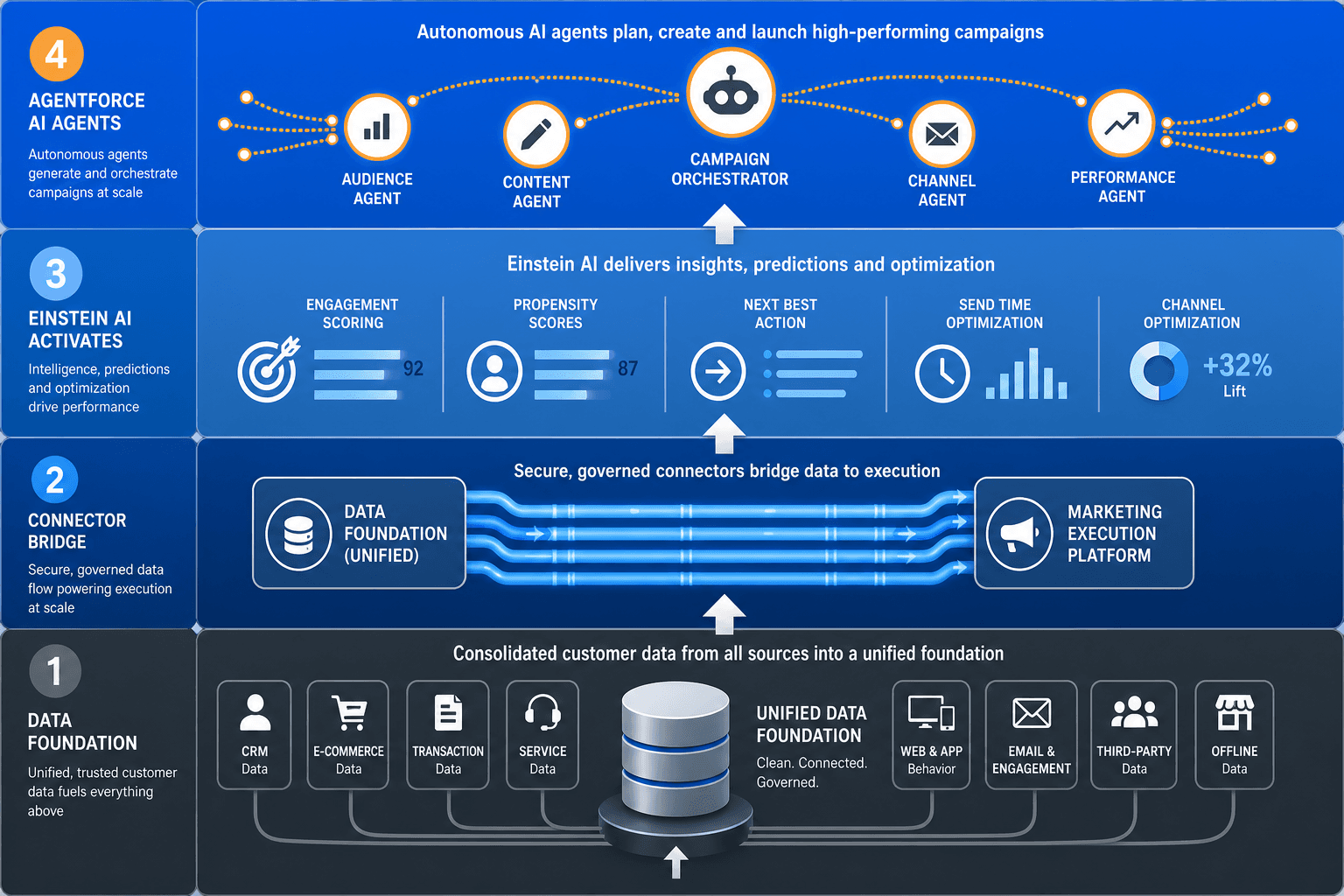
Phase 1: Einstein Features
Einstein features are the first AI layer to activate, and they work on engagement data that accumulates over time. You need a baseline of send history before these features produce meaningful signals.
- Einstein Send-Time Optimization: Delivers each email at the time that individual contact has historically been most likely to open. This is per-contact timing, not a single optimal send window for the whole list. Available in MCG and MCA.
- Einstein Engagement Scoring: Classifies contacts as high, medium, or low engagement based on their email interaction history. Useful for suppressing disengaged contacts before they damage deliverability, and for prioritizing high-engagement segments for premium campaigns. Available in MCA.
- Einstein Engagement Frequency: Automatically removes contacts who are receiving too many messages and adds contacts who need more outreach, based on individual engagement signals. This is automated frequency capping — it reduces manual list management. Available in MCA only.
For readers who want deeper coverage of Einstein feature capabilities and limitations, the Salesforce Einstein GPT Marketing Automation tool profile covers the Einstein feature set at evaluation depth. This guide focuses on the activation sequence rather than feature descriptions.
Phase 2: Agentforce Segment Creation
Once Data 360 is provisioned with clean data and unified profiles are resolved, Agentforce can build audience segments from natural language prompts — no SQL required. A marketer can describe the audience they want in plain language, and Agentforce translates that into a Data 360 segment using the unified profile data.
The quality of these segments depends entirely on the quality of the underlying unified profiles. If identity resolution was run too aggressively or too loosely, if data fields are inconsistently populated, or if the ingestion scope was too broad, the natural language segments will produce unreliable results. This is why Phase 1 data quality work is not optional.
Phase 3: Agentforce Campaign Creation Agent
The Campaign Creation agent is the most capable — and most demanding — AI feature in the stack. From a single prompt, it can generate a full campaign brief, recommend audience criteria, produce a journey structure, and draft email and SMS content. It uses Data 360 unified profiles to ground its recommendations in actual customer data rather than generic templates.
Prerequisites before activating Phase 3:
- Data 360 provisioned with clean, classified data
- Unified profiles resolved and validated
- Generative AI features enabled in your org settings
- Trust layer and data governance configured — this controls what data Agentforce can access and what it cannot
- User permissions defined for which roles can invoke Campaign Creation agents
The Five Costliest Mid-Market Mistakes
These are not theoretical risks. They are the specific errors that produce budget overruns, failed implementations, and platform abandonment at the mid-market level. Each one is avoidable with the right decision sequence.
- Ingesting all available data before defining use cases. Data classification in Data 360 locks after ingestion. If you ingest your full CRM, ERP, and event data 'just in case' without a defined use case for each data type, you cannot reclassify it without re-ingesting at full credit cost. Start with the smallest data set that supports your first two or three use cases. Expand deliberately.
- Defaulting to streaming over batch unnecessarily. Streaming calculated insights cost 53x more than batch. Streaming activation costs 160x more than batch. Most mid-market daily email campaigns and weekly reporting cycles do not require real-time processing. Audit every ingestion and activation configuration for whether streaming is genuinely required before enabling it.
- Running unfiltered identity resolution. Identity resolution costs 100,000 credits per million rows — 50x more expensive than external data ingestion. Running resolution across your full contact database without scoping matching rules and row count will consume a significant portion of your credit budget in a single operation. Run resolution in stages, validate results after each pass, and avoid overly strict matching rules that trigger repeated re-resolution.
- Activating AI features before data is clean. Einstein Engagement Scoring and Agentforce Campaign Creation agents both depend on the quality of unified profiles. Activating these features before data quality work is complete produces unreliable scores, generic agent outputs, and eroded team confidence in the platform. The data quality sprint is not a nice-to-have — it is a prerequisite.
- Choosing the wrong edition. Over-buying MCE when MCG or MCA fits your actual use case adds implementation complexity, partner costs, and connector configuration overhead that mid-market teams rarely need. Under-buying by choosing MCG when you need MCA means missing Einstein Engagement Frequency — the automated frequency capping feature that prevents list fatigue. Match the edition to your actual contact volume, use case complexity, and technical staff, not to your aspirational roadmap.
Realistic Timelines and Team Requirements by Edition
Implementation timelines vary significantly by edition and data complexity. The figures below reflect mid-market implementations with existing Sales or Service Cloud infrastructure — not greenfield Salesforce deployments.
| Edition / Phase | Typical Timeline | Team Requirement | Partner Needed? |
|---|---|---|---|
| MCG | 3–6 weeks | Certified Salesforce admin, straightforward data model | Usually not |
| MCA | 4–8 weeks | Experienced admin, basic Data 360 configuration | Sometimes for Data 360 setup |
| MCE Corporate | 10–16 weeks | Admin plus technical lead, connector configuration | Typically yes |
| MCE Enterprise | 16–24+ weeks | Dedicated implementation team | Yes |
| Data 360: initial setup and configuration | 2–4 weeks | Admin with Data 360 certification or training | Depends on complexity |
| Data 360: data integration and mapping | 4–6 weeks | Data architect or senior admin | Often yes for external sources |
| Data 360: custom development and testing | 6–8 weeks (if needed) | Developer or partner | Yes if custom development required |
A few planning notes that these timelines do not fully capture:
- Data quality remediation is not included in these timelines. If your CRM data requires a cleanup sprint before ingestion, add two to four weeks before the Data 360 setup phase begins.
- Complex ERP integrations or third-party data sources add significant time to the data integration and mapping phase — these are the most variable element in mid-market timelines.
- Full enterprise Data 360 implementations commonly require 6 to 18 months. Mid-market teams with a focused initial use case scope can stay at the lower end of that range.
- Marketing Cloud Next remains a future direction for teams that achieve full Data 360 maturity. It is not a realistic near-term destination for most mid-market teams starting implementation in 2026 — plan for MCG or MCA as your operating platform for at least 12 to 18 months before evaluating MCN.

Comments
Join the discussion with an anonymous comment.