
HubSpot Sales Hub (Breeze AI)
A feature-level review of HubSpot Sales Hub's Breeze AI suite — Prospecting Agent, Smart Deal Progression, AI Forecasting, and Buyer Intent Signals — covering what each capability actually does, which tier it requires, honest setup prerequisites, and where the tool falls short, written for sales managers and RevOps leads evaluating or implementing it in 2026.
Category
CRM AI, sales enablement, pipeline managementPricing
freemium, subscription, enterpriseBest For
10–100 rep inbound-led B2B sales teams and RevOps leads evaluating CRM-native AI at Professional tier or aboveCompared With
Salesforce Einstein, Apollo AI, Outreach AILast Reviewed
Profile Updated
Tags
Tool Profile at a Glance
| Attribute | Detail |
|---|---|
| Last Reviewed | June 2026 |
| Skill Level | Intermediate to Advanced |
| Best For | 10–100 rep inbound-led B2B sales teams; RevOps leads evaluating CRM-native AI |
| Free Tier | HubSpot CRM (no Sales Hub AI features) |
| Starter | $15/seat/month — basic CRM, no sequences, no AI forecasting, no Breeze Agents |
| Professional | $100/seat/month — sequences, AI forecasting, Prospecting Agent, Smart Deal Progression; $1,500 mandatory onboarding fee |
| Enterprise | $150/seat/month — all Professional features plus Predictive Lead Scoring, advanced conversation intelligence; $3,500 mandatory onboarding fee |
| Prospecting Agent Pricing | $1.00 per recommended lead (100 HubSpot Credits); 28-day free trial available |
| Commerce Hub (CPQ) | $85–$140/user/month — sold separately, not included in Sales Hub |
| Key Limitations | Sequences are email-only, linear, 50-contact cap; no power dialer; AI forecasting insufficient for 100+ rep teams |
| Beta Features | Smart Deal Progression (public beta as of April 17, 2026); Buyer Intent Signals (expanded buying signals in beta) |
What Changed in Spring 2026 — and Why It Matters Now
On April 17, 2026, HubSpot shipped its Spring 2026 Spotlight — 100+ product updates across the platform, with several changes that materially affect how sales teams should evaluate and use the AI features inside Sales Hub. This is the right moment to assess these capabilities, but not because the product is finished. It's because enough has changed that prior reviews are outdated, and because two of the most significant features are still in public beta.
The four changes practitioners need to know about:
- Prospecting Agent rebuilt with outcome-based pricing: HubSpot moved from a subscription model to $1 per recommended lead (100 HubSpot Credits). You pay when a lead is surfaced, not for ongoing monitoring. This is the first pay-per-result model in the CRM-native AI sales category.
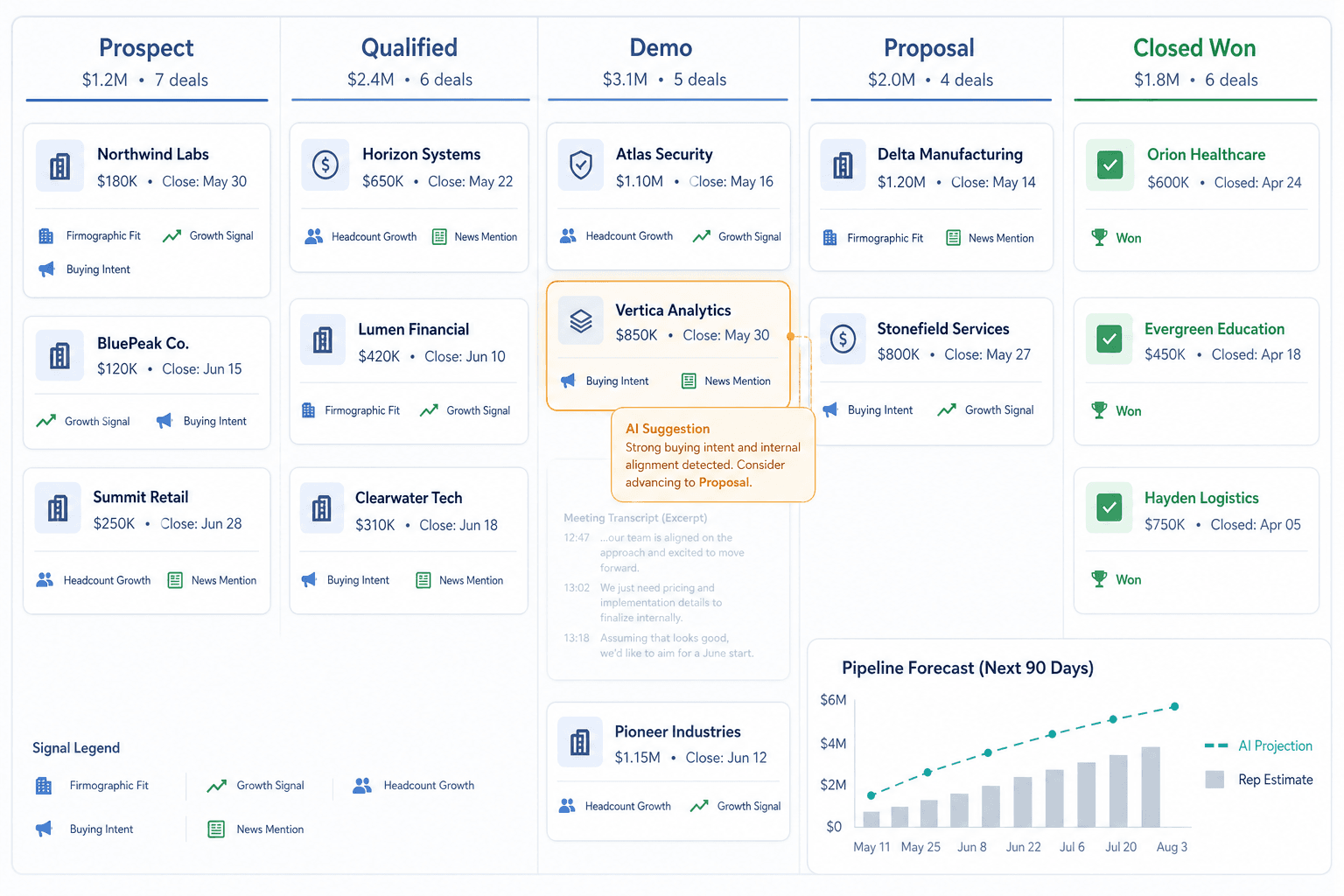
- Smart Deal Progression launched in public beta: This is a post-meeting workflow tool that uses your pipeline stage definitions — not just call transcripts — to suggest CRM updates, follow-up emails, and next-step action items. It is more than a call summary tool, but it is also not yet a stable feature.
- HubSpot Credits formalized as the billing layer for Breeze Agents: Credits are consumed when meaningful work is completed — a lead enrolled, a resolution handled, an answer generated. Tier allocations are Starter 500, Professional 3,000, Enterprise 5,000. High-volume Prospecting Agent use will exhaust Professional allocation quickly.
- Expanded Buyer Intent Signals in beta: The expanded buying signals layer — detecting funding rounds, job postings, tech stack changes, leadership changes — is listed as beta in HubSpot's own documentation. Confirm GA status before building workflows around it.
How Breeze AI Is Structured Inside Sales Hub
Breeze AI is not a single product. It is three distinct layers that serve different functions, operate under different pricing models, and have different dependencies. Conflating them leads to incorrect tier expectations and failed implementations. Here is the architecture as it stands in 2026:
| Layer | What It Is | Pricing Model | Availability |
|---|---|---|---|
| Breeze Copilot (Assistant) | In-app AI assistant for everyday tasks — drafting emails, summarizing records, answering questions about your CRM data | Included in all paid plans | All Sales Hub tiers; limited on Free CRM |
| Breeze Agents | Autonomous, outcome-based agents: Prospecting Agent ($1/lead), Customer Agent ($0.50/resolution), Data Agent ($0.10/answer), Smart Deal Progression (beta, Professional+) | HubSpot Credits — charged per completed outcome | Professional and Enterprise for Prospecting Agent and Smart Deal Progression; varies by agent |
| Breeze Intelligence | Data enrichment and buyer intent layer — the rebranded Clearbit dataset. Powers company and contact enrichment, website visitor identification, and buying intent signals | Separate add-on pricing; not included in Sales Hub tiers | Available as add-on across tiers; intent signal accuracy depends on CRM lifecycle stage setup |
The practical implication: when a HubSpot sales rep tells you their platform "has AI," they may mean any of these three things. Breeze Copilot is available to essentially everyone. Breeze Agents require Professional tier and HubSpot Credits. Breeze Intelligence requires a separate purchase. Make sure any demo or pricing conversation specifies which layer is being shown.
Feature-by-Feature Practitioner Review
Prospecting Agent
Tier required: Sales Hub Professional or Enterprise
The Prospecting Agent monitors enrolled prospects for buying signals — funding rounds, leadership changes, website engagement spikes, job postings — and uses your CRM data, ICP criteria, and product context to draft personalized outreach emails. When a signal is detected, it recommends a lead and drafts the email. You are charged 100 HubSpot Credits ($1) when a lead is enrolled and recommended, not when the monitoring runs.
The agent runs within meaningful operational guardrails: a 1,000 email per day account-wide send limit, and a cap of 3 cold outreach emails per contact within any 90-day period when there are no signals or engagement. These limits are deliberate — they protect sender reputation and prevent the agent from behaving like a bulk email tool.
Adaptive enrollments run for 30 days by default. To continue outreach beyond that window, you need to set up workflow re-enrollment — this is a setup step that is easy to miss and will silently end your agent's activity if skipped.
The single largest prerequisite: CRM data quality. The agent uses your existing CRM records, ICP definitions, and product details to generate outreach. If your contact records are incomplete, your ICP criteria are vague, or your lifecycle stages are inconsistently applied, the agent will produce generic or misaligned output regardless of tier.
"Prospecting Agent is only truly effective if your CRM is exceptionally clean and well-tagged."
Honest verdict: For inbound-led teams with clean CRM data and a well-defined ICP, the Prospecting Agent meaningfully reduces the time reps spend on research and first-draft outreach. For teams with messy data or an undefined ICP, it will produce output that requires heavy editing — and the $1/lead cost will add up without proportionate return.
Smart Deal Progression
Tier required: Sales Hub Professional or Enterprise (also available in Service Hub Professional and Enterprise)
Smart Deal Progression is frequently described as a call summary tool. That framing undersells what it actually does — and also what makes it dependent on setup quality.
After a meeting, the agent analyzes the transcript alongside the full deal history, your pipeline stage definitions, and your forecast logic. It then generates three outputs: suggested CRM updates (both default and custom properties), a drafted follow-up email, and next-step action items. The rep reviews these and applies them with one click.
The distinction that matters for RevOps teams: the agent's stage change suggestions are grounded in how your team defines progression, not just what was said in the last call. If a prospect mentions a delayed start date or a new approval process, the system flags a mismatch between the conversation and the current deal stage — using your stage criteria as the reference point.
Setup dependency: Smart Deal Progression requires HubSpot Meeting Notetaker to be connected to your calendar. Without meeting transcripts, the agent has no source material to analyze. This is a hard prerequisite, not a soft recommendation.
Honest verdict: The concept is sound and the one-click apply workflow reduces the friction of post-meeting CRM hygiene. But because it is in public beta, practitioners should use it as a supplementary check rather than a primary pipeline management tool. Monitor its suggestions for accuracy over your first 30 days before trusting it to drive stage updates at scale.
AI Forecasting
Tier required: Sales Hub Professional or Enterprise
AI Forecasting presents two views side by side: the Rep Forecast (your team's manual estimate) and the AI Projection (calculated from historical win rates and current pipeline health). The practical use is in the gap between them — when the AI projection is materially lower than the rep's estimate, it surfaces deals that warrant a closer look.
For teams of 10–100 reps, this provides a useful second opinion on pipeline health without requiring a dedicated forecasting platform. The model is adequate for identifying over-optimism in the pipeline and tracking forecast accuracy over time.
Buyer Intent Signals
Tier required: Varies by signal type; expanded buying signals in beta across Professional and Enterprise
Buyer Intent Signals draws on website visit data, research activity, and third-party signals from the Breeze Intelligence layer (rebranded Clearbit). The accuracy of these signals is directly tied to the quality of your lifecycle stage setup and tracking configuration. If lifecycle stages are applied inconsistently, or if your tracking setup has gaps, intent scores will be skewed or misleading — generating false positives that waste rep time.
Predictive Lead Scoring
Tier required: Sales Hub Enterprise only
Predictive Lead Scoring uses machine learning to assign close likelihood scores based on historical deal patterns. It is Enterprise-only and requires sufficient closed-deal history in your CRM to produce meaningful predictions. Teams that are new to HubSpot, or that have limited historical deal data, will not get reliable output from this feature regardless of tier.
Honest verdict: This is a genuine capability for mature HubSpot installations with 12+ months of clean deal history. For teams without that foundation, the feature will produce low-confidence scores that are not actionable.
Pricing, Tier Gates, and the Real Year-One Cost
The jump from Starter to Professional is a 6.7x price increase per seat. That gap is where all meaningful sales AI lives — sequences, workflow automation, AI forecasting, Prospecting Agent, and Smart Deal Progression are all Professional-tier features or above. The free CRM and the $15 Starter tier do not include any of the Breeze Agent capabilities reviewed in this article.
| Cost Item | Professional (10 reps) | Notes |
|---|---|---|
| Sales Hub licenses | $12,000/year | $100/seat × 10 reps × 12 months |
| Mandatory onboarding fee | $1,500 (one-time) | Required at Professional tier; verify current figure at hubspot.com/pricing/sales |
| Year-one total (licenses + onboarding) | $13,500 | Without quoting/CPQ capability |
| Commerce Hub Professional (CPQ) | $10,080/year | $84/user/month × 10 users — sold separately |
| Year-one total with Commerce Hub | ~$23,580 | Approximate; Commerce Hub pricing varies by configuration |
| Prospecting Agent credits (variable) | $1.00/lead enrolled | Professional plan includes 3,000 Credits ($30 value); high-volume use requires additional Credit purchases |
CPQ is not part of Sales Hub at any tier. If your sales process includes quoting, proposals, or product catalogs, Commerce Hub is a required additional purchase at $85–$140 per user per month depending on tier. This is the most commonly overlooked cost item in HubSpot Sales Hub evaluations.
Honest Limitations: Where Breeze AI Falls Short
Vendor content for HubSpot Sales Hub consistently omits or minimizes the following gaps. Each one is material for specific team types.
- Sequences are email-only and linear. HubSpot sequences have no conditional branching, no multi-channel steps (no LinkedIn, no SMS, no call tasks in sequence), and a 50-contact manual enrollment cap. For teams running structured high-volume outbound, this is a fundamental constraint. Outreach and Salesloft are purpose-built for that motion; HubSpot is not.
- No power or parallel dialer. HubSpot Sales Hub does not include a power dialer or parallel dialer at any tier. High-volume calling teams will need a third-party integration (e.g., Kixie, Aircall, Orum). This is a non-trivial gap for outbound-heavy motions.
- Mobile app limitations. The HubSpot mobile app is functional for basic CRM tasks but does not surface the full Breeze AI feature set. Field reps who work primarily from mobile will not have access to the same AI-assisted workflow as desktop users.
- AI Forecasting is not enterprise-grade. The side-by-side rep vs. AI projection view is useful for 10–100 rep teams. For teams above that threshold, with complex territory structures or multi-product forecasting requirements, the tool does not offer the depth of Clari, Salesforce Einstein, or Gong.
- Smart Deal Progression and Buyer Intent Signals are in public beta. These are not stable features. Their behavior, pricing, and availability can change without notice. Teams that build pipeline management workflows around beta features carry the risk of those workflows breaking or changing when features reach GA.
- CRM data quality is the single largest prerequisite. Every Breeze AI feature — Prospecting Agent, Smart Deal Progression, AI Forecasting, Buyer Intent Signals, Predictive Lead Scoring — produces output quality that is directly proportional to the cleanliness and completeness of your CRM data. Bad data produces bad AI suggestions, regardless of which tier you are on. This is not a caveat buried in the fine print; it is the primary implementation risk.
- Conversation intelligence has structural limits. HubSpot's Enterprise-tier conversation intelligence can transcribe calls and flag keyword mentions, but it does not extract structured data points — budget figures, timeline commitments, competitive mentions — and map them to deal fields automatically. Teams that need structured call intelligence should evaluate Gong or Chorus alongside HubSpot.
Comparison: HubSpot Breeze AI vs Salesforce Einstein vs Apollo AI vs Outreach AI
| Dimension | HubSpot Breeze AI | Salesforce Einstein | Apollo AI | Outreach AI |
|---|---|---|---|---|
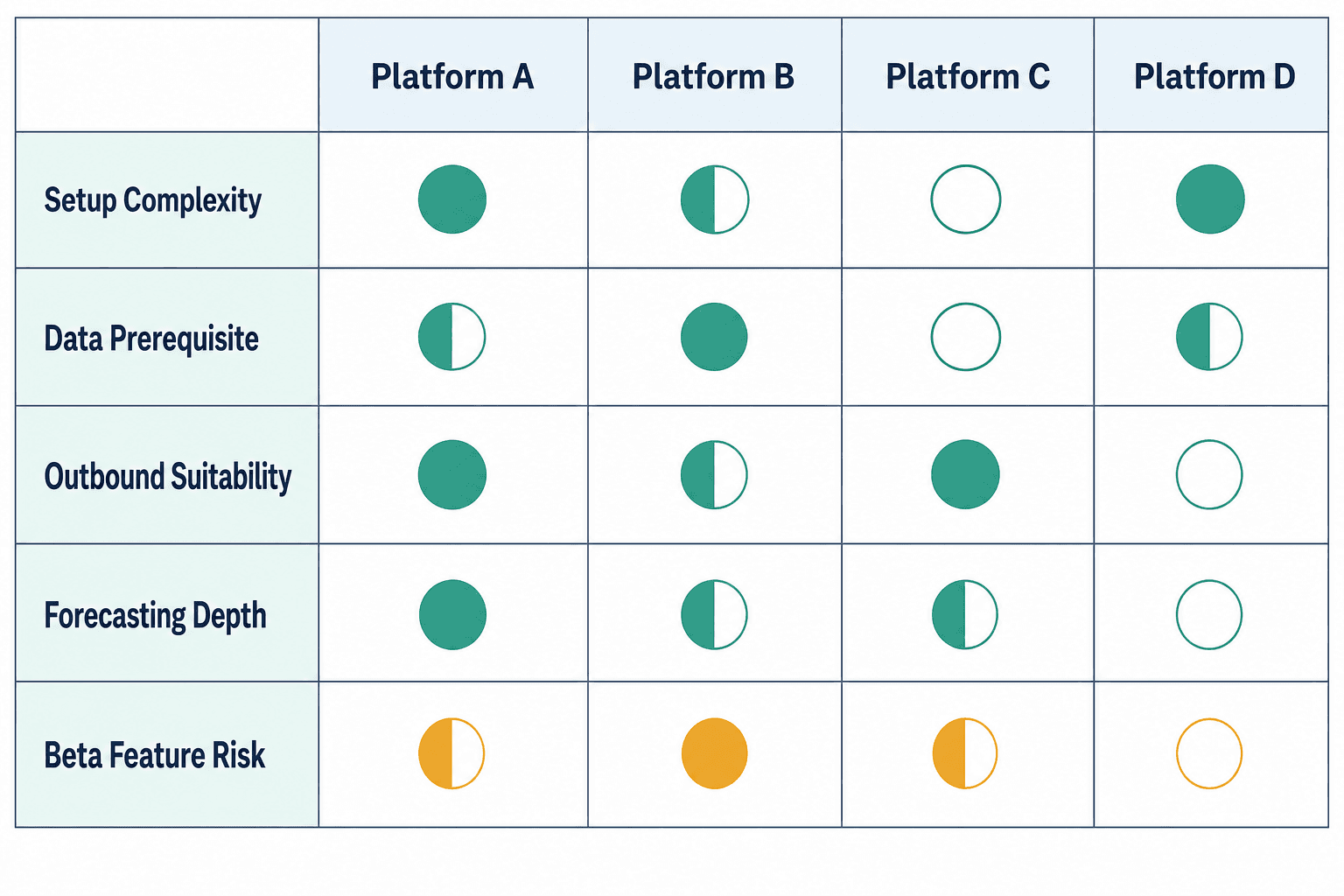
| Setup Complexity | Moderate — CRM data hygiene is the primary blocker; agent setup is guided but requires Admin access and multiple configuration steps | High — requires Salesforce admin expertise; Einstein features are deeply integrated but complex to configure | Low-to-moderate — Apollo is designed for fast onboarding; less dependent on existing CRM history | Moderate — best value realized when integrated with an existing CRM; standalone setup is faster |
| CRM Data Prerequisite | High — all Breeze AI features degrade significantly with poor data quality | High — Einstein scoring and forecasting require substantial historical data | Lower — Apollo maintains its own contact and company database; less dependent on your CRM history | Moderate — Outreach AI uses engagement data from its own platform; CRM quality matters less for sequencing |
| Outbound Suitability | Limited — sequences are email-only, linear, 50-contact cap; no power dialer; insufficient for high-volume structured outbound | Moderate — better sequence tooling than HubSpot but still not purpose-built for outbound at scale | Strong — Apollo is purpose-built for outbound prospecting with multi-channel sequences and a built-in dialer | Strong — Outreach is the category leader for structured multi-channel outbound sequences |
| Forecasting Depth | Adequate for 10–100 rep teams; rep vs. AI projection view is useful; insufficient for complex enterprise forecasting | Deep — Einstein Forecasting is enterprise-grade with scenario modeling, territory management, and advanced analytics | Basic — Apollo's forecasting is pipeline-stage-based; not AI-driven at the same depth | Moderate — Outreach AI surfaces deal risk signals but forecasting is not its primary strength |
| Beta Feature Risk | High — Smart Deal Progression and expanded Buyer Intent Signals are in public beta as of Q2 2026 | Low — Einstein features are mature and GA across most capabilities | Low — core Apollo AI features are stable and GA | Low — Outreach AI features are mature; AI-generated summaries and deal insights are stable |
| Approx. Entry Cost for AI Features | $100/seat/month (Professional) + $1,500 onboarding; Prospecting Agent at $1/lead | Salesforce Sales Cloud Enterprise starts at ~$165/user/month; Einstein add-ons priced separately | Apollo Professional starts at ~$49/user/month with AI features included | Outreach pricing is not publicly listed; typically enterprise-quoted; significantly higher than HubSpot at entry |
Setup Guide: Prospecting Agent and Smart Deal Progression
Activating the Prospecting Agent
Before starting: you need Super Admin permissions or the "Access prospecting agent" permission explicitly granted. The agent cannot be configured in a sandbox account — HubSpot Credits are consumed in production only.
- Enable four AI settings switches. In your HubSpot account settings, navigate to AI settings and enable all four required data access switches: Give users access to generate AI tools and features; CRM data; Customer conversation data; and Files data. All four must be on for the agent to function correctly.
- Set up your selling profile(s). Selling profiles let you segment outreach by ICP, product line, tone, or persona. You can create up to 85 profiles. Start with one profile that reflects your primary ICP — add complexity after you have validated the agent's output quality against that baseline. This is also where you define the product context and value proposition the agent will use when drafting outreach.
- Configure identity settings. Set the sender identity the agent will use for outreach — this should be a real rep's email address connected to HubSpot, not a generic alias. The agent's deliverability is tied to your sender reputation; using a poorly warmed or generic address will hurt open rates.
- Choose outreach mode: set to Review before sending. In the outreach options configuration, select "Review before sending" rather than "Send automatically." This is the recommended starting configuration. Reps review and edit each draft before it goes out. Treat the first 30–60 days as a calibration period — monitor output quality before considering autonomous sending.
- Set up workflow re-enrollment. Adaptive enrollments end after 30 days by default. If you want the agent to continue monitoring and outreaching beyond that window, configure a workflow re-enrollment in HubSpot Workflows. Without this step, the agent will silently stop outreach at the 30-day mark.
- Monitor the Analyze tab. The Prospecting Agent has an Analyze tab that shows signal detection activity, outreach volume, and response rates. Review this weekly during your first month to understand which signals are triggering outreach, whether email drafts are being edited significantly before sending, and whether Credit consumption is tracking to your expectations.
Activating Smart Deal Progression
- Connect your calendar to HubSpot Meeting Notetaker. Smart Deal Progression requires meeting transcripts as its primary input. In your HubSpot settings, navigate to Calling and Meetings and connect your calendar (Google or Outlook). Enable Meeting Notetaker so that calls and video meetings are automatically transcribed. Without transcripts, the agent has no source material and will not generate suggestions.
- Verify your pipeline stage definitions are specific. The agent uses your pipeline stage definitions and forecast logic when generating suggestions. Vague stage criteria (e.g., "In progress") will produce vague suggestions. Before activating Smart Deal Progression, review your pipeline stage exit criteria and make them specific — what must be true for a deal to move from Demo to Proposal? That specificity is what the agent uses to evaluate whether a conversation warrants a stage change.
- Review AI suggestions on deal records after each meeting. After a meeting is transcribed, the agent surfaces suggestions directly on the deal record in HubSpot. These appear as a panel with three sections: suggested CRM property updates, a drafted follow-up email, and next-step action items. Review each suggestion — do not apply them automatically without reading them during the beta period.
- Apply suggestions with one click (after review). Each suggestion has an "Apply AI Suggestion" button. Reps can refine the suggestion before applying — the follow-up email draft in particular should be reviewed and personalized before sending. The CRM property updates are generally lower-risk to apply directly, but spot-check custom property suggestions during the first few weeks.
Verdict: Who Should Buy, Who Should Skip, and How to Negotiate
Buy if:
- Your team is 10–100 reps running an inbound-led or moderate-outbound B2B motion.
- You are already using or planning to use HubSpot Marketing Hub — the CRM-native integration between marketing and sales data is where HubSpot's AI creates the most differentiated value.
- You are willing to commit to the Professional tier and invest in CRM data hygiene before activating AI features. Teams that skip the data foundation step will be disappointed by output quality.
- Your forecasting needs are met by a rep vs. AI projection view — you do not need scenario modeling, territory hierarchies, or multi-product rollups.
- You want a single platform for CRM, marketing automation, and sales AI rather than a best-of-breed stack.
Skip if:
- Your primary motion is high-volume structured outbound requiring multi-channel sequences, conditional branching, or a power dialer. Outreach and Salesloft are purpose-built for this; HubSpot is not.
- You need enterprise-grade forecasting with scenario modeling, territory management, or complex rollup logic. Clari or Salesforce Einstein are better fits.
- Your sales process is CPQ-heavy and quoting is a daily workflow. Commerce Hub is a required additional purchase that significantly increases the total cost.
- Your CRM data is in poor condition and you are not prepared to invest in cleaning it before activating AI features. The AI will not compensate for bad data — it will amplify it.
- You need stable, GA features for critical pipeline processes. Smart Deal Progression and Buyer Intent Signals are in public beta — building core workflows around them carries change-risk.
Negotiation Tactics
- Partner channel for onboarding fee reduction: HubSpot's certified partner network (agencies and implementation consultancies) can sometimes negotiate reduced or waived onboarding fees as part of a bundle arrangement. If you are working with a HubSpot partner, ask them directly about onboarding fee structures.
- Seat mix optimization: Not every rep needs a Professional seat. If some team members only need basic CRM access and do not require sequences or AI features, a mix of Starter and Professional seats can reduce the total seat cost. Confirm with HubSpot which features are seat-specific versus account-wide.
- Q4 timing: HubSpot's sales team has end-of-quarter and end-of-year targets. Q4 is historically the best time to negotiate on multi-year commitments, additional Credits, or onboarding fee discounts.
- CRM Suite bundle: If you need both Marketing Hub and Sales Hub, the CRM Suite bundle pricing is typically more favorable than purchasing hubs individually. Request a bundle quote and compare it against the standalone hub costs before signing.
- Request a Credits usage estimate: Before committing to a tier, ask your HubSpot account executive to model your expected Credits consumption based on your team size and prospecting volume. The 3,000 Credits included in Professional covers 30 Prospecting Agent leads — if your team runs active outbound, you will need to purchase additional Credits and should factor that into your cost model.
Case studies featuring HubSpot Sales Hub (Breeze AI)
No case studies featuring HubSpot Sales Hub (Breeze AI) yet. Browse all case studies.
Comments
Join the discussion with an anonymous comment.