
ChatGPT
GPT-4o was retired on February 13, 2026, and ChatGPT advanced through five GPT-5 model generations in the months that followed — along with a wave of marketing-critical features most practitioners haven't fully mapped. This reference guide decodes every significant 2025–2026 update by marketing function, with honest notes on which features require paid plans.
Category
content creation, research, integrations, image generationPricing
freemiumBest For
Marketing managers, content marketers, SEO professionals, and performance marketers who need to understand what changed in ChatGPT from GPT-4o through GPT-5.5 Instant and which 2026 features to act onCompared With
Claude, GeminiLast Reviewed
Profile Updated
Tags
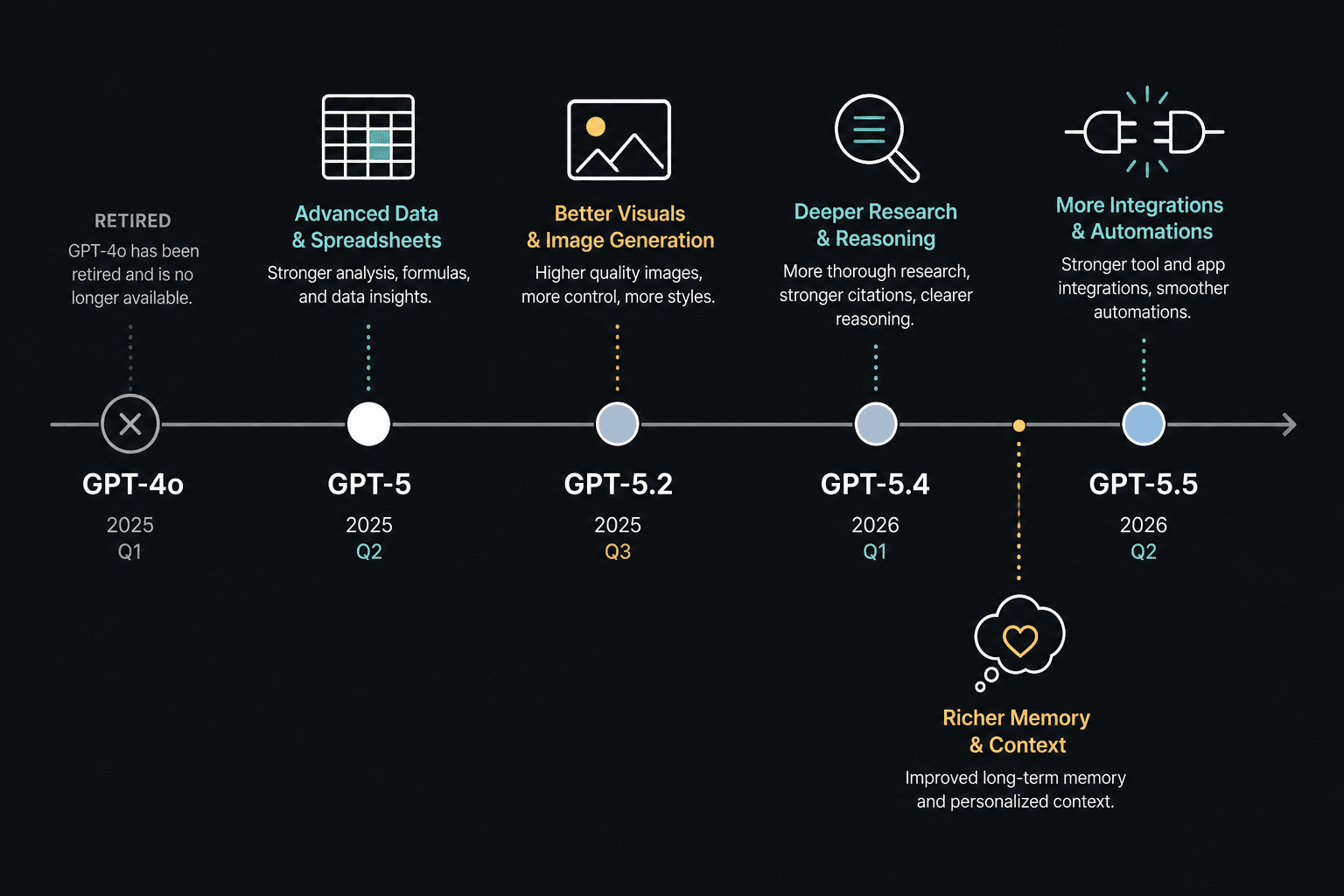
GPT-4o Is Gone: What Happened and Why It Matters
On February 13, 2026, OpenAI retired GPT-4o from ChatGPT — along with GPT-4.1, GPT-4.1 mini, and o4-mini. If you've been running on autopilot with a workflow built around GPT-4o, it no longer exists in the interface you're using.
The retirement wasn't a surprise internally. By the time OpenAI made the announcement, only 0.1% of users were still actively choosing GPT-4o each day. The rest had already migrated — many without realizing it, because ChatGPT had been quietly defaulting to newer models for months.
What's worth understanding is how the transition happened. When GPT-5 launched in August 2025 and GPT-4o was briefly restored after user pushback, OpenAI collected direct feedback on what felt wrong. That feedback shaped two subsequent releases: GPT-5.1 and GPT-5.2 both included explicit improvements to personality, warmth, creative ideation support, and customization controls — changes made because users said GPT-5 felt too clinical compared to GPT-4o.
OpenAI acknowledged the transition was frustrating for some users. That's a meaningful admission for a company that rarely surfaces internal friction publicly. For marketers, the practical implication is this: the model you relied on for brand voice, tone calibration, and creative drafts has been replaced by something that has been deliberately tuned based on the complaints of the users who missed GPT-4o. The current default — GPT-5.5 Instant — is the result of that tuning process, carried through five generations.
The GPT-5 Model Timeline: A Reference You Can Actually Use
OpenAI released five distinct GPT-5 model generations between August 2025 and May 2026. The naming convention shifted rapidly, and the difference between an "Instant" and "Thinking" variant matters for how you use the tool. Here's the full progression.
| Model | Released | Type | Status (as of June 2026) | Key change for marketers |
|---|---|---|---|---|
| GPT-5 | Aug 2025 | Unified (auto-switching) | Superseded | Replaced GPT-4o as default; unified fast and reasoning modes; reduced sycophancy and hallucination rates |
| GPT-5.1 | Nov 2025 | Instant + Thinking | Retired Mar 11, 2026 | Personality and warmth improvements based on GPT-4o user feedback; creative ideation controls |
| GPT-5.2 | Dec 2025 | Instant + Thinking + Pro | Available to paid users | Expert-level professional task performance; improved document work, spreadsheets, step-by-step planning; knowledge cutoff Aug 2025 |
| GPT-5.3 Instant | Mar 2026 | Instant | Available to paid users (retiring ~Aug 2026) | Replaced GPT-5.1 as default; speed and accuracy improvements for everyday tasks |
| GPT-5.4 Thinking | Mar 2026 | Thinking | Available to paid users | Integrated Codex coding capabilities; upfront thinking plan visible before final output; improved deep web research; factuality ~33% better than GPT-5.2 |
| GPT-5.5 Instant | May 2026 | Instant | Current default — all plans | Reduced overformatting and gratuitous emojis; improved conciseness; stronger image understanding; now default for Free through Pro |
What GPT-5.x Actually Means for Marketing Outputs
Benchmark numbers don't translate well to marketing workflows. Here's what the GPT-5.x improvements mean in practice, based on the capability changes documented across the model releases.
- Reduced overformatting. GPT-5.5 Instant explicitly addresses the tendency of earlier models to respond with unnecessary bullet points, gratuitous emojis, and padded structure. If you've been manually stripping formatting artifacts from ChatGPT outputs before using them, this is a direct improvement to your editing workload.
- Stronger instruction-following. Across GPT-5.1 through 5.5, OpenAI improved how well the model adheres to custom instructions, style preferences, and tone constraints. For marketers who maintain system prompts for brand voice, this means fewer corrections per output.
- Lower hallucination rates for research tasks. GPT-5 reduced hallucination rates significantly versus GPT-4o — roughly 45% lower with web search enabled. GPT-5.4 improved factuality further, with individual claim error rates approximately 33% lower than GPT-5.2. This matters for competitive research, audience analysis, and any task where you're relying on ChatGPT to retrieve or synthesize factual information.
- Improved image understanding. GPT-5.5 Instant includes better visual reasoning, which is useful for reviewing ad creative, analyzing competitor screenshots, or getting feedback on landing page layouts when you upload an image.
- Reduced sycophancy. GPT-5 reduced the model's tendency to agree with whatever the user implies — from approximately 14.5% sycophancy rate to under 6%. For marketers using ChatGPT to pressure-test messaging or evaluate creative, this means pushback when your framing is weak, not reflexive agreement.
- Professional task quality at GPT-5.2 and above. GPT-5.2 Thinking was the first OpenAI model to reach expert-level performance on a benchmark covering 44 professional job types including marketing, accounting, and sales — with 70.9% of tasks matching or exceeding human specialist quality. This is the model tier relevant to complex document work, structured planning, and multi-step campaign analysis.
Content and Writing: What Changed for Copy and Brief Work
For content marketers and copywriters, the GPT-5.x transition brings four concrete workflow changes.
- Less formatting noise by default. GPT-5.5 Instant was specifically tuned to reduce gratuitous bullet points and emoji clutter. Conversational responses, email drafts, and social copy are more likely to come back as clean prose without requiring a follow-up instruction to "remove the bullets."
- Personality presets for tone control. GPT-5 introduced four personality presets — Cynic, Robot, Listener, and Nerd — available in text chat. These are useful for matching output tone to specific content contexts: a Cynic preset for contrarian thought leadership, a Listener preset for empathetic customer-facing copy.
- Large-paste handling as attachment. Long text pastes — full briefs, brand guidelines, transcript dumps — are now handled as attachments rather than inline context. This keeps the conversation cleaner and prevents context window pollution when you're working with extended source material.
- Canvas is being retired for GPT-5.5 users. As of May 28, 2026, the canvas interface is being phased out for GPT-5.5 Instant and Thinking models. It's replaced by writing blocks and code blocks directly in chat. If your team has built workflows around canvas for document editing or structured drafts, those workflows need to be rebuilt around the new in-chat block format.
Research and Competitive Intel: The Deep Research Overhaul
Deep research — ChatGPT's mode for extended, multi-source web investigation — received a significant overhaul on February 10, 2026. The changes address the core limitation of the original version: you couldn't control what it searched or steer it once it started.
The updated version gives marketers meaningful control over the research process. Before a research run begins, you can now create and edit a research plan — specifying the scope, priority questions, and source constraints. You can also edit that plan mid-run if the initial direction misses the mark. A redesigned progress sidebar shows what the model is doing in real time, which is useful for knowing when to intervene.
- Focus research on specific websites. For competitive analysis, this means you can constrain a research run to a competitor's site, a specific publication, or an industry database rather than getting a broad web sweep.
- Add connected apps as trusted sources. If you've connected Google Drive or Notion, those sources can be designated as trusted inputs for deep research — meaning internal research reports, customer interview notes, or past campaign briefs can inform the model's synthesis alongside web sources.
- Editable research plans. Review and modify the model's proposed research structure before it executes. For audience analysis or market sizing tasks, this prevents the model from spending its research budget on tangential subtopics.
- Mid-run editing. If a research run is heading in the wrong direction, you can now redirect it without canceling and restarting from scratch.
Integrations and Connectors: HubSpot, Slack, Google Drive, and More in Standard Chat
One of the most practically significant 2026 changes for marketing teams is the expansion of connectors into standard chat — not just deep research mode. For Plus and Pro users, ChatGPT can now query connected business tools directly from a normal conversation.
The marketing workflow value here is real: instead of switching between ChatGPT and your CRM or project management tool, you can ask questions about internal data — recent HubSpot contact activity, Slack channel discussions, Google Drive documents — and get synthesized answers without leaving the chat interface.
| Connector | Available since | Marketing use case |
|---|---|---|
| Slack | Oct 2025 | Query channel discussions, surface recent team decisions, pull context from project threads |
| Google Drive | Feb 2026 (unified Mar 2026) | Reference internal briefs, research docs, past campaign reports during chat |
| HubSpot | 2026 rollout | Query contact lists, campaign data, pipeline status without leaving ChatGPT |
| Outlook | 2026 rollout (shared mailboxes Apr 2026) | Reference email threads, shared inbox context for campaign coordination |
| SharePoint | 2026 rollout | Access internal knowledge bases, brand guidelines, approved asset libraries |
| Notion | 2026 rollout | Pull from content calendars, project wikis, research databases |
| Box | 2026 rollout | Access approved creative assets and document repositories |
| Dropbox | 2026 rollout | Reference stored files and shared team folders |
In February 2026, OpenAI also added the ability to add sources to Projects directly from Slack channels or Google Drive links — making it possible to build a persistent project workspace that stays current with your team's actual working documents.
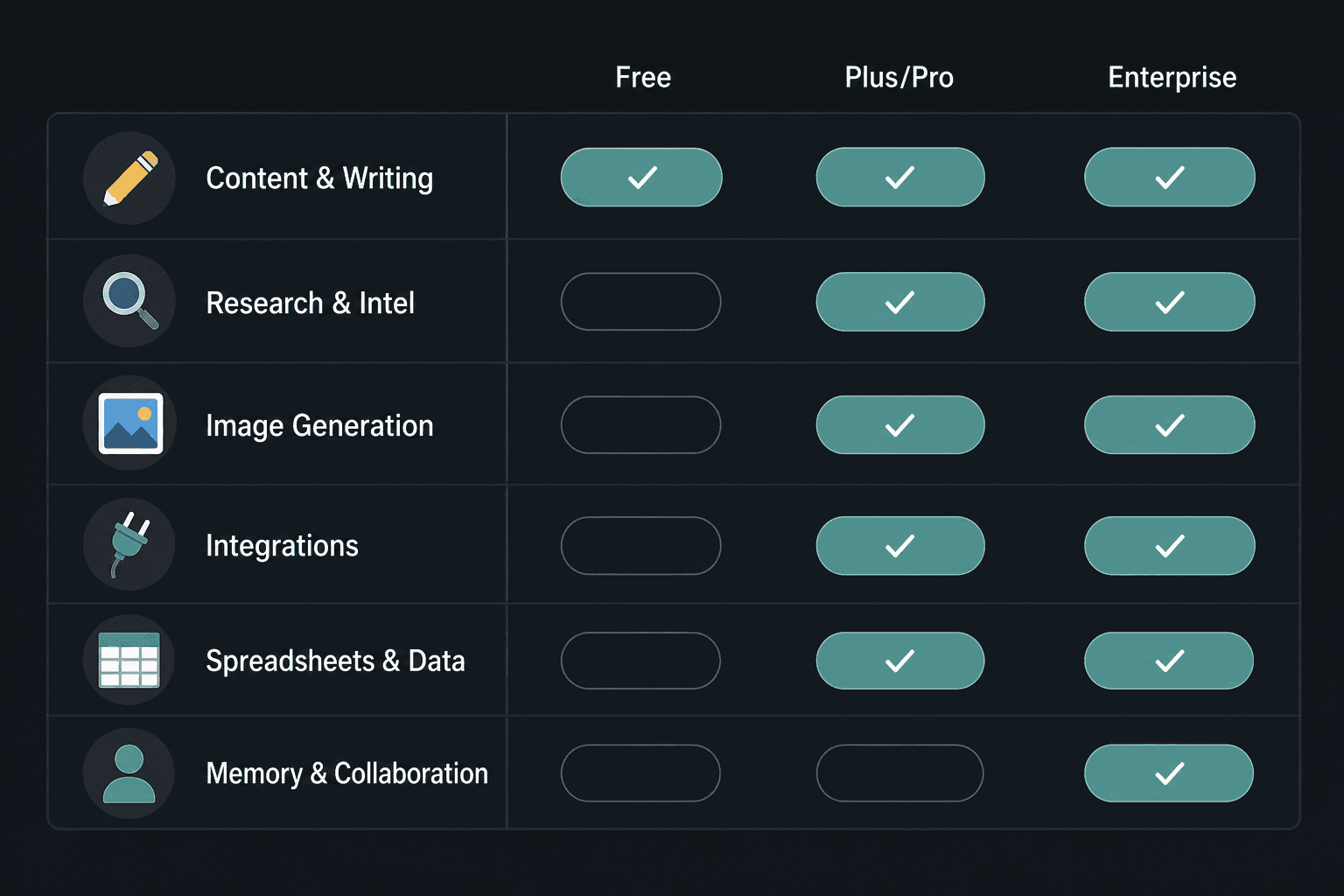
Image Generation, Spreadsheets, Memory, and Collaboration: The Rest of What Changed
ChatGPT Images 2.0 (April 21, 2026 — All Plans)
Images 2.0 introduced thinking-powered image generation: before producing an image, the model plans its composition, considers the prompt constraints, and refines its approach. On paid plans, this "images with thinking" mode is available for more complex generation tasks. The practical value for marketers is in social and ad visual iteration — generating multiple concept variations for a campaign, exploring layout options for a hero image, or producing mockups for internal review before sending to a designer.
ChatGPT for Excel and Google Sheets (May 7, 2026 — All Plans, Global)
ChatGPT now integrates directly into Excel and Google Sheets as a sidebar. It handles campaign budget trackers, formula generation, multi-tab file analysis, and reporting templates without requiring you to copy data into a chat window. Free and Go users have limited usage; Plus and Pro users work within agentic usage limits. For performance marketers managing spend pacing or content teams tracking editorial calendars in spreadsheets, this is a direct workflow addition.
Memory Sources (May 5, 2026 — All Consumer Plans)
Memory sources show you exactly which saved memories, past chat sessions, connected Gmail data, or Library files shaped a given response. For marketers, this solves a real trust problem: when ChatGPT produces a brief or recommendation that feels oddly specific, you can now see whether it's drawing on a brand guidelines document you uploaded three months ago, a past conversation about a specific campaign, or a connected inbox thread. You can correct or delete any memory that's introducing stale or irrelevant context.
File Library, Shared Projects, and Team Collaboration
File Library launched March 23, 2026 for Plus, Pro, and Business users, then expanded to Free and Go on May 14, 2026. It auto-saves all uploads and files created in chat, browsable via a Library tab on web, iOS, and Android. Storage tiers: 500 MB for Free, 4 GB for Go, 20 GB for Plus and Business, 100 GB for Pro.
Shared Projects — available to all users since October 23, 2025 — let teams build persistent collaborative workspaces with shared files, custom instructions, and shared context. Combined with the February 2026 source-from-apps feature, a marketing team can now maintain a Project that stays current with their Google Drive folder or Slack channel, with shared custom instructions for brand voice and a common file library for approved assets.
The ChatGPT Ad System: What Marketers Should Know (But Not Act On Yet)
ChatGPT began testing ads in Free and Go tiers in the US on February 9, 2026, expanding to Australia, New Zealand, and Canada on April 16, 2026. The system is distinct from search advertising: ads appear only in Free and Go tiers (not Plus, Pro, or Business), are always labeled as sponsored, and are separated from organic answers.
Advertisers receive aggregated impressions and clicks only — no user chat data, no query-level targeting information. Ads are excluded from health, mental health, and political topics. The system is brand-new and the advertiser interface is not publicly documented at the level needed to evaluate it as a performance channel.
Plan Tier Reference: Which Features Require Plus, Pro, or Enterprise
| Feature | Free | Go | Plus / Business | Pro | Enterprise |
|---|---|---|---|---|---|
| GPT-5.5 Instant (default model) | ✓ | ✓ | ✓ | ✓ | ✓ |
| GPT-5.2 / 5.4 Thinking models | — | — | ✓ | ✓ | ✓ |
| Connectors in standard chat (HubSpot, Slack, Drive, etc.) | — | — | ✓ | ✓ | ✓ |
| Deep research with internal app sources | — | — | ✓ | ✓ | ✓ |
| Memory sources (visibility into what shaped a response) | ✓ | ✓ | ✓ | ✓ | ✓ |
| File Library | ✓ (500 MB) | ✓ (4 GB) | ✓ (20 GB) | ✓ (100 GB) | ✓ |
| ChatGPT for Excel / Google Sheets | ✓ (limited) | ✓ (limited) | ✓ | ✓ | ✓ |
| ChatGPT Images 2.0 | ✓ (standard) | ✓ (standard) | ✓ (with thinking) | ✓ (with thinking) | ✓ |
| Shared Projects | ✓ | ✓ | ✓ | ✓ | ✓ |
| Ads appear in interface | ✓ | ✓ | — | — | — |
What Was Retired: The Full Deprecation List
| What was retired | Retirement date | Replacement |
|---|---|---|
| GPT-4o | Feb 13, 2026 | GPT-5.5 Instant (current default) |
| GPT-4.1 | Feb 13, 2026 | GPT-5.5 Instant |
| GPT-4.1 mini | Feb 13, 2026 | GPT-5.5 Instant |
| o4-mini | Feb 13, 2026 | GPT-5.5 Instant |
| GPT-5.1 (Instant + Thinking) | Mar 11, 2026 | GPT-5.3 Instant / GPT-5.4 Thinking |
| Legacy deep research mode | Mar 26, 2026 | Updated deep research with editable plans and source controls |
| Canvas (for GPT-5.5 models) | May 28, 2026 (ongoing) | Writing blocks and code blocks in chat |
Action Checklist: Updating Your ChatGPT Workflow for 2026
This checklist is organized by function. Work through the items relevant to your role — not all of these apply to every marketer.
All Users
- Confirm you are on GPT-5.5 Instant by checking the model selector. If you see GPT-4o or GPT-5.1 listed as your active model, those are no longer available — the interface should have auto-migrated you.
- Review your saved memories via the memory sources panel. Delete or correct any memories that are stale, from old campaigns, or that reflect brand voice instructions you've since updated.
- If you used canvas for document editing or structured drafts, rebuild those workflows using writing blocks in chat. Canvas is being retired for GPT-5.5 models.
Content Marketers and Copywriters
- Test GPT-5.5 Instant on a current brief or copy task. Specifically check whether the reduced overformatting and emoji defaults match your expectations — if your custom instructions were previously compensating for these issues, they may now be over-constraining the output.
- Evaluate the personality presets (Cynic, Robot, Listener, Nerd) for tone-matching use cases in your content mix.
- Test large-paste-as-attachment handling with your longest briefs or brand guidelines to confirm context is being processed cleanly.
Research, SEO, and Competitive Intelligence
- Rebuild any deep research workflows that relied on the legacy mode — it was removed March 26, 2026. The updated version requires you to create a research plan, which is a different starting point than the old interface.
- If you're on Plus or above, connect Google Drive or Notion and designate relevant internal research files as trusted sources for deep research runs.
- Test the "focus on specific websites" feature for competitor research — constrain a run to a specific competitor's blog or a trade publication to get more targeted synthesis.
Performance Marketers and Demand Gen
- Evaluate ChatGPT for Excel or Google Sheets for budget pacing, campaign tracker maintenance, and formula work. The sidebar integration means you can stay in the spreadsheet rather than copying data into a chat window.
- If you're on Plus or above and not in the EEA/Switzerland/UK, connect HubSpot or your CRM and test querying pipeline or campaign data directly in chat.
- Note the ChatGPT ad system for awareness, but do not allocate budget to it yet. Track OpenAI's advertiser documentation as it develops.
Marketing Teams and Managers
- Audit your team's shared Projects. If you set these up when they launched in October 2025, verify that the custom instructions, shared files, and connected sources still reflect current campaign priorities and brand guidelines.
- Review File Library storage usage across your team. Free users have 500 MB; if team members are hitting limits, evaluate whether a plan upgrade is warranted based on actual file usage patterns.
- If your team is based in the EEA, Switzerland, or UK, document that connectors in standard chat are currently unavailable and flag this for any workflow planning that assumes connector access.
Compare with
Case studies featuring ChatGPT
ChatGPT for Marketing Teams: Deployment Case Study and Implementation Playbook
A structured case study documenting how a mid-market B2B SaaS marketing team deployed ChatGPT across content, email, and SEO functions — covering the implementation sequence, measurable outcomes, failure points encountered, and an honest assessment of where the tool fell short.
Comments
Join the discussion with an anonymous comment.