
Google AI Max for Search vs. Performance Max: What Changed, When It Happened, and How to Split Your Campaigns
A practitioner-grade breakdown for paid media managers who need to understand how AI Max for Search actually differs from Performance Max, what each milestone from beta through forced DSA migration means for their accounts, and a decision framework — mapped to specific account conditions — for when to run each, both, or neither.
What AI Max for Search Actually Is (and Isn't)
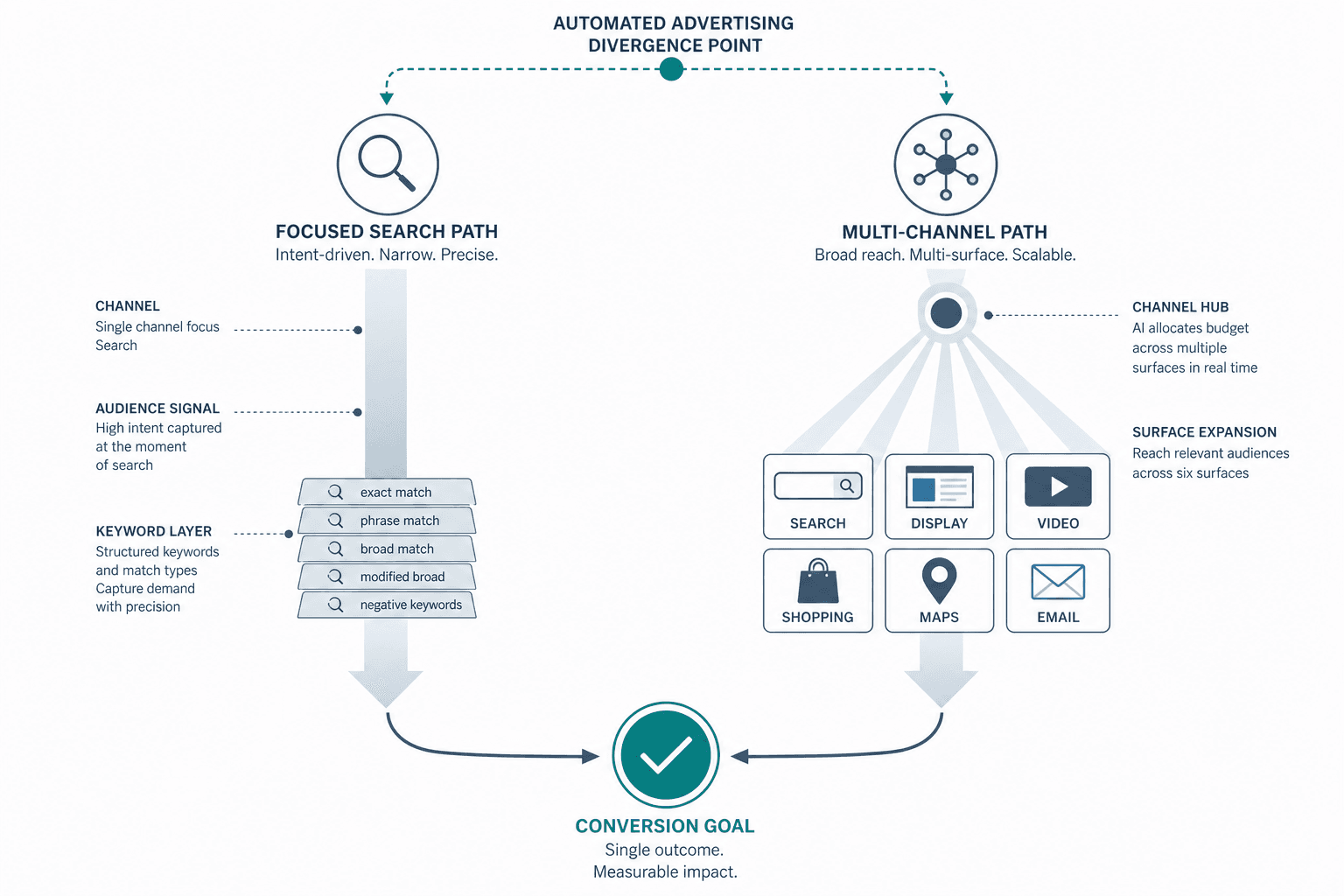
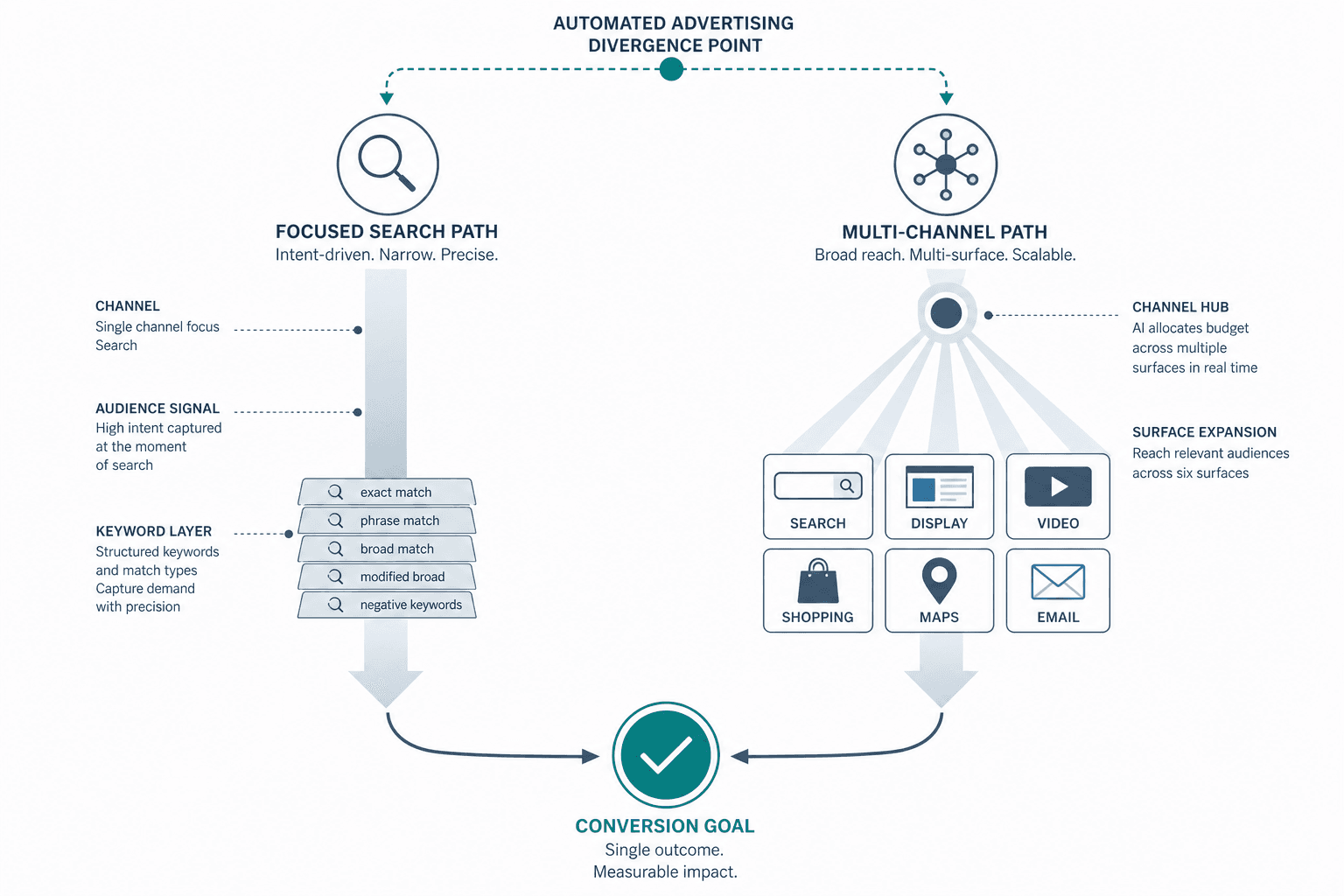
The most important thing to establish before any comparison: AI Max for Search is not a new campaign type. It is a one-click feature suite layered onto campaigns you already have. Your keyword structure, ad groups, campaign settings, and bidding configuration all remain in place. You are not rebuilding anything.
AI Max bundles three distinct features into a single toggle:
- Search term matching — expands query reach beyond your explicit keywords using AI, similar to how broad match works but driven by real-time intent signals and landing page context.
- Text customization — generates responsive ad copy variations tailored to the matched query, pulling from your landing page and existing assets.
- Final URL expansion — dynamically selects the most relevant page on your site for each query, rather than always sending traffic to the URL you specified in the ad.
Performance Max is structurally different. It is a standalone campaign type that replaces your campaign structure entirely and runs across Search, Shopping, YouTube, Display, Gmail, Maps, and Discover from a single campaign. You do not manage keywords in PMax — you provide asset groups and audience signals, and Google's automation handles everything else.
This distinction matters practically. When you enable AI Max, you retain the ability to add negative keywords, set ad group-level brand controls, pin RSA headlines, and view search term reports. When you run PMax, you operate at a campaign level with limited structural control and, until recently, limited reporting transparency. They are complementary tools, not interchangeable ones.
The Milestone Timeline: From Beta to Forced Migration
AI Max has moved through four meaningful stages in roughly thirteen months. Each stage changed what the feature does, who it applies to, and what practitioners need to act on. Here is what each date actually meant operationally.
| Date | Milestone | What Changed Operationally | Account Impact |
|---|---|---|---|
| May 6, 2025 | Open beta launch | AI Max available to all advertisers as an opt-in feature suite on Search campaigns. Google published a 14% uplift claim. | Voluntary. No existing campaigns affected. The 14% figure compared AI Max vs. keyword-match-only setups and excluded retail. |
| February 26, 2026 | Text guidelines global rollout | Advertisers gained access to term exclusions (up to 25 per campaign per language) and messaging restrictions (up to 40 per campaign) to govern AI-generated ad copy. Google published a 27% uplift claim. | The 27% figure applied specifically to campaigns historically reliant on exact and phrase match keywords. Text guidelines are a brand safety lever for copy — they do not restrict which queries AI pursues. |
| April 15, 2026 | General availability (GA) | Full feature suite (all three components) confirmed available. Google published a 7% uplift claim. DSA sunset announced. | The 7% figure compared full-feature AI Max against matching-only AI Max, in non-retail accounts, with undisclosed sample size. Retail is explicitly excluded from this benchmark. |
| September 2026 (exact date unconfirmed) | Forced auto-migration | Dynamic Search Ads (DSA), automatically created assets (ACA), and campaign-level broad match campaigns will be automatically upgraded to AI Max. | No opt-out. The only control lever is voluntary early migration before the deadline. Default feature activation differs by legacy campaign type — see below. |
The practical implication: a DSA campaign auto-upgraded in September arrives with final URL expansion active by default. That means Google's AI can send traffic to any page on your site it deems relevant — including pages you have not optimized for conversion. Voluntary early migration lets you configure URL exclusions and brand controls before the feature is live.
AI Max vs. Performance Max: A Direct Comparison
The table below covers the dimensions that actually determine which product fits which account situation. These are not marketing differentiators — they are structural constraints and capabilities that change how you configure, monitor, and control each campaign type.
| Dimension | AI Max for Search | Performance Max |
|---|---|---|
| Channel scope | Search only | All Google channels: Search, Shopping, YouTube, Display, Gmail, Maps, Discover |
| Campaign structure | Preserved — existing keywords, ad groups, and campaign settings remain intact | Replaced — no keyword structure; you provide asset groups and audience signals |
| Keyword control | Existing keywords retained; AI expands reach beyond them via search term matching | No keyword management; Google controls query matching entirely |
| Reporting transparency | Search term reports available; AI Max expanded matches reported separately from traditional matches | Channel-level reporting; search term visibility limited (improved post-November 2025) |
| Bidding eligibility | Smart Bidding required (Target CPA, Target ROAS, Maximize Conversions, or Maximize Conversion Value). Manual CPC is not compatible. | Smart Bidding required; no manual bidding option |
| Creative control | Text guidelines (term exclusions + messaging restrictions) available; RSA pinning supported unless both text customization and final URL expansion are enabled simultaneously | Asset-level creative submission; no copy pinning; Google generates combinations |
| Negative keywords | Honored at campaign and ad group level per Google FAQ; monitor for early-stage leakage | Campaign-level negatives supported, up to 10,000 |
| Brand controls | Available at both campaign and ad group level | Campaign-level brand exclusions |
| Search Partner Network | AI Max can expand significantly to SPN; one independent analysis found campaigns where SPN received 50%+ of impressions at dramatically lower conversion rates | SPN included by default; limited exclusion controls |
| Auction interaction | When both AI Max and PMax are eligible for the same query, Ad Rank determines which serves — no automatic coordination | Competes with AI Max in auction on shared queries; higher Ad Rank wins |
Google's Power Pack Framework: What It Recommends and What It Leaves Unresolved
At Google Marketing Live 2025, Google introduced the concept of a three-campaign relay it calls the Power Pack: AI Max for Search captures high-intent search queries, Performance Max drives multi-channel conversion, and Demand Gen handles upper-funnel awareness. The framing is that each stage hands off to the next in a coordinated sequence.
The logic is reasonable in theory. In practice, the framework has a structural gap: there is no automatic coordination between these three campaign types. They do not share budget intelligently, they do not avoid each other's queries automatically, and they do not self-organize into the relay Google describes. Without deliberate human configuration, they compete against each other in the same auction.
Making the Power Pack work requires three things Google's framework does not provide automatically:
- Distinct KPIs per campaign type. Demand Gen should optimize toward mid-funnel actions (add-to-cart, newsletter sign-up). PMax should target hard conversions. AI Max should focus on bottom-funnel search intent. Without separate goals, all three campaigns chase the same signal.
- Pre-built exclusion lists. Core search keywords from AI Max campaigns should be added as negatives in PMax to prevent the two from competing on the same queries. Brand terms need campaign-level exclusions in PMax.
- Separate budget allocations with defined learning periods. Each campaign type needs enough budget to complete its learning phase independently before you draw conclusions about performance or attribution.
Demand Gen is not the focus of this article. It appears here only as context for understanding the Power Pack structure. The decision between AI Max and PMax does not depend on whether you run Demand Gen.
Decision Framework: When to Use AI Max, PMax, Both, or Neither
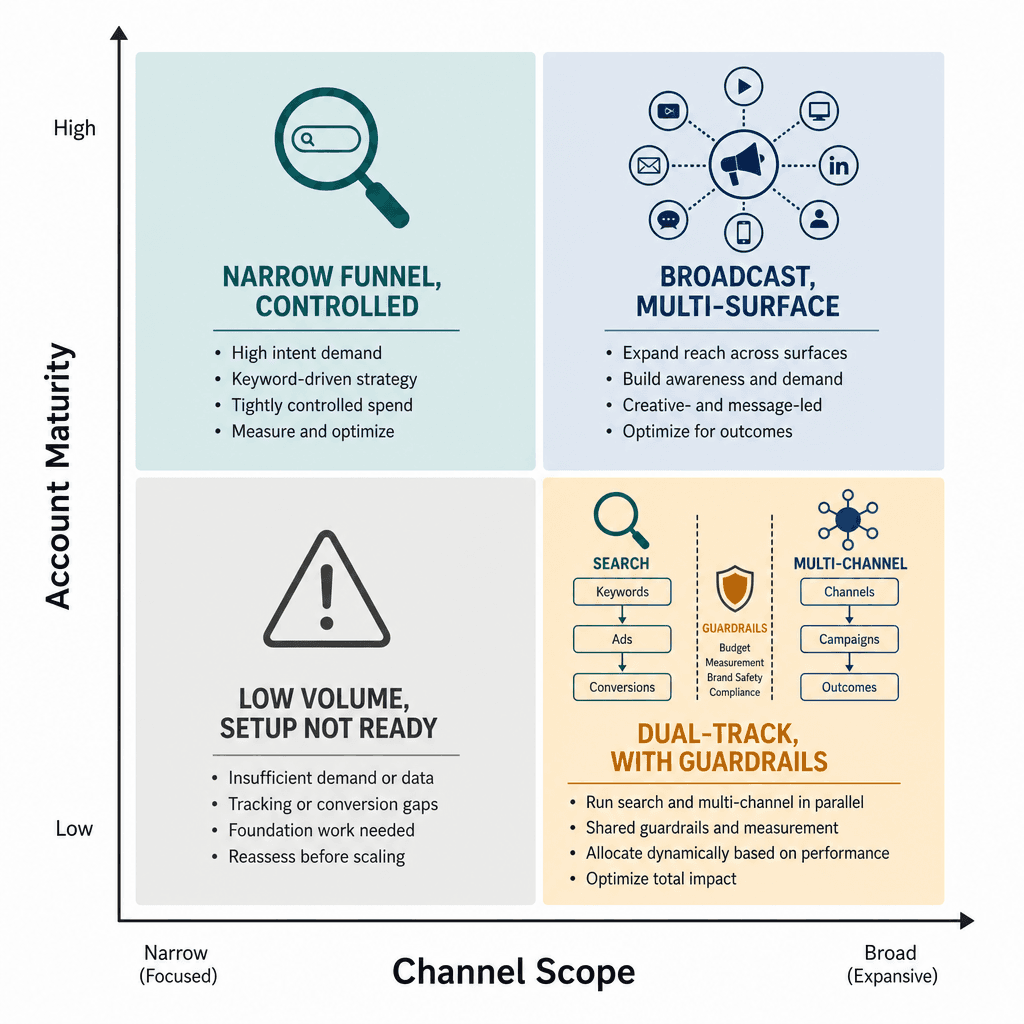
The split decision is not about preference — it maps to specific account conditions. Here are four scenarios with the threshold conditions that determine which applies to your account.
| Scenario | Account Conditions | Recommended Approach |
|---|---|---|
| AI Max only | 100+ monthly conversions; keyword-mature account with established Search structure; brand safety requirements that need copy control; search is the primary acquisition channel; existing DSA or broad match campaigns that need to migrate before September 2026 | Enable AI Max on existing Search campaigns. Configure text guidelines, URL exclusions, and brand controls before activating final URL expansion. Monitor search term reports weekly for the first 30 days. |
| PMax only | Multi-channel customer journey; visual product catalog (retail, ecommerce); no existing keyword structure to preserve; goal is reach and discovery across surfaces, not search-intent capture | Run PMax with a complete asset group, audience signals, and campaign-level negative keyword list. Add brand exclusions. Accept limited structural control in exchange for cross-channel reach. |
| Both with guardrails | Sufficient budget to support two independent learning periods simultaneously; clean, verified conversion tracking; brand campaigns already separated; negative keyword lists pre-built for PMax; 100+ monthly conversions in Search campaigns | Segment by intent: AI Max for high-intent bottom-funnel search queries; PMax for multi-channel awareness and mid-funnel discovery. Add core AI Max keywords as negatives in PMax. Monitor auction overlap reports monthly. |
| Neither yet | Fewer than 100 monthly conversions; Smart Bidding not yet configured; conversion tracking unverified or incomplete; no established keyword structure | Build the foundation first. Configure Smart Bidding, verify conversion tracking, and reach 100+ monthly conversions before introducing AI-driven automation. Premature activation extends learning periods and produces unreliable data. |
Overlap, Cannibalization, and How to Prevent It
When AI Max and PMax run simultaneously in the same account, they can compete against each other on shared queries. Ad Rank determines which serves — there is no automatic coordination. This creates two problems: wasted budget from internal competition, and attribution inflation where both campaigns claim credit for the same conversion.
How to Detect Overlap
- Auction overlap reports. Run these monthly to identify queries where AI Max and PMax are both bidding. High overlap on branded or high-value terms is the most common problem.
- Search term report cross-referencing. Export AI Max search term reports and PMax search term reports (where available) and compare. Queries appearing in both indicate direct competition.
- Attributed conversion inflation. If total attributed conversions across both campaigns exceed your actual conversion count in Analytics, you have a double-counting problem. This often signals that both campaigns are claiming credit for the same path.
How to Prevent It
- Add core search keywords as negatives in PMax. This is the most effective structural separation. If AI Max owns high-intent search queries, PMax should not be competing on those same terms.
- Use campaign-level brand exclusions in PMax. Brand terms should be owned by dedicated brand Search campaigns or AI Max — not by PMax, which has less copy control and lower transparency.
- Monitor Search Partner Network (SPN) scaling. Independent analysis of AI Max campaigns found that some accounts saw over 50% of impressions flow to Search Partners, with conversion rates as low as 0.07% compared to 3.04% on core Google Search. SPN exclusion is available — use it if your SPN conversion rate is significantly below your core Search rate.
- Watch for negative keyword leakage. Google's FAQ confirms that AI Max honors negative keywords, but early-stage reports suggest leakage may occur. This appears to be a bug rather than expected behavior, but it warrants active monitoring in the first 30–60 days after enabling AI Max.
Required Guardrails Before You Enable Either
This is a configuration checklist, not a setup walkthrough. These are the controls that need to be in place before AI Max or PMax is active at scale — not after you have observed a problem.
For AI Max
- Text guidelines. Configure term exclusions (up to 25 per campaign per language) and messaging restrictions (up to 40 per campaign) before enabling text customization. These have been available globally since February 26, 2026. They govern ad copy — they do not restrict which queries AI pursues, so they are not a substitute for negative keywords.
- Negative keywords. Review and update your negative keyword lists before enabling search term matching. AI Max expands query reach — if your negatives are not current, irrelevant traffic will increase.
- URL exclusions. Block non-conversion pages (blog posts, careers pages, privacy policy, login pages) before enabling final URL expansion. Without exclusions, Google may serve traffic to pages that have no conversion path.
- Brand controls. Set brand inclusion and exclusion lists at both campaign and ad group level. AI Max supports both — use them.
- SPN exclusion decision. Pull your current SPN conversion rate from the network segment report. If it is materially below your Google Search conversion rate, exclude SPN before enabling AI Max.
- RSA pinning decision. Decide whether you need pinning before enabling features. Pinning is not respected when both text customization and final URL expansion are active simultaneously. If pinning matters for brand or compliance reasons, choose one of the two features, not both.
For Performance Max
- Complete asset groups. Provide the full range of headlines, descriptions, images, and video assets. Incomplete asset groups force Google to generate more creative from less input, reducing copy quality.
- Campaign-level negative keyword list. Add brand terms and core search keywords from your AI Max campaigns as negatives in PMax before launch.
- Audience signals. Provide customer match lists, in-market segments, and remarketing audiences as signals. These do not restrict targeting — they give the AI a starting point for optimization.
- Verified conversion tracking. PMax optimizes entirely toward your conversion goals. If tracking is misconfigured, the campaign will optimize toward the wrong signal from day one.
Performance Reality Check: Auditing Google's Three Lift Claims
Google has published three separate performance figures for AI Max since beta. They are frequently cited as if they represent a single, general uplift claim. They do not. Each measures a different baseline, a different population, and a different feature configuration.
| Claim | Published | What It Measures | What It Excludes |
|---|---|---|---|
| 14% more conversions at similar CPA/ROAS | May 2025 (beta launch) | AI Max vs. keyword-match-only Search campaigns | Retail accounts explicitly excluded. No sample size disclosed. |
| 27% more conversions | February 26, 2026 (text guidelines rollout) | Campaigns historically reliant on exact and phrase match keywords | Narrower population than the 14% claim. Applies specifically to exact/phrase-heavy accounts, not all Search accounts. |
| 7% more conversions at similar CPA/ROAS | April 15, 2026 (GA announcement) | Full-feature AI Max (all three components) vs. search term matching-only AI Max | Non-retail only. Sample size undisclosed. This compares two AI Max configurations — not AI Max vs. no AI Max. |
Independent agency data tells a more varied story. smec analyzed results across more than 250 AI Max campaigns and found a median revenue uplift of +13% — but also a median CPA increase of +16%, and a ROAS outcome distribution ranging from −35% to +42%. Only 22% of campaigns in that dataset hit their original ROAS targets. The distribution was flat rather than bell-curved, meaning poor outcomes were as common as strong ones.
Other independent data points add texture:
- Brainlabs ran 23 tests across 16 mature accounts and found that enabling all three AI Max features together produced a +40% higher success rate than enabling only some features. Quality Score improved from 6.8 to 7.3 across tested campaigns.
- In one analysis by Monks (as reported by Digital Applied), approximately 30,000 AI Max search terms were reviewed, and 99% of impressions in that sample drove zero conversions. This is an extreme case, but it illustrates the query quality risk when search term matching expands without adequate negative keyword controls.
- A B2B lead generation test documented clicks nearly tripling and CPC falling by 59% after enabling AI Max — but conversions dropped 38% and cost per lead nearly doubled from $493 to $850. Increased reach does not automatically translate to increased qualified demand, particularly in B2B contexts where query precision matters more than volume.
Turning on AI Max for Google Search is basically a coin toss. — Mike Ryan, smec, March 2026, summarizing the flat ROAS distribution observed across 250+ AI Max campaigns
The variance in these outcomes reflects something important: AI Max performance is highly account-specific. Keyword maturity, landing page quality, negative keyword completeness, conversion tracking accuracy, and vertical type all influence results. Google's aggregate figures are not a reliable predictor for any individual account.
The practical implication is that AI Max should be tested as an experiment — not enabled account-wide based on Google's published benchmarks. A 50/50 campaign experiment running for a minimum of four weeks, against a stable baseline, with conversion tracking verified, is the minimum credible test structure. Extrapolating from Google's 14% or 27% figures to your own account without testing is not a strategy — it is an assumption.

Comments
Join the discussion with an anonymous comment.