
Google AI Max for Search and Performance Max: How to Run the Power Pack Without Cannibalizing Your Conversions
AI Max for Search is a feature suite layered onto existing Search campaigns — not a new campaign type — and running it alongside Performance Max without proper guardrails causes signal cannibalization, inflated attribution, and rising CPCs. This guide explains the structural difference between the two products, how to configure the Power Pack correctly, and how to migrate DSA campaigns before Google's September 2026 auto-upgrade deadline.
What AI Max for Search Actually Is (and What It Isn't)
According to the Google Ads Help Center, AI Max is described as "a comprehensive suite of targeting and creative features" that sits on top of Search campaigns you already have. You do not create an AI Max campaign. You enable AI Max features within an existing Search campaign.
The suite has three core components:
- Search term matching. Extends beyond your existing keyword list using broad match and keywordless technology to capture relevant queries you haven't explicitly bid on.
- Text customization. Draws on your existing ad copy, landing page content, and assets — combined with generative AI — to produce ad text suited to each query context.
- Final URL expansion. Routes traffic to whichever URL on your domain Google's model predicts will perform best for a given query, rather than always sending to the URL you specified.
Alongside these three features, AI Max includes a set of controls that give advertisers meaningful guardrails: brand settings (specify brands your ads should be associated with or excluded from, at campaign or ad group level), URL inclusions and exclusions, and locations of interest targeting. The search terms report also gains an "AI Max" match type label and a source column that distinguishes broad match expansion from keywordless matching — which matters when you're auditing what traffic the feature is actually capturing.
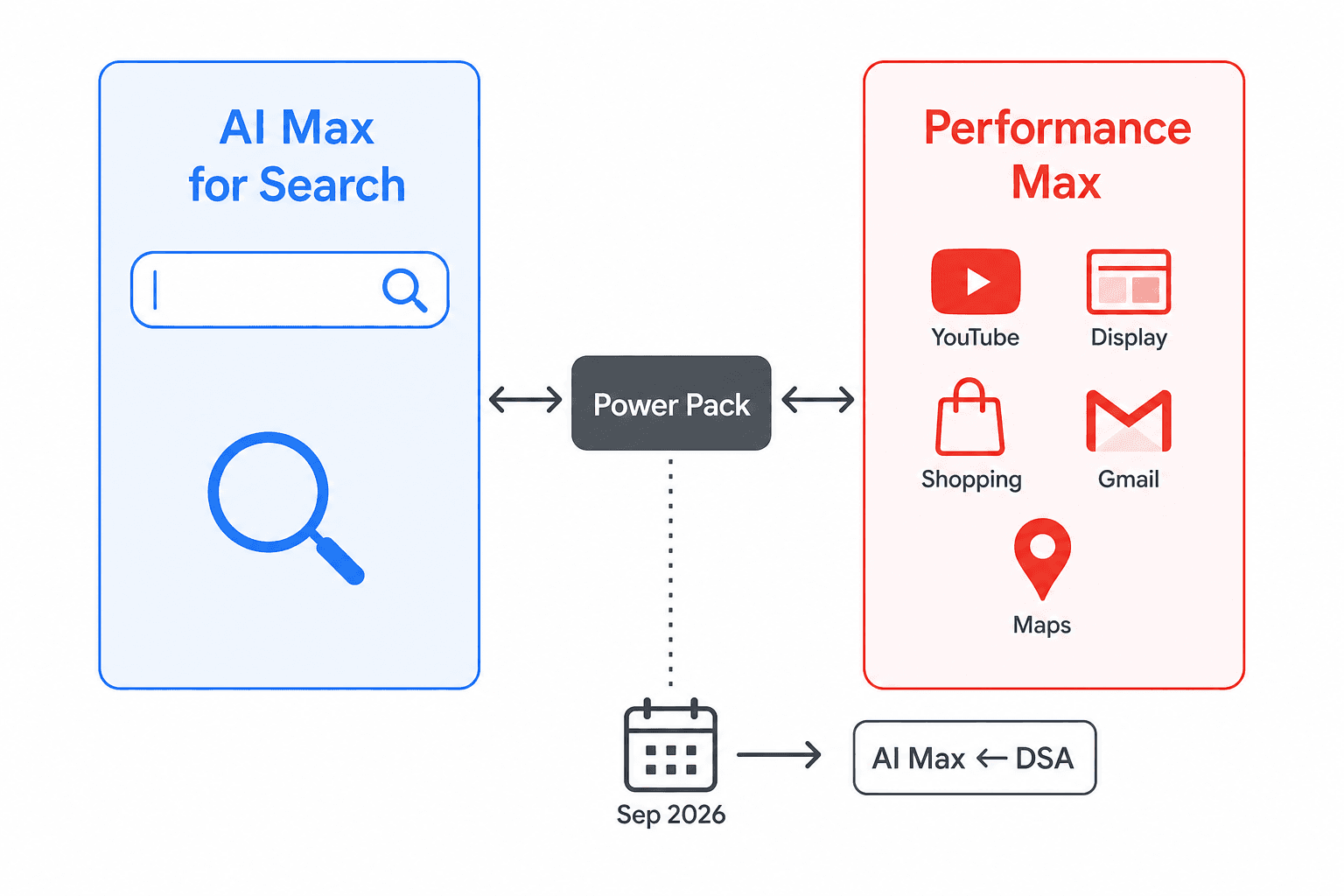
Performance Max, by contrast, is a standalone campaign type. It spans YouTube, Display, Search, Discover, Gmail, and Maps from a single campaign structure. It operates on goal-based automation with audience signals and asset groups as its primary inputs. These are structurally different products with different control surfaces, different reporting granularity, and different roles in an account. The confusion between them is the root cause of most of the account problems this guide is designed to prevent.
AI Max Features Explained for Practitioners
Understanding each AI Max component at a working level — not just its name — determines how you configure it, what you monitor, and where you apply controls.
Search Term Matching
This feature combines two expansion mechanisms. Broad match expansion uses your existing keywords as a semantic anchor but serves ads on related queries that don't contain your exact keyword terms. Keywordless matching goes further: it uses signals from your landing pages, ad copy, and assets to identify relevant queries even when no keyword in your account would have matched them. The practical implication is that AI Max can surface your ads on query territory you've never explicitly targeted — which is the source of both its upside and its risk if your negative keyword list is underdeveloped.
Text Customization
Text customization has two sub-components: asset optimization and Final URL expansion. The asset optimization layer reads your existing ads, your landing page copy, and any uploaded assets, then uses generative AI to produce ad text variations tailored to individual queries. This is not a simple template fill — the model assembles headlines and descriptions dynamically. Final URL expansion takes this a step further by also varying the destination URL, selecting whichever page on your domain the model predicts will produce the best outcome for a given query. If your site has poor page structure or thin content on key landing pages, Final URL expansion can route traffic to suboptimal destinations. Auditing your site content before enabling this feature is not optional.
AI Brief: The Natural-Language Steering Layer
AI Brief is the most significant new advertiser control introduced alongside AI Max. Powered by Gemini, it lets you provide natural-language instructions that steer how AI Max behaves — without requiring you to configure individual keyword lists or write every ad variant manually.
AI Brief has three components:
- Messaging Guidelines. Tell Google AI what your ads should and shouldn't say — for example, "never mention specific prices" or "always lead with the sustainability angle."
- Matching Guidelines. Define which searches you want to capture or avoid — for example, "avoid searches for in-person degrees" if you only offer online programs.
- Audience Guidelines. Specify tailored messages for particular audience segments — for example, "for health-conscious shoppers, lead with clean ingredients."
Once you submit a brief, AI Brief shows you sample assets and searches so you can review direction before committing. When you start using AI Brief, your existing text guidelines automatically migrate into the Messaging Guidelines section.
A separate point worth clarifying: text guidelines — a simpler version of messaging controls — rolled out globally in February 2026. AI Brief is distinct from and more capable than text guidelines. If you were using text guidelines before April 2026, those settings will carry over into AI Brief's Messaging Guidelines automatically when you adopt AI Brief.
AI Max vs. Performance Max: The Structural Differences That Matter
The comparison below covers the dimensions that actually drive account decisions — not feature marketing language. For a deep dive into configuring PMax's internal controls (audience signals, search themes, asset groups, bidding strategy, and negative keywords), see the companion guide on steering the Performance Max algorithm — that content is not repeated here.
| Dimension | AI Max for Search | Performance Max |
|---|---|---|
| Product type | Feature suite on existing Search campaigns | Standalone campaign type |
| Channel scope | Search only | YouTube, Display, Search, Discover, Gmail, Maps |
| Campaign creation | Enable within existing Search campaign | Create as a new campaign type |
| Control level | Granular: keyword lists, brand settings, URL inclusions/exclusions, AI Brief | Goal-based: audience signals, asset groups, search themes |
| Search term reporting | Full search term report with AI Max match type and source column | Aggregated channel data; limited search term visibility |
| Targeting mechanism | Keyword-anchored + semantic expansion + keywordless | Audience signals + asset content + search themes |
| Budget behavior | Competes within Search auction alongside other Search campaigns | Operates as its own ecosystem across all channels |
| DSA relationship | Direct successor to Dynamic Search Ads; September 2026 auto-upgrade | No direct DSA migration path |
| Best suited for | High-intent search query capture with advertiser control | Cross-channel reach and ecosystem presence |
The Power Pack Framework: Running AI Max and PMax Together
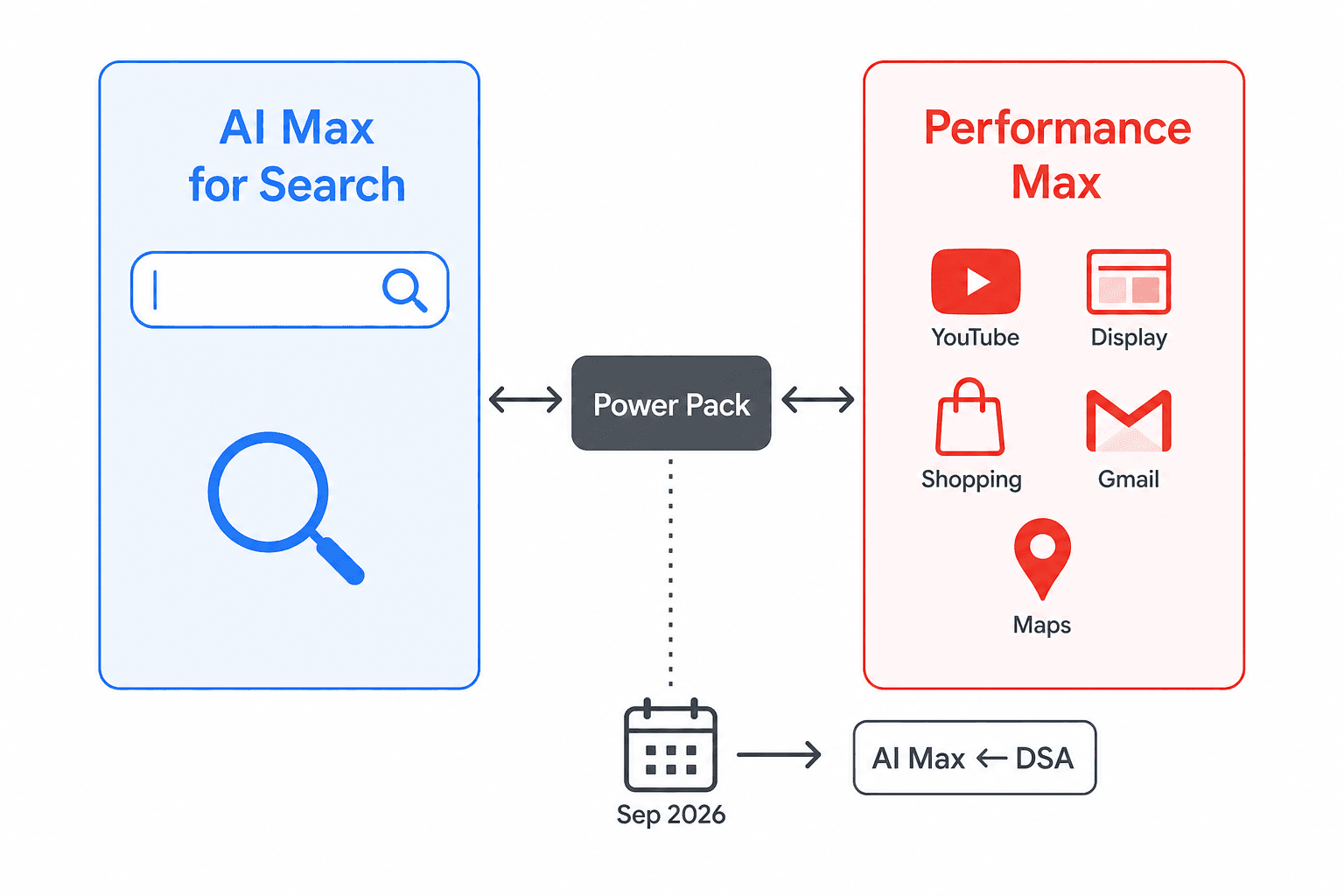
Google's recommended strategy for most advertisers in 2026 is to run AI Max for Search and Performance Max simultaneously — a configuration Google refers to as the Power Pack. The logic is straightforward: AI Max captures high-intent search queries with advertiser-controlled precision; PMax handles cross-channel ecosystem reach across YouTube, Display, Discover, Gmail, and Maps. Demand Gen campaigns can layer on top for upper-funnel awareness and consideration.
The critical point that Google's own framing sometimes underemphasizes: the Power Pack is not a product merger, and it does not self-manage. Running both products in the same account without explicit budget separation and exclusion management causes them to compete against each other — a problem covered in detail in the next section.
The Power Pack framework assigns each product a distinct role:
- AI Max for Search: Bottom-funnel, high-intent query capture. Users who are actively searching for what you sell. Your most direct conversion path from search.
- Performance Max: Mid- and upper-funnel reach across non-search channels. Users who haven't yet searched but match your audience signals. Cross-channel presence and remarketing.
- Demand Gen (optional): Upper-funnel awareness on YouTube and Discover. Feeds the audience pool that PMax and AI Max will later convert.
For PMax configuration specifics — how to set audience signals, structure asset groups, configure search themes, and manage bidding — the practitioner's guide to steering the Performance Max algorithm covers those inputs in depth. The present guide focuses on the account-level relationship between the two products and the guardrails that make the Power Pack work.
Signal Cannibalization: The Risk Most Advertisers Underestimate
When AI Max for Search and Performance Max run simultaneously in the same account without brand exclusions and proper funnel segmentation, they enter the same auctions. Both products can bid on the same search queries — and when they do, they inflate each other's CPCs, fragment conversion attribution across two campaign types, and make it nearly impossible to determine which product is actually driving results.
This is not a theoretical concern. Both Vizup's practitioner analysis and TrafficGuard's reporting identify signal cannibalization as the primary failure mode in accounts running the Power Pack without guardrails. TrafficGuard's article also cites an independent analysis of over 250 retail campaigns that found a median revenue uplift of 13% alongside a median CPA increase of 16% — a result that suggests the efficiency gains Google promotes do not reliably materialize when the two products are not properly separated. (Note: TrafficGuard does not name the original source of this analysis in its reporting; treat the figures as directionally informative rather than independently verified benchmarks.)
Three mitigation actions address signal cannibalization directly:
- Apply brand exclusions in PMax. If PMax is bidding on branded search queries, it competes directly with your AI Max Search campaigns on your highest-intent traffic. Brand exclusions in PMax push that traffic to AI Max, where you have more control and better reporting visibility.
- Segment by funnel stage. AI Max should own bottom-funnel, high-intent search queries. PMax should cover mid- and upper-funnel non-search channels. When both products chase the same bottom-funnel queries, you've lost the structural logic of the Power Pack entirely.
- Monitor auction overlap reports weekly. Google Ads provides auction insight data that shows where your campaigns are competing against each other. Review this on a weekly cadence, not monthly — cannibalization can develop quickly when AI Max's keywordless matching expands into territory PMax is also targeting.
Practical Budget Separation: A Starting Framework
Budget allocation between AI Max and PMax is one of the most common questions practitioners ask when setting up the Power Pack, and it has no universal correct answer. What follows is a starting framework — not a Google-endorsed formula and not a prescriptive rule.
Vizup's May 2026 practitioner analysis suggests beginning with 60–70% of your search budget allocated to AI Max for intent capture and 30–40% to PMax for cross-channel reach. The rationale: AI Max is your most direct path to conversion-ready traffic; PMax's value compounds over time as it builds audience data, so it warrants a meaningful budget but shouldn't cannibalize your highest-intent channel.
| Allocation | Product | Role | Review trigger |
|---|---|---|---|
| 60–70% of search budget | AI Max for Search | High-intent query capture, bottom-funnel conversion | CPC inflation, declining impression share on core terms |
| 30–40% of search budget | Performance Max | Cross-channel reach, mid/upper-funnel, remarketing | Auction overlap with AI Max, poor channel mix in reports |
On performance expectations: Google's April 2026 blog post reports that advertisers using the full AI Max feature suite — search term matching, text customization, and Final URL expansion together — see an average of 7% more conversions or conversion value at a similar CPA/ROAS compared to using search term matching alone. This figure comes from Google's internal data and reflects the incremental value of enabling all three features versus a partial implementation. It is not a comparison against non-AI Max Search campaigns, and it should not be treated as a guaranteed outcome for any specific account.
DSA-to-AI Max Migration: What the September 2026 Deadline Means for Your Account
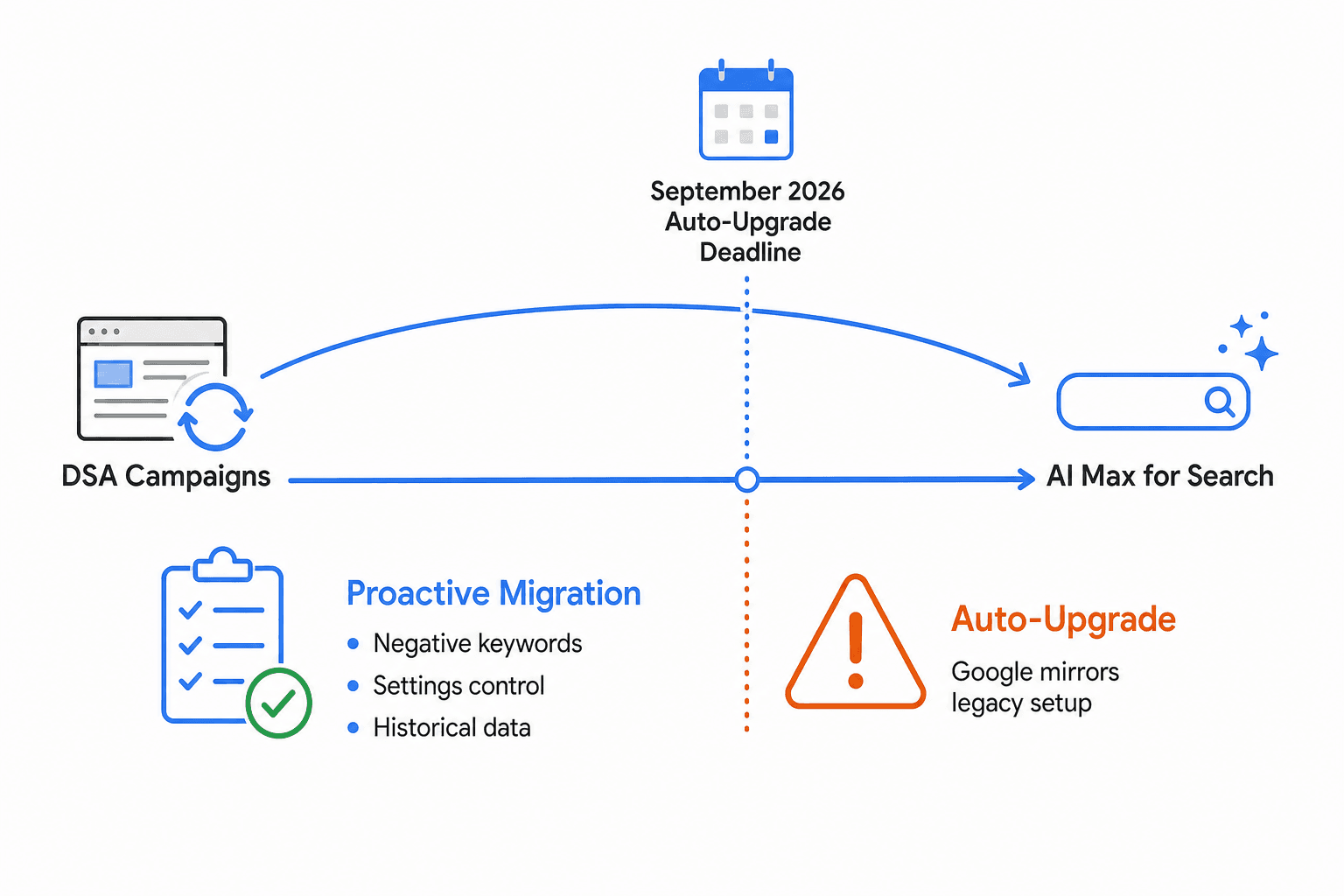
Google confirmed in its April 15, 2026 blog post that starting in September 2026, three campaign configurations will be automatically upgraded to AI Max:
- Dynamic Search Ads (DSA) campaigns. Dynamic ad groups will transition to standard ad groups. All three AI Max features will be enabled. Historical settings and data will be ported. Legacy URL controls will be preserved.
- Automatically created assets (ACA). Search term matching and text customization will be enabled automatically.
- Campaign-level broad match setting. Search term matching will be enabled on campaigns that have broad match set at the campaign level.
The case for migrating proactively — before the auto-upgrade — comes down to control. When Google auto-upgrades your DSA campaigns, it mirrors your legacy setup and enables all three AI Max features simultaneously. You don't get to choose which features to enable first, in what order, or with what negative keyword lists in place. You also lose the opportunity to audit your site content before Final URL expansion starts routing traffic across your domain.
Proactive migration lets you:
- Control which AI Max features you enable first and in what sequence.
- Build and refine your negative keyword lists before keywordless matching goes live.
- Audit your site content and landing pages so Final URL expansion has quality destinations to route traffic to.
- Port historical settings and data using Google's upgrade tools rather than starting from a reset configuration.
- Familiarize yourself with AI Max's reporting interface — particularly the search terms report with its new match type and source columns — before you're managing a live account under pressure.
- Set up AI Brief with your Messaging, Matching, and Audience Guidelines before the auto-upgrade would otherwise impose Google's defaults.
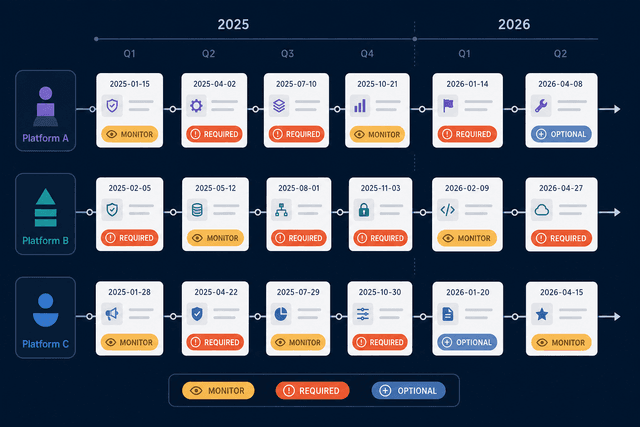
For a timestamped record of the AI Max launch and DSA deprecation announcements, the Cross-Platform ML Changelog covering Google Ads, Meta, and HubSpot changes through 2025–2026 documents these entries in sequence if you need a reference trail for internal reporting or stakeholder communication.
DSA Migration Checklist
- Identify all DSA campaigns, ACA-enabled campaigns, and campaigns with campaign-level broad match in your account.
- Audit your site content and landing pages. Flag thin pages, outdated content, and any URLs you want to exclude from Final URL expansion before it's enabled.
- Build negative keyword lists based on your DSA search term report history. Identify query categories that drove irrelevant traffic and add them as negatives before migration.
- Use Google's upgrade tools to port historical settings and data. Do not manually recreate campaigns from scratch — you'll lose historical performance data that informs smart bidding.
- Enable AI Max features in stages if possible: start with search term matching, observe the search term report for one to two weeks, then enable text customization and Final URL expansion.
- Configure brand settings — inclusions and exclusions — before enabling keywordless matching.
- Draft your AI Brief guidelines (Messaging, Matching, Audience) and submit them before the campaign goes fully live under AI Max.
- Set up weekly search term report reviews and auction overlap monitoring from day one of the migrated campaign.
Weekly Optimization Workflow for Power Pack Accounts
The Power Pack is not a set-and-forget configuration. Both AI Max and PMax require active management — not because the automation is unreliable, but because the automation optimizes toward the signals you give it, and those signals need regular review to stay accurate.
The following checklist is designed as a weekly maintenance rhythm for accounts running AI Max alongside Performance Max.
| Task | What to look for | Action if flagged |
|---|---|---|
| Review AI Max search term report | New query categories from keywordless matching; irrelevant match types | Add negatives; adjust Matching Guidelines in AI Brief |
| Review PMax search term report | Branded queries appearing in PMax; overlap with AI Max query territory | Add brand exclusions; tighten PMax audience signals |
| Check auction overlap report | AI Max and PMax bidding against each other on same queries | Adjust funnel segmentation; review budget split |
| Audit brand exclusions in PMax | Any branded terms slipping through | Update brand exclusion lists at campaign level |
| Review AI Brief previews | Sample assets or search matches that conflict with guidelines | Iterate on Messaging or Matching Guidelines; resubmit brief |
| Monitor PMax channel breakdown | Heavy Search inventory in PMax (suggests cannibalization) | Rebalance budget toward AI Max; strengthen audience signals in PMax |
| Replace underperforming assets | Low-performing headlines or descriptions in AI Max text customization | Upload fresh copy variants; review landing page content quality |
One practical note on cadence: the first four weeks after enabling AI Max or migrating from DSA are the highest-signal period. Review the search term report and auction overlap data daily during this window, then shift to weekly once the account has stabilized and your negative keyword lists are refined.
Comments
Join the discussion with an anonymous comment.