
Google Ads Performance Max AI Features: A Practitioner's Guide to Steering the Algorithm
Performance Max delivers AI-driven results only when marketers configure its inputs deliberately — this guide explains how each AI mechanism in PMax works in 2026 and how to set up audience signals, search themes, AI Brief, asset groups, negative keywords, and bidding to guide the algorithm toward your actual business outcomes.
The Core Tension: Automation Only Works With the Right Inputs
Performance Max campaigns are often described as a set-it-and-let-Google-optimize solution. That framing is the source of most PMax disappointments. The algorithm is genuinely powerful — but it optimizes toward whatever signals you give it, and it will optimize confidently toward the wrong outcomes if those signals are poorly configured.
The marketers who get consistent results from PMax aren't the ones who activate it and step back. They're the ones who treat every input — audience signals, search themes, asset groups, negative keywords, bidding parameters — as a deliberate communication to the algorithm about what good performance looks like for their specific business.
This guide covers how each AI mechanism in PMax works mechanically in Q2 2026, and what configuration choices actually move outcomes. It assumes you're already running PMax or actively evaluating it — not that you need a definition of what it is. If you want historical context on how PMax's feature set has evolved, the 2024 PMax Changelog covers the prior year's changes in detail.
How PMax AI Core Works: Cross-Channel Optimization Logic
Performance Max runs a single campaign across all of Google's owned inventory: Search, Shopping, Display, YouTube, Discover, Gmail, and Maps. The AI allocates budget across these channels in real time based on where it predicts the highest conversion probability for each impression opportunity. You set one campaign-level daily budget; the algorithm decides the channel split.
Smart Bidding operates underneath this allocation layer, setting individual bids at auction time using real-time signals — device, location, time of day, audience membership, query context — combined with Google's attribution modeling. The bid for any given impression reflects the algorithm's estimate of that user's conversion probability given all available signals at that moment.
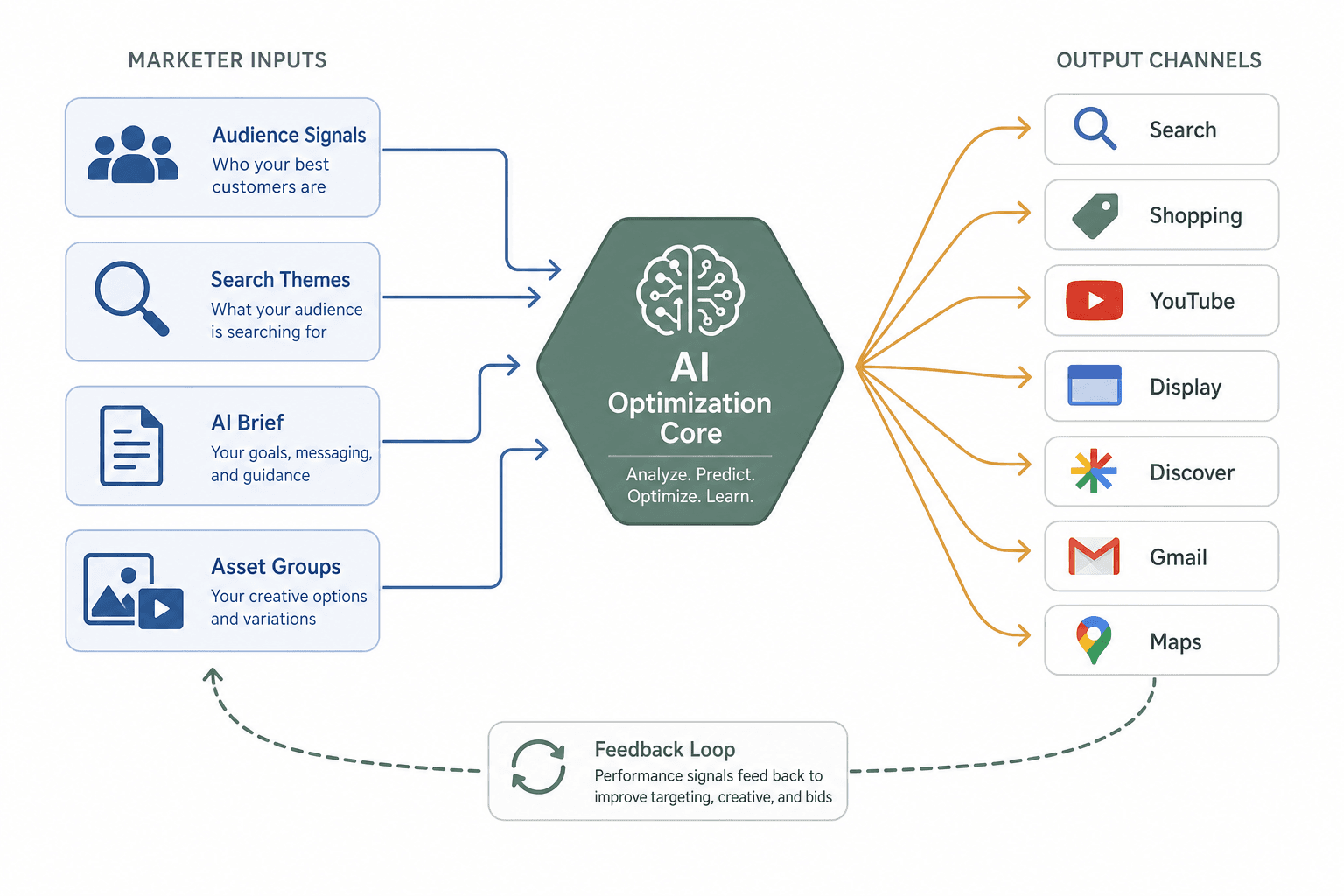
Google recommends sizing daily budgets at 10–20x your target CPA. This isn't arbitrary — it reflects the volume of conversion data the algorithm needs to make statistically reliable bid decisions. Campaigns running below this threshold often exhibit erratic spend patterns as the model lacks sufficient signal to differentiate high-probability from low-probability impressions.
One practical implication of the cross-channel architecture: when a user's query exactly matches a keyword in a standard Search campaign in the same account, the Search campaign takes priority over PMax. This is the primary mechanism for separating brand and non-brand traffic between campaign types, and it's worth understanding before you structure your account.
Google has also introduced Ask Advisor, a Gemini-powered agentic experience within the Google Ads interface that allows marketers to query campaign performance, request optimization suggestions, and get plain-language explanations of algorithm behavior. It functions as a campaign management aid rather than an automated decision-maker — the marketer still executes any recommended changes.
Audience Signals: Four Types, One Key Mechanic
Audience signals are the most misunderstood input in Performance Max. The critical distinction from traditional audience targeting: signals are directional starting points, not targeting restrictions. Providing a Customer Match list doesn't limit your campaign to those users — it tells the algorithm what your ideal customer looks like, and the algorithm then expands outward to find users who exhibit similar behavioral patterns.
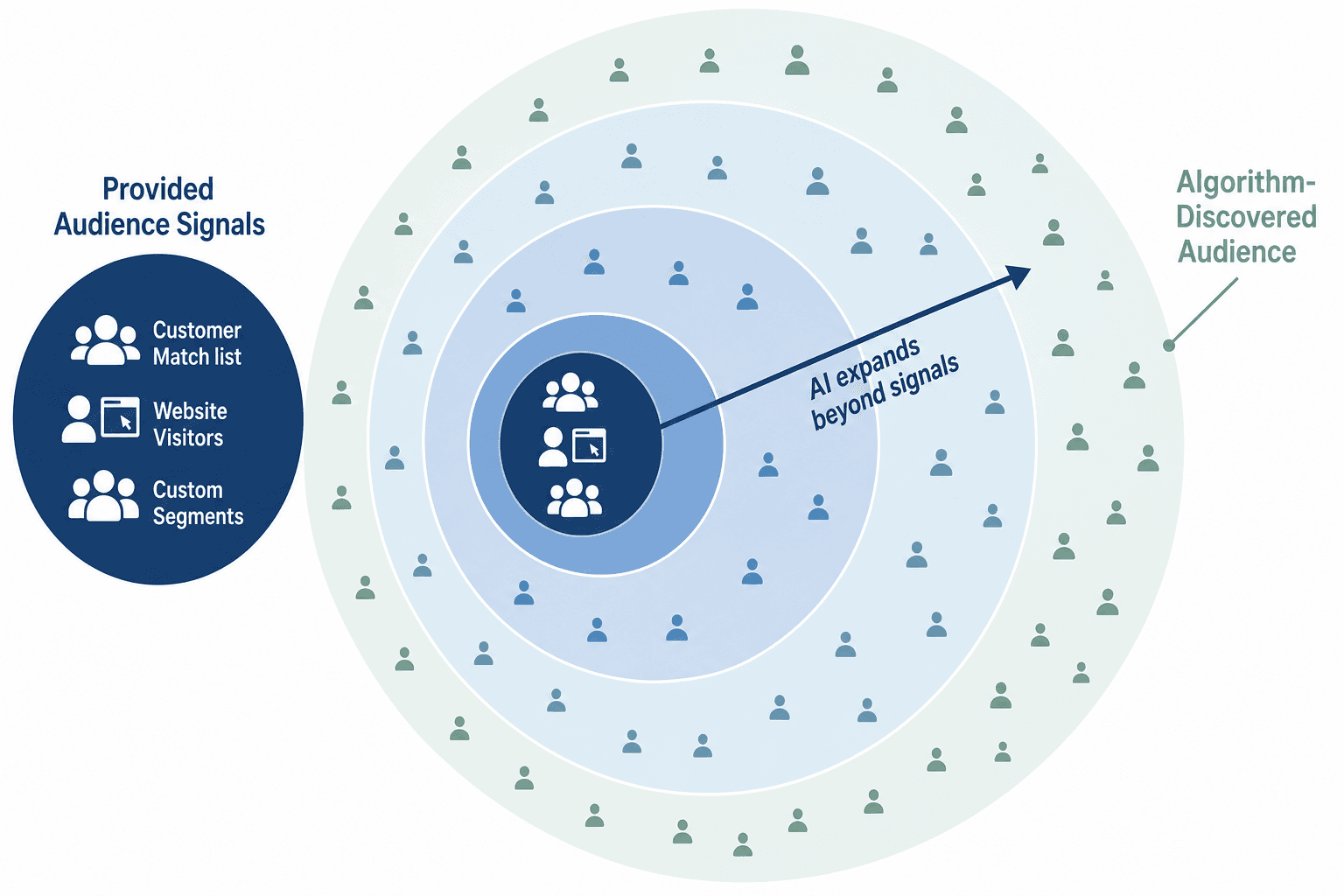
This expansion mechanic is what makes signal quality matter more than signal size. A tightly defined Customer Match list of 500 high-value converters will generally produce better expansion results than a broad in-market audience of 5 million users, because the algorithm has a cleaner behavioral pattern to replicate.
| Signal Type | Strength | What It Provides the Algorithm | Practical Notes |
|---|---|---|---|
| Customer Match | Strongest | Behavioral and purchase patterns from your own CRM data | No minimum list size required; upload first-party data via hashed email. Accelerates the learning period. |
| Website Visitors / Remarketing | Strong | On-site behavioral signals from users who have already engaged | Segment by page visited or action taken for more precise signals |
| In-Market & Affinity Audiences | Directional | Google's categorization of users by purchase intent or interest area | Useful for campaigns without sufficient first-party data; less precise than CRM or site data |
| Custom Segments | Variable | Search query behavior and competitor app usage patterns | Build segments from search terms that indicate buying intent or competitor research |
Stack multiple signal types per asset group rather than relying on a single type. A Customer Match list combined with a high-intent remarketing segment and a custom segment built from purchase-intent search queries gives the algorithm a richer behavioral profile to expand from than any single signal in isolation.
Google has also added audience list exclusions to PMax, allowing you to exclude specific lists from targeting — for example, preventing existing customers from seeing acquisition-focused messaging. Exclusions function as hard constraints rather than directional signals, so they don't affect the expansion logic applied to your positive signals.
Search Themes in 2026: Expanded Capacity and New Transparency Tools
Search themes tell PMax which types of search queries are most relevant to your campaign goals. They function at the same auction priority level as phrase match and broad match keywords in standard Search campaigns — not as exact-match constraints, but as weighted signals that influence which queries the algorithm pursues.
Think of themes as thematic cores, not keyword lists. Rather than entering "running shoes size 10 men," you'd enter "men's running shoes" — the algorithm interprets the theme and matches across a range of semantically related queries.
Beyond capacity, 2026 brought meaningful transparency improvements to how search themes work:
- Query matching transparency: The interface now shows which actual search queries matched each theme, giving you visibility into how broadly the algorithm is interpreting your theme inputs.
- AI-powered theme suggestions: Google's system analyzes your landing page content and historical conversion data to recommend additional themes you may not have considered.
- Confidence scoring: Each theme now carries a confidence score indicating how strongly the algorithm associates that theme with conversion-likely queries in your account context.
- Theme performance metrics: Individual theme-level performance data is now available, allowing you to identify which themes are driving query volume and which are dormant.
Use the query matching transparency data to audit whether your themes are attracting the right query types. If a theme is matching queries that are clearly irrelevant, it's a signal to either narrow the theme wording or add corresponding negative keywords to exclude those query patterns.
AI Brief: Steering PMax With Natural-Language Guidelines
AI Brief is a Gemini-powered input tool announced by Google in April 2026 that lets marketers define campaign behavior using plain-language instructions rather than structured configuration fields. It accepts three types of guidelines:
- Messaging Guidelines: Instructions about what the campaign's ads should or should not communicate. This is where you enforce brand voice, legal constraints, and messaging priorities — for example, specifying that pricing should never appear in ad copy, or that a particular product benefit should be consistently highlighted.
- Matching Guidelines: Instructions about which types of searches the campaign should prioritize or avoid. This is a natural-language complement to search themes and negative keywords — useful for capturing nuanced intent distinctions that are difficult to express through keyword syntax alone.
- Audience Guidelines: Instructions for tailoring messaging to specific audience segments. For example, directing the algorithm to emphasize different product benefits for health-conscious users versus price-sensitive users.
Before committing AI Brief inputs, marketers can preview sample assets and searches that the algorithm would generate based on the guidelines. This preview-and-iterate workflow is the primary practical value — it surfaces how the algorithm is interpreting your instructions before they go live, allowing you to refine the language.
AI Brief is an input layer on top of the existing PMax configuration stack — it doesn't replace audience signals, search themes, or asset groups. Think of it as a way to communicate constraints and priorities that are difficult to encode in structured fields, particularly for regulated industries, brand-sensitive advertisers, or campaigns with complex audience segmentation requirements.
Asset Groups and Creative Performance: What the Algorithm Needs
Asset groups are the creative input layer of PMax. The algorithm assembles ads dynamically from the assets you provide, selecting combinations based on predicted performance for each placement and audience context. The composition ceiling per asset group is 15 short headlines, 5 long headlines, 5 descriptions, 20 images, and 5 videos.

A meaningful upgrade in 2026 is the shift from Low/Good/Best ratings to asset-level performance metrics. Each individual headline, description, image, and video now reports impressions, clicks, CTR, and conversion contribution. This granularity lets you identify which specific assets are driving results and which are being deprioritized by the algorithm, rather than inferring from aggregate ad strength scores.
| Asset Type | Max per Asset Group | What to Prioritize | Replacement Cadence |
|---|---|---|---|
| Short headlines | 15 | Variety of angles — benefit-led, feature-led, question-format | Replace Low-rated after 4–6 weeks, 1–2 at a time |
| Long headlines | 5 | Complete value propositions that work standalone | Same cadence as short headlines |
| Descriptions | 5 | Distinct benefit statements; avoid repeating headline copy | Replace Low-rated after 4–6 weeks |
| Images | 20 | Multiple aspect ratios; product, lifestyle, and context variety | Rotate based on CTR and conversion contribution data |
| Videos | 5 | Purpose-built for YouTube; avoid relying on auto-generated video | Replace underperforming video after 4–6 weeks of data |
Video deserves specific attention. YouTube is among the highest-converting placements in PMax, and the algorithm will auto-generate video from your static assets if you don't provide purpose-built video. Auto-generated video consistently underperforms purpose-built creative — the algorithm can assemble a technically valid video, but it cannot replicate the pacing, narrative structure, and visual quality of intentionally produced content.
The 2026 "Ads Using Video" segment in reporting lets you directly compare performance between ad combinations that included video and those that didn't. If you're running PMax without purpose-built video, this segment will surface the performance gap and quantify the cost of the gap in your specific account.
The Asset Combinations report is a separate tool that shows which specific pairings of assets — headline A with image B with description C — the algorithm is assembling most frequently and which combinations are generating the highest conversion rates. Use it to understand the creative logic the algorithm has learned, not just individual asset performance in isolation.
New Marketer Controls: Closing the 2026 Control Gaps
PMax launched in 2021 with significant gaps in marketer control — no campaign-level negative keywords, limited brand controls, and no channel-level visibility. The 2026 feature set has substantially addressed these gaps. Here's what's now available and what each control actually does:
Campaign-Level Negative Keywords
Negative keywords can now be added at the campaign level in PMax, supporting broad, phrase, and exact match negatives. You can add them directly from the search terms report — the same workflow as standard Search campaigns.
Brand Exclusions
Campaign-level brand exclusions prevent your PMax campaign from serving on searches for your own brand terms or specified competitor brand terms across all seven networks. This is the primary mechanism for ensuring PMax doesn't cannibalize branded Search campaigns or serve in brand auction contexts where your standard Search campaign should take priority.
Channel-Level Reporting
PMax now reports spend, impressions, clicks, and conversions broken down across all seven networks: Search, Shopping, Display, YouTube, Discover, Gmail, and Maps. This is visibility, not control — you cannot manually allocate budget by channel. But the data is actionable in a different way: if channel-level reporting shows YouTube consuming 40% of budget with a conversion rate far below the campaign average, that's a signal to evaluate your video creative quality rather than a dial you can turn directly.
Final URL Expansion Text Disclaimers
When Final URL Expansion is active, Google's AI selects landing pages based on query relevance — which can create compliance problems for regulated industries that require specific legal text in every ad. The 2026 update adds mandatory text disclaimer support: specified text will always appear in ads regardless of which URL FUE selects. This resolves the compliance conflict that previously forced regulated advertisers to disable FUE entirely.
Smart Bidding and Learning Period Management in PMax
PMax's Smart Bidding behavior follows a specific progression that differs from how bidding works in standard Search campaigns. The learning period is more sensitive to structural changes, and the consequences of disrupting it are more significant because the algorithm is learning across multiple channels simultaneously.
- New campaigns (fewer than 50 conversions/month): Use Maximize Conversions without a target CPA or ROAS. Adding a target before the algorithm has sufficient conversion data forces it to constrain bids prematurely, often resulting in very low impression share or erratic spend.
- Mature campaigns (50+ conversions/month): Add a Target CPA or Target ROAS, but set it within 20% of your current actual performance. Setting a target significantly below current CPA or above current ROAS is the most common cause of learning period resets in established campaigns.
- Budget change rule: Reducing a PMax campaign budget by more than 20% in a single change resets the learning period. Implement budget reductions in 10–15% increments spaced at least 5–7 days apart to preserve accumulated learning.
- Structural change frequency: Limit major structural changes — new asset groups, significant audience signal changes, large negative keyword additions — to no more than once every two weeks. Frequent changes prevent the algorithm from accumulating the data volume it needs to make reliable bid decisions.
Google has reported that Smart Bidding Exploration — a feature that deliberately tests slightly higher bids on queries where conversion data is limited, in order to expand the algorithm's learning — produces conversion volume increases in accounts where it's active. These figures are vendor-reported and should be treated as directional rather than guaranteed outcomes for any individual account.
PMax and AI Max for Search: How They Relate and When to Run Both
AI Max is not a campaign type — it is a feature set added to existing Search campaigns. The architectural distinction matters: PMax and AI Max for Search are complementary products designed for different parts of the acquisition funnel, not competing alternatives.
PMax handles cross-channel acquisition and remarketing across all of Google's inventory. AI Max for Search applies AI-enhanced targeting, dynamic copy generation, and final URL selection specifically within the Search channel, and is currently the only route to ad placements in Google's AI Overview results.
Running both in the same account requires attention to the priority hierarchy. Exact match keywords in Search campaigns take priority over PMax for identical queries. This means your AI Max-enabled Search campaigns will capture exact-match traffic before PMax sees it — which is generally the intended behavior for high-value branded or high-intent non-branded terms.
Practical Setup Checklist: Ordered Configuration Steps
The following checklist covers the full PMax input stack in the order that configuration decisions compound on each other. Complete earlier steps before moving to later ones — bidding strategy decisions, for example, depend on having a realistic conversion volume baseline that you can only establish after audience signals and asset groups are properly configured.
- Set campaign-level daily budget at 10–20x your target CPA. If you don't yet have a reliable target CPA, use your best estimate from existing Search campaigns and plan to refine after 30 days of PMax data.
- Configure audience signals before launch. Upload Customer Match lists first (no minimum size). Add website visitor segments and custom segments based on purchase-intent search queries. Stack at least two signal types per asset group.
- Define brand exclusions at campaign level. Exclude your own brand terms to prevent PMax from competing with branded Search campaigns. Exclude competitor brand terms if you don't want PMax serving in those auctions.
- Build asset groups with full creative coverage. Provide purpose-built video — do not rely on auto-generated video. Aim for at least 10 short headlines, 3 long headlines, 3 descriptions, 10+ images across multiple aspect ratios, and at least 2 videos per asset group at launch.
- Add search themes reflecting your core intent categories. Use thematic phrases, not individual keywords. Verify the current per-asset-group limit in Google Ads Help Center before building your theme structure.
- Configure AI Brief guidelines if available in your account. Verify rollout status in PMax before building a workflow dependency. If live, use Messaging Guidelines to enforce brand and legal constraints; use Matching Guidelines to define intent boundaries; use Audience Guidelines for segment-specific messaging priorities.
- Set bidding to Maximize Conversions without a target for new campaigns. Do not add a target CPA or ROAS until the campaign has accumulated 50+ conversions.
- Add initial negative keywords from search terms report after 2 weeks. Verify campaign-level negative keyword self-serve access in your account. Add broad exclusions for clearly irrelevant query categories first; refine with phrase and exact match negatives as data accumulates.
- Review channel-level reporting at 30 days. Identify any channels consuming disproportionate budget relative to conversion contribution. Use findings to inform asset quality decisions (particularly video) rather than expecting to manually reallocate budget.
- Transition to Target CPA/ROAS after 50+ conversions. Set the initial target within 20% of current actual performance. Tighten gradually over subsequent weeks — no more than 10–15% adjustments, spaced at least 5–7 days apart.
- Rotate underperforming assets on a 4–6 week cycle. Replace Low-rated assets identified in asset-level performance reporting. Change one or two assets at a time to isolate the impact of each change. Use the Asset Combinations report to identify which pairings the algorithm favors before removing any component.
- Limit major structural changes to once every two weeks. This applies to significant audience signal changes, new asset groups, large negative keyword additions, and bidding target adjustments. Frequent changes prevent the algorithm from stabilizing on a learned performance baseline.
| Input | Verify Before Launch | Verify at 30 Days | Ongoing Cadence |
|---|---|---|---|
| Audience signals | At least 2 signal types per asset group | Expansion quality via search terms report | Refresh Customer Match lists quarterly |
| Search themes | Confirm per-group limit in Help Center | Query matching transparency review | Add/remove based on theme performance metrics |
| AI Brief | Confirm PMax rollout status | Preview sample assets; iterate guidelines | Review when brand messaging changes |
| Asset groups | Full creative coverage including video | Asset-level metrics for Low-rated assets | Replace underperformers every 4–6 weeks |
| Negative keywords | Brand exclusions set | Add initial negatives from search terms | Ongoing from search terms report |
| Bidding | Maximize Conversions, no target | Conversion volume toward 50+ threshold | Add target after 50+ conversions; adjust ≤15% at a time |
| Channel reporting | Baseline recorded at launch | Budget distribution vs. conversion contribution | Monthly review to inform creative decisions |
Comments
Join the discussion with an anonymous comment.