
B2B LinkedIn AI Ad Creative Testing Playbook
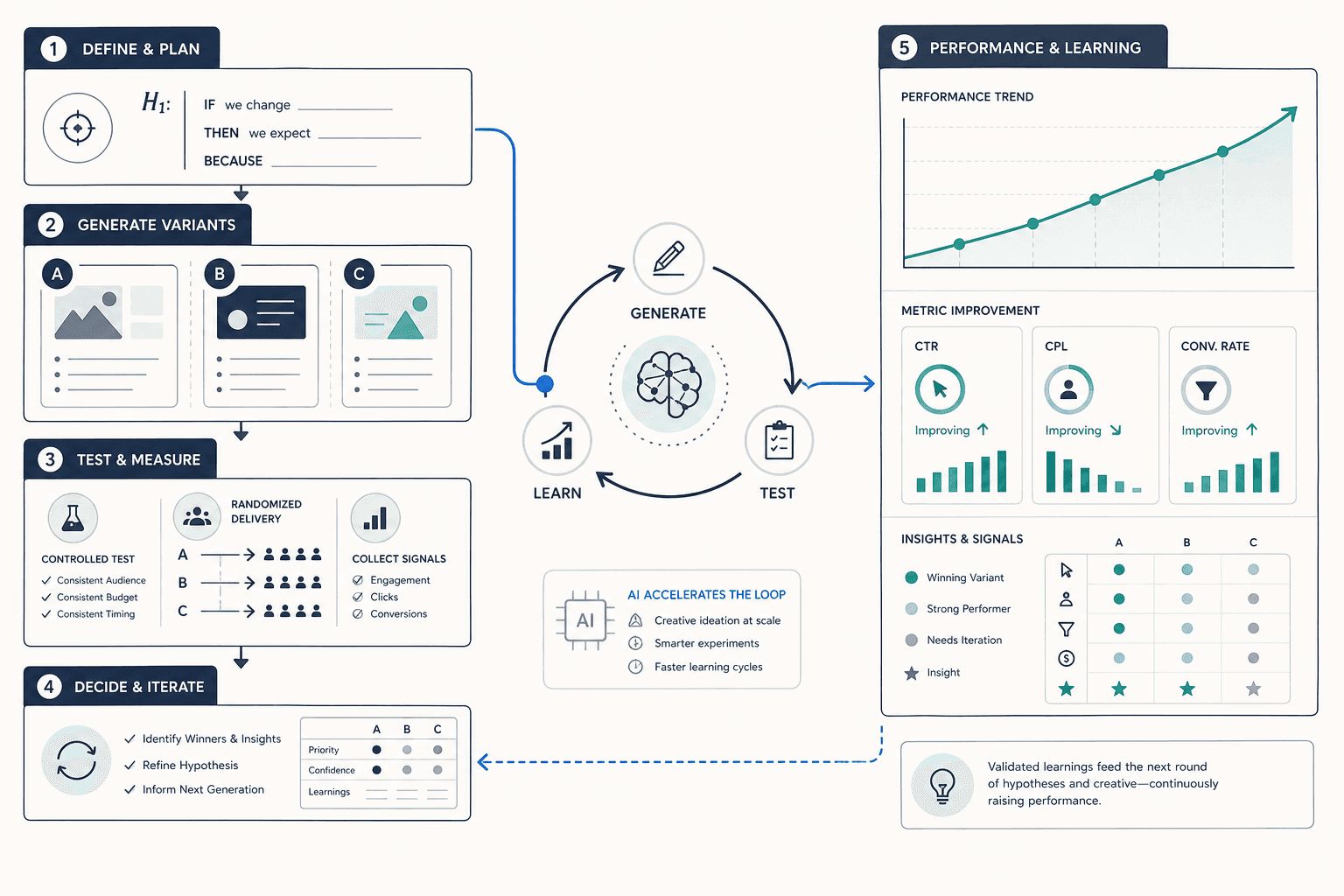
A practitioner-level, 5-stage workflow for B2B paid media managers who want to use LinkedIn's 2025–2026 native AI tools — AI Ad Variants, Flexible Ad Creation, Accelerate, and ad personalization — alongside targeted external AI to generate, test, and iterate ad creative systematically. Covers B2B-specific hypothesis framing, decision thresholds, and how to build compounding creative intelligence without falling into the traps that make LinkedIn testing slower and more expensive than B2C channels.
Why B2B LinkedIn Creative Testing Is Distinctly Hard
Most creative testing frameworks were built for B2C channels — Meta, TikTok, YouTube — where audiences number in the tens of millions, CPCs sit below $2, and you can accumulate statistically meaningful signal in 48 hours. LinkedIn B2B operates under entirely different physics, and applying the same frameworks without adjustment produces slow results, wasted budget, and false conclusions.
The constraints are structural, not incidental:
- CPCs on LinkedIn typically run $5–$15 for B2B audiences, compared to $0.50–$2 on Meta. Every under-performing variant costs proportionally more before you can call it.
- Your addressable audience is a narrow professional segment — often 50,000 to 200,000 people — not a broad demographic. Audience fatigue sets in faster, and overlap between test cells is harder to avoid.
- B2B buying cycles run weeks to months. The conversion event you actually care about — a qualified pipeline opportunity — lags ad exposure by a duration that most standard test windows don't capture.
- Professional context changes what works creatively. The same visual and copy patterns that drive B2C clicks can actively signal low credibility to a VP of Engineering or a CFO.
- Signal accumulation is slow. Reaching statistical significance on a narrow professional segment at $10 CPCs requires patience and budget that B2C rapid-iteration playbooks simply don't budget for.
These constraints don't make creative testing impossible on LinkedIn. They make it more valuable — because teams that test systematically build durable creative intelligence that compounds over time, while teams that guess iterate expensively and forget what they learned.
LinkedIn's 2025–2026 Native AI Creative Toolset
LinkedIn has shipped several AI creative tools across 2025 and into 2026. They serve different points in the testing workflow, and confusing them — or treating any single one as a complete testing solution — leads to wasted setup time and misread results. Here's how each maps to a specific use case.
| Tool | What It Does | Testing Use Case | Key Limitation |
|---|---|---|---|
| AI Ad Variants | Generates multiple on-brand copy variants (headlines, intro text) from a single seed input directly in Campaign Manager | Rapidly expanding your copy pool without manual rewriting — useful for Stage 2 of the playbook | Output quality depends heavily on seed quality; variants need human review before launch |
| Flexible Ad Creation | Accepts up to 4 images, 4 videos, and 4 copy variations; auto-mixes combinations and shifts budget toward winners | Multi-element creative testing where LinkedIn's algorithm handles optimization across up to 64 combinations | Still rolling out as of early 2026 — not universally available to all advertisers; verify access in your account |
| Accelerate | AI-powered campaign builder that handles audience targeting, bidding, and ad copy generation end-to-end | Benchmarking AI-optimized campaign performance vs. manually structured Classic campaigns | Reduces manual targeting control; should not be used as a pure A/B test harness for isolated variable testing |
| Ad Personalization | Dynamic copy macros that insert first name, job title, industry, or company name into ad text at delivery time | Testing whether personalized messaging outperforms generic copy for a specific persona segment | Currently limited to managed customers with a LinkedIn Account Representative; fatigue appears after approximately one month |
A few data points worth anchoring to:
- Advertisers running five or more ad variants see on average 20%+ higher CTR than those running a single ad, according to LinkedIn's December 2025 analysis. AI Ad Variants makes reaching that threshold significantly faster.
- Accelerate campaigns showed a 42% improvement in cost per action vs. Classic campaigns across LinkedIn's analysis of 67 A/B tests from October 2023 through September 2024. This is LinkedIn's own self-reported benchmark from a defined test period — not an independent third-party finding. Treat it as directional evidence, not a guaranteed outcome.
- Personalized ads delivered a 33% CPL reduction in US campaigns and 20%+ improvement globally, based on practitioner-reported data from Jordan Digital Marketing (Search Engine Land, March 2026). These are results from a specific agency's campaigns — not a universal benchmark.
Where External AI Tools Fit In
LinkedIn's native toolset covers a lot of ground, but it leaves three gaps that external AI tools fill more effectively:
- At-scale copy generation. AI Ad Variants generates variants from a single seed, but if you need 20–30 copy angles across multiple personas and funnel stages before a campaign launch, tools like Claude or GPT-4o are faster and more flexible for bulk generation. Use them upstream, then feed the best candidates into Campaign Manager.
- Visual variant generation. LinkedIn has no native image generation tool. For testing visual styles, backgrounds, or layout treatments at scale, tools like Midjourney, Adobe Firefly, or Canva's AI features let you produce multiple visual directions quickly — though any AI-generated imagery should be reviewed for accuracy and brand fit before use.
- Pre-flight performance prediction. Some platforms (Pencil, Madgicx, and similar) offer pre-launch creative scoring based on historical performance patterns. These predictions are probabilistic, not deterministic — treat them as a triage tool for prioritizing which variants to test first, not as a substitute for actual test data.
The 5-Stage B2B Creative Testing Playbook
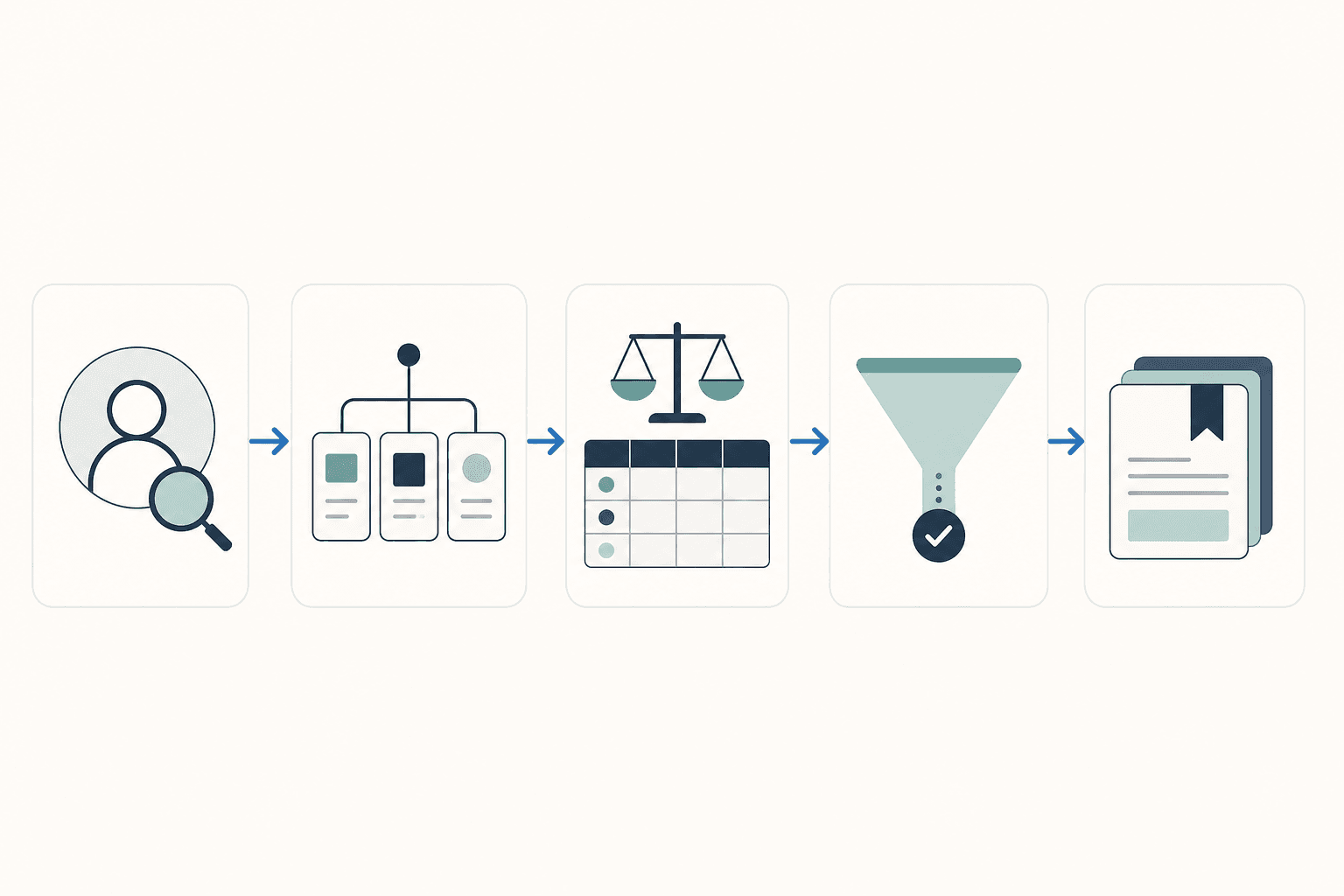
The playbook below is designed to be run quarterly. Each stage builds on the previous one, and the output of Stage 5 feeds directly back into Stage 1 for the next cycle. The goal is not just to find a winning ad — it's to accumulate transferable creative intelligence that makes each subsequent test faster and cheaper.
Stage 1: Define a Testable Hypothesis
Most B2B creative tests fail before they launch because the hypothesis is too vague. "Let's test a new image" is not a hypothesis. A testable hypothesis names the variable, the audience, the funnel stage, and the expected direction of the result — and it's grounded in a specific professional pain point, not a visual preference.
Hypothesis template:
A concrete example from the CXL B2B enterprise software test: "Professional headshots will outperform abstract tech imagery for IT Directors at 500+ employee companies at the consideration stage, because decision-makers in this segment need to see real people to establish trust, measured by cost per qualified lead over 14 days." That test produced 31% lower CPA and 24% higher conversion rate for the headshot variant — but the result is only replicable if you understand the specific conditions under which it was observed.
Before generating any variants, document: the buyer persona (role, seniority, company size), the funnel stage (awareness, consideration, decision), the specific professional pain point the ad addresses, and the one variable being tested. If you can't write this down in two sentences, the test isn't ready to launch.
Stage 2: Generate Variants Using LinkedIn AI and External Tools
With a clear hypothesis, generate your variant pool. Use LinkedIn's AI Ad Variants to produce copy alternatives from your strongest existing headline or intro text — the tool works best when the seed input is specific and on-brand, not generic. Review all outputs before adding them to your campaign; the tool produces usable drafts, not final copy.
For copy angles that LinkedIn's tool doesn't generate well — particularly highly technical or persona-specific framings — use an external LLM with a structured prompt that includes the persona, pain point, funnel stage, and a constraint on tone (e.g., "direct and peer-level, not promotional"). Generate 10–15 candidates and select the 3–5 that best represent distinct angles, not minor rewordings of each other.
If your test involves visual variables, produce your image variants before setting up the campaign. If you have access to Flexible Ad Creation (currently rolling out in early 2026 — verify availability in your account), you can upload up to four images, four videos, and four copy variations and let LinkedIn's system handle the mixing and optimization. If you don't yet have access, structure your test manually with one variable isolated per campaign.
Stage 3: Structure the Test Correctly
Poor test structure is where most B2B LinkedIn creative tests produce misleading results. Three rules that are non-negotiable:
- Isolate one variable per test. If you change both the image and the headline simultaneously, you cannot attribute performance differences to either. Pick the variable your hypothesis specifies and hold everything else constant.
- Run for a minimum of 7 days, regardless of early signals. LinkedIn's professional audience has weekday-heavy engagement patterns. A variant that looks like a winner on Tuesday morning may look very different by Friday afternoon. Seven days captures at least one full weekly cycle.
- Budget for minimum 1,000 impressions per variant. Below this threshold, performance differences are more likely to reflect noise than genuine signal. At $10 CPCs, this means budgeting meaningfully — plan for this before setting up the test, not after.
For Accelerate campaigns: use them to benchmark AI-optimized performance against your best Classic campaign, not as a creative A/B test harness. Accelerate adjusts targeting, bidding, and creative simultaneously — that's useful for efficiency benchmarking, but it makes it impossible to isolate which creative variable drove any observed difference.
Stage 4: Analyze Against B2B-Appropriate Metrics
CTR and CPL are useful directional signals, but neither is your primary success metric for B2B LinkedIn. The metric that matters is cost per qualified lead (CPQL) — the cost to generate a lead that meets your qualification criteria (ICP fit, intent signals, sales-accepted status).
A variant with lower CPL but worse lead quality will cost your pipeline more than a variant with higher CPL and better qualification rates. If your CRM or marketing automation platform can pass lead quality data back to LinkedIn (via offline conversions or CRM integration), use it. If not, build a manual review step into your analysis before calling a winner.
Statistical threshold for declaring a winner: 95% confidence interval, minimum 1,000 impressions per variant, and a 7-day minimum test period. These thresholds come from ATTN Agency's AI creative testing framework — developed from $40M in ad spend data, primarily in DTC and paid social contexts. The statistical logic applies to LinkedIn, but the time and budget requirements are higher given B2B audience sizes and CPCs.
Stage 5: Institutionalize Winners and Build a Creative Intelligence Log
A test that produces a winning variant but no documented learning is a one-time event. A test that produces a documented insight — "professional headshots outperform abstract imagery for IT Directors at consideration stage, 31% lower CPA, Q1 2026" — is a compounding asset.
After each test cycle, add a structured entry to your creative intelligence log. At minimum, capture: the hypothesis tested, the variable isolated, the audience and funnel stage, the metric result, the confidence level, the test period, and the actionable takeaway for future tests.
This log becomes the input for Stage 1 of the next cycle. Over three to four quarters, it gives you a proprietary, account-specific body of evidence about what works for your specific audience — something no external benchmark or vendor case study can replicate.
What to Test in B2B LinkedIn Creative (Prioritized)
Not all creative variables are equally worth testing first. The table below ranks testable variables by their typical impact on B2B LinkedIn performance, with hypothesis framing for each. Run higher-priority tests before lower-priority ones — you'll generate more actionable signal faster.
| Priority | Variable | Hypothesis Frame | Notes |
|---|---|---|---|
| 1 | Copy angle tied to professional pain point | "[Pain point framing] will outperform [benefit framing] for [persona] at [funnel stage] because..." | The single highest-leverage variable for B2B. Pain point copy typically outperforms feature or benefit copy at awareness and consideration stages. |
| 2 | Visual style: people vs. abstract | "Professional headshots will outperform abstract imagery for [persona] because decision-makers need to see real people to build trust" | CXL B2B enterprise software test: headshots produced 31% lower CPA and 24% higher CVR vs. abstract tech visualization for IT Directors. Treat as a hypothesis, not a universal rule. |
| 3 | Ad format | "Document Ads will outperform Single Image Ads for [persona] at consideration stage because long-form content signals depth of expertise" | Format testing is high-effort but high-signal — format choice affects audience behavior, not just creative preference. |
| 4 | Social proof type | "Customer quote from a peer role will outperform analyst citation for [persona] because..." | B2B audiences respond differently to peer validation vs. third-party authority depending on role and buying stage. |
| 5 | Personalization macro | "Ads using job title macro will outperform generic copy for [persona segment] because direct role acknowledgment increases relevance" | Only available to managed customers currently. Expect fatigue after ~1 month — plan for rotation. |
| 6 | CTA text and intent signal | "'See how [company type] reduces [pain point]' will outperform 'Learn more' for [persona] at consideration stage because..." | CTA testing is fast and low-cost — useful for optimizing within a winning creative concept rather than finding the concept itself. |
"Professional headshots will outperform abstract imagery for enterprise software ads because IT decision-makers need to see real people to build trust." — CXL hypothesis framing for a B2B enterprise software creative test that produced 31% lower CPA and 24% higher conversion rate vs. abstract tech visualization.
Frame each test as a hypothesis before launch, not as a question. "Which image works better?" is a question. "Professional headshots will outperform abstract imagery for this persona because of this behavioral rationale" is a hypothesis — and it's falsifiable, which means the result teaches you something regardless of which variant wins.
Decision Thresholds: When to Call a Winner
Premature winner declaration is the single most common and expensive mistake in LinkedIn creative testing. At $10 CPCs, a false positive — pausing a variant that would have won given more data — means restarting an expensive test cycle. The decision rules below are designed to prevent that.
| Decision Rule | Threshold | Rationale |
|---|---|---|
| Minimum impressions per variant | 1,000 | Below this threshold, performance differences are more likely to reflect delivery noise than genuine creative signal |
| Minimum test duration | 7 days | Captures at least one full weekly engagement cycle; LinkedIn B2B audiences have strong weekday patterns that skew early readings |
| Statistical confidence for winner declaration | 95% confidence interval | Standard threshold for reliable winner identification; lower confidence levels produce too many false positives at LinkedIn's CPCs |
| Primary success metric | CPQL (cost per qualified lead) | CPL alone rewards volume over quality; CPQL connects creative performance to pipeline impact |
The ATTN Agency framework — derived from $40M in paid social ad spend — found that AI-powered testing reduced time-to-winner from 21 days to 7 days and improved winning creative identification accuracy from approximately 65% to 85%. That data is primarily from DTC and e-commerce paid social, not B2B LinkedIn specifically. The directional finding — that structured AI-assisted testing substantially reduces time-to-winner — is credible, but B2B LinkedIn's smaller audiences and higher CPCs mean your minimum viable test window will often exceed 7 days to reach the 1,000-impression threshold per variant.
Common Mistakes and LinkedIn-Specific Limitations
Understanding where LinkedIn's AI tools fall short is as important as knowing where they help. The failure modes below are predictable — naming them before you encounter them is the point.
- Testing too many variables simultaneously. Changing image, headline, and CTA in the same test produces data you cannot interpret. When everything is different, nothing is learnable. Isolate one variable per test, even when it feels slow.
- Treating Accelerate as a creative A/B testing tool. Accelerate optimizes targeting, bidding, and creative simultaneously. It's a performance tool, not an isolation tool. Use it to benchmark overall campaign efficiency against Classic, not to determine which specific creative element drove a result.
- Expecting Meta-style rapid iteration. Meta Advantage+ and TikTok Smart Creative operate on audience pools of tens of millions and CPCs below $2. LinkedIn B2B audiences are orders of magnitude smaller and more expensive. The iteration cadence that works on Meta will exhaust your LinkedIn audience and budget before you accumulate meaningful signal.
- Ignoring personalization fatigue. Personalized ads using dynamic macros (first name, job title, company) perform well initially — Jordan Digital Marketing observed 33% CPL drops in US campaigns — but fatigue appears after approximately one month. Plan for rotation: combine personalized and non-personalized ads in the same campaign to manage frequency and enable ongoing comparison.
- Assuming Flexible Ad Creation is available to your account. As of the December 2025 LinkedIn announcement, Flexible Ad Creation was confirmed as rolling out in early 2026. Its availability to self-serve advertisers vs. managed accounts has not been confirmed universally. Check your Campaign Manager before building it into your workflow.
- Optimizing for CPL instead of CPQL. A creative that generates cheap leads from the wrong personas will look like a winner in Campaign Manager and a failure in your CRM. Build lead quality feedback into your analysis loop before calling any creative test complete.
Comments
Join the discussion with an anonymous comment.